


Hey there, Dmytro here. This month’s Stripo updates focus on account security, payment reliability, longer session times, and streamlined team workflows.
New: Account and settings
Security page
We added a dedicated Security page in Settings. It gathers every access-restriction control in one place, so admins don’t need to hunt through separate menus. From here, you can review sign-in options, restrict risky actions, and tailor limits for teams or contractors. If your company runs multiple projects, treat the Security page as the central hub, providing a single point of access with full visibility and faster audits.
Session length: 24 → 72 hours
Signed-in sessions now last 72 hours. Writers and designers who switch devices during the workweek will spend less time re-authenticating their accounts. If your security policy requires shorter windows, set stricter rules at the organization level and keep the longer default for non-sensitive roles.
New: Integrations and exports
WhatCounts: Direct export
You can now send finished emails straight to WhatCounts from the Stripo editor. The export tool keeps your email’s HTML, images, and dynamic elements intact, so you can start testing and scheduling messages inside WhatCounts without copy-pasting or adjusting layouts. Teams that rely on WhatCounts for regional sends save time by skipping manual uploads.
NetCore: Export added
We expanded the export list with NetCore. If your marketing or transactional campaigns run in NetCore, you can build templates in Stripo, keep your brand styles consistent, and move them into NetCore in a few clicks. The export dialog detects your linked account and allows you to select the correct folder or project before sending.
Constant Contact: Replace or create new
For Constant Contact users, you can now choose whether to create a new template or replace an existing one during export. This is helpful for recurring campaigns: update a saved template directly instead of managing duplicates. All structural changes from the editor transfer properly, including modules and display conditions.
Klaviyo: Connect without an export
You can now link a Klaviyo account without sending a test email first. This helps admins prepare integrations during setup week and then hand the environment over to the campaign team. The Connection Wizard validates credentials, stores the mapping, and makes the destination available to the entire project once permissions allow it.
API: Folder selection for new emails
Developers working with the Stripo API can now specify a destination folder when creating a new email. This helps keep production accounts organized and removes the need to manually move new items after creation. It’s especially practical for agencies managing many client folders or enterprises that divide work by market or region.
Improved: Editor workflow and UX
Version history with smarter navigation
When reviewing changes in the Version history, you no longer need to manually expand each Accordion section. Clicking an event now opens all related Accordion sections automatically. This makes it easier to trace layout and content changes, especially for complex emails that include collapsible blocks.
Synchronized modules get better control
We added two important upgrades for synchronized modules:
- you can now check in the editor whether a module is synchronized with its source version, so you know if it will receive future updates from the original library;
- display conditions set for a synchronized module are now stored and exported with the module, so conditional content behaves consistently across all templates and emails.
These changes help large teams maintain stable, brand-ready modules and ensure that conditional logic is not lost when the module is reused in multiple campaigns.
Fixed: New editor
We closed a large batch of issues in the new editor this month, with a special focus on the Text block.
Many long-standing bugs related to text formatting, link styling, and layout consistency were fixed. This makes working with text far more predictable: colors apply to all selected links, deleted styles do not reappear, and copied containers behave as expected.
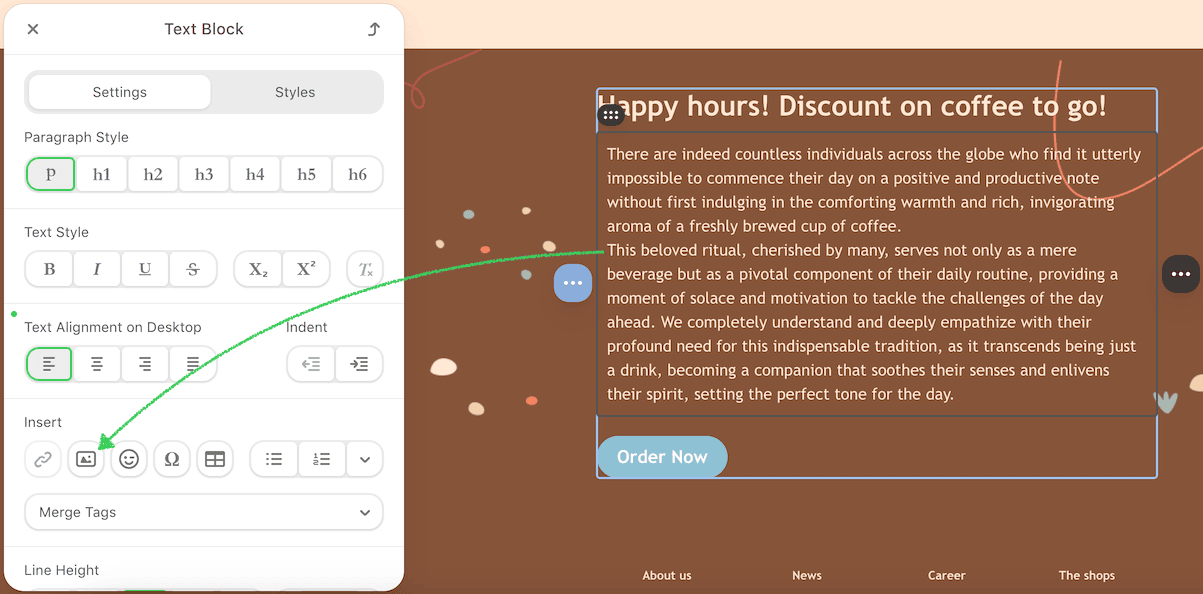
Alongside the fixes, we want to highlight a useful feature in the Text block that many teams overlook: you can now insert an image directly into the Text block and wrap text around it.
This is handy for adding a small logo, icon, or product photo inside a paragraph without creating extra columns or containers.
Here’s how it works:
- drag a Text block into your email and, in its settings panel, open the Insert section and click the Image button;
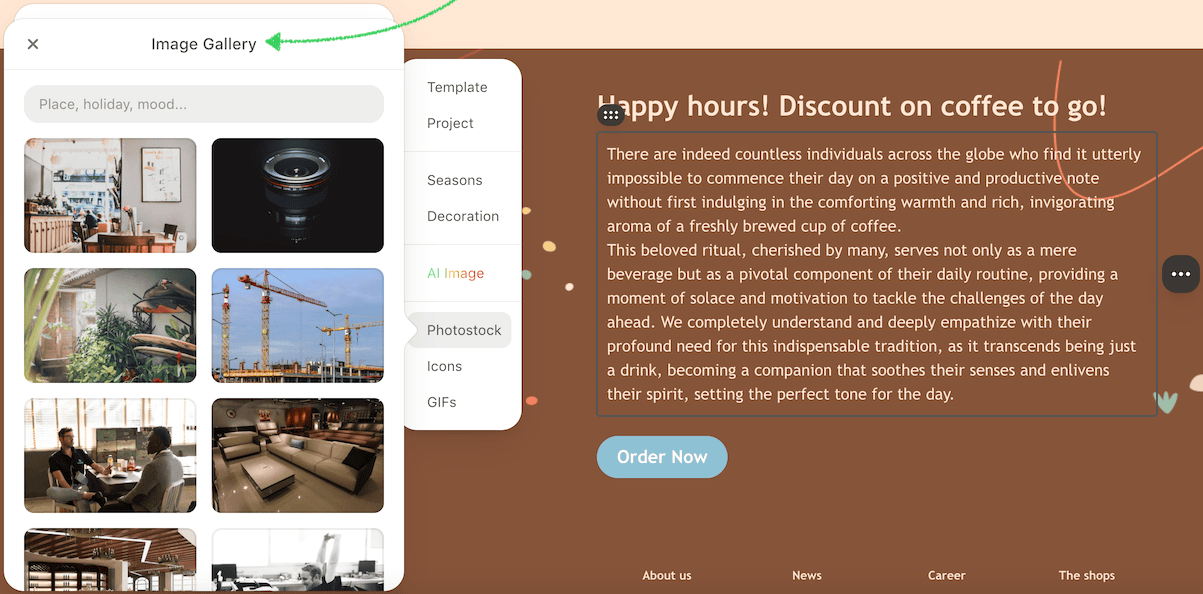
- pick an image from the library or upload a new one; it appears in the text at its original size, aligned to the left by default;
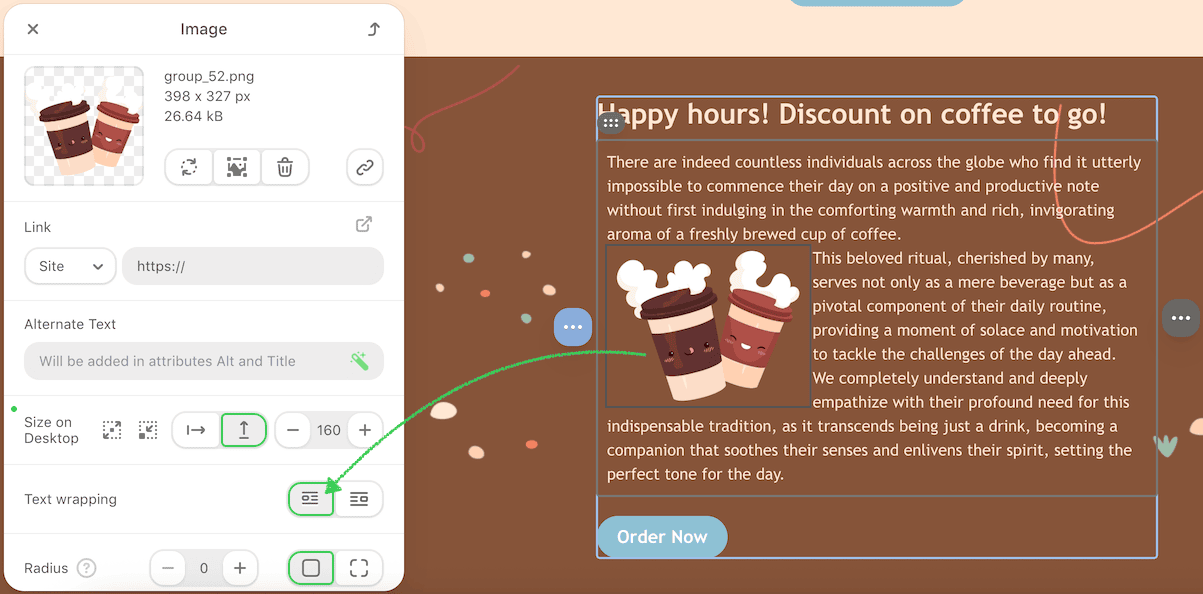
- click the image to open its settings panel;
- edit the text around the image directly in the same block.


In the image settings panel, you can:
- switch text wrapping to align the image to the right;
- adjust size and margins (note: margins are not supported in Outlook);
- add a link, alt text, or border radius for rounded corners.

This addition makes it easier to create more flexible layouts, for example, a paragraph with a small product shot or a quote with an author’s photo, without adding extra rows or relying on custom HTML.
Text and content editing
- text cleared when editing through the code editor — resolved;
- when changing the color of links inside a Text block, previously, only the first link was updated. Now all links update together;
- styles from deleted paragraphs no longer reappear during further edits;
- a Text block added to an HTML-made list from the old editor no longer becomes a separate block;
- image size controls in the Text block now respond correctly, including switching between width and height and stopping at the defined maximum width.
Timer and time zone
We reinforced the Timer block to handle incorrect or unsupported settings more safely. This reduces rendering problems when teams reuse older templates and also:
- fixed wrong time zone detected in the Timer block;
- removed extra green size indicator in the Timer settings;
- if a background color was chosen earlier, the block can no longer be switched to a transparent background, preventing inconsistent rendering.
Controls and settings UI
- missing Font size controls after switching between mobile and desktop views. Restored for headings, buttons, and rows;
- removed temporary “For desktop” labels that appeared on mobile in heading controls;
- names for padding controls return after leaving the Version history;
- background color changes work again across rows, structures, containers, blocks, and overall email settings;
- background image in structures displays correctly after toggling between versions with and without an image.
Structures, containers, and modules
- VML structure width now updates properly when the email width changes;
- container sizes recalculate as expected when adding container modules with custom paddings;
- saving a custom structure as a module and then re-adding it no longer breaks the layout;
- synchronization now works for three-container rows or structures;
- <tr> tags no longer remain after deleting a structure from a row;
- deleting a copy of a container no longer deletes the original container;
- comments popover opens at the right location when accessed from email notifications;
- console errors removed when opening emails with modules, switching tabs in the Form block, copying containers, adding text to a Banner, or switching styles in Carousel.
Links and dropdowns
- pasted links are no longer auto-converted, keeping the original formatting;
- the dropdown list of previously used links is back in the Link field;
- the Link field stays visible after editing an existing link, preventing disruption during quick fixes.
Exports and storage
- Outlook App: Fixed base64 image conversion so exported emails display properly in the app;
- AWS S3: Connection now works for the EU (Stockholm) region;
- Oracle Eloqua: Email group selection works after reconnecting the account;
- Zapier: Export works even when the export link contains URL parameters;
- Useinsider: Export and creation of new connections are restored;
- synchronized modules: Now export correctly with their display conditions intact.
API updates
- improved email generation when modules use unique margins, reducing the need for post-export edits;
- added the option to select a folder during email creation via the Stripo API, which helps keep accounts organized;
- API responses now include creation dates for emails and templates, improving traceability for audits and automated workflows.
Coming soon
We’re keeping the focus on reliability and enterprise-scale control.
Next month you can expect:
- continued stability improvements across the editor, plugins, API, and export paths to reduce rare edge-case errors;
- more account-level controls for large teams, making it easier to manage permissions and enforce consistent production standards. Full details will be shared in the next Product Pulse.
Wrapping up
September brought practical updates that make email production smoother, including new exports and API options, smarter synchronized modules, improved version history, and numerous bug fixes. These changes enable teams to build campaigns more quickly and maintain stable layouts across all platforms.
We’ll continue to refine our core tools and add upcoming controls for enterprise accounts. As always, we welcome feedback, as it guides us in choosing our next priorities.


0 comments