
How to add a video to an email?


Do you use videos in your emails? If not, it’s definitely worth starting. Videos are a great communication tool that you can use to connect with your customers, build their trust and loyalty, and educate and inspire them. Stats reveal that 87% of people are ready to buy a product or service immediately after watching a video. To increase your engagement rates and make your campaigns more effective, you should rely not only on email design but also on other ways of enhancing your messages, such as adding videos to your email message.
In this article, we will guide you through the process of how to embed a video in an email with Stripo and explore the best ways to use videos for your email marketing.
Why you should add videos to your email marketing campaigns: The benefits
Among the reasons you should use video files in your emails:
- The word “video” in the subject line increases open rates by 19%
This helps set the right expectations: You were promised a video, and here it is. People who enjoy watching videos will be happy, and you will get more recipients clicks. Those who don’t like watching videos will likely ignore the email. If you track this behavior and collect data, you can later create a separate segment of subscribers who don’t watch videos and send them text-based emails instead. I’m sure they’ll appreciate such attention to their preferences.
- Videos strengthen emotional connection with the brand and improve memorability
It’s difficult to stand out with static HTML when everyone receives dozens of them every day, but an emotional, meaningful video can highlight what your brand shares with its audience and is far more likely to leave a lasting impression.
- Videos are shared more often and tend to build more trust
If your video is well produced, funny, or resonates with someone’s own thoughts (depending on your goal), people will share it with friends or post it on social media. That’s how powerful video content is today.
However, before you start inserting videos on a regular basis in every email you send, take a moment to analyze whether your audience actually wants to watch them. What were the open rates of your previous video emails? Maybe you noticed an increase in unsubscribes after you started sending emails with a video?
By analyzing your metrics, you can determine which emails benefit from videos and which segments of your audience should receive them. Let’s move on to the next question.
The ultimate guide: How do you add a video in email using Stripo?
Stripo offers two ways to insert videos in your emails:
Using the video block: Simply add a video URL to a YouTube video or a video hosting platform, such as Vimeo or TikTok. In this case, the person will be redirected to the corresponding platform: YouTube, Vimeo, or TikTok.
Using HTML code: this approach allows customers to watch the video directly inside the email.
So, let’s jump in.
1. Inserting video URL into emails
In Stripo, you can add a link to a video file from YouTube, the Vimeo hosting platform, or TikTok. I'll tell you how to do it.
First, you go to the left panel of the editor, and then select the “Video” block. Here, I’ll show you this in screenshots.

Then you drag-n-drop it into your template. Once you’ve done that, left-click on this field and a panel with video settings will open on the right.
Upload your video to a platform, such as YouTube, Vimeo, TikTok, or your own hosting, before generating a link or embed code.
Next, you need to copy the URL from your website or video hosting platform, such as Vimeo, and paste it into the required field.

The good news is that all you have to do is paste the YouTube/Vimeo/TikTok link. Alt texts, which are important for email accessibility, are added automatically in Stripo; they are generated using the name of your video. You can also read how alt text helps bypass spam filters.
If your video doesn’t appear in the preview, check the error log inside your email editor or ESP.
Choose the play button color. This should contrast with the video thumbnail color. This is why Stripo enables you to change the color of the button into black, white, traditional red, or even the blue one if you use a video file from Vimeo.

Set the preview image width, which is 600 px by default. You may change the width or height of the image, if you please.

By clicking the size button, you select the width or height of the poster image to make it fit your email design.
Following these steps, you may add Vimeo or TikTok videos as well.
How to add a custom video thumbnail to an email for better click-through rates
In the Stripo editor, you can add a custom video thumbnail, but the best part is not that you can make it a GIF to attract attention. The icing on the cake is that you can create this GIF using AI—thanks to the built-in GIF maker right in the editor.

For example, take a look at this video thumbnail. Usually, YouTube previews are static images. Here, we used the video’s cover image, but instead of a standard button, we added an animated play button. You can create these kinds of custom thumbnails in Stripo.
Next, you write the text for your newsletter, and your email becomes email ready.
A video added this way works in any email client but redirects the person to the YouTube website, the video hosting platform, or TikTok. If you want the entire video to stream directly in the email, you need to add it using embed code.
2. Using embed code to add a HTML5 video to your emails
If you need to embed video files using code, the article “Step-by-Step Instructions: How to Embed Video in Email Using HTML” gives a clear explanation of how to do it. It also walks you through how to work with embedded video directly so that you can implement it correctly in your emails.
You may have a question about email client compatibility.
Which email clients allow you to embed a video?
Embedded video inserted via code is supported by iOS Mail, Outlook for Mac, Apple Mail, Samsung Mail, and Thunderbird. Only your subscribers who use these email service providers will be able to watch the video directly in your email.
Embed code is not supported by email service providers, such as Gmail, Outlook, Yahoo Mail, and Office 365.
Fortunately, Stripo has taken care of this. We provide embed code that, by default, plays the video directly in the email wherever it’s supported. As a fallback for email service providers, such as Gmail, Outlook, and Yahoo Mail, a link to YouTube (for example) will be displayed instead. This ensures that all your subscribers will be able to watch the video.
However, embedding videos in your emails has not only advantages but also some drawbacks:
- video in email increases the overall size of the email, affecting the deliverability of emails to recipients and your rating as a sender;
- spam filters often react negatively to video content, increasing the risk of your email landing in the spam folder.
Therefore, consider when it makes sense to use a video. Now let’s move on to the best practices for using videos in emails.
Best practices to boost engagement and conversions with video email campaigns
Here are a few more ways to improve the customer’s experience with your video email. As we all know, if the recipient enjoys the interaction, they’re much more likely to forward the email to friends or colleagues, open your future messages, and stay more receptive to the rest of your email marketing efforts.
1. Add a custom thumbnail image
-
Use a static image with a play button
A clean, attractive video thumbnail with a play button clearly signals to the recipient that a video awaits behind the button. Don’t forget to add alt text for the thumbnail image for accessibility.
This is a universal method that works across all email clients and avoids compatibility issues. You don’t place the actual video in an email; instead, when recipients click, they’re taken to a video platform or your website depending on where you are hosting the video.

-
Add an animated button for higher interaction
An animated “Click to watch” button unmistakably tells the recipient what action to take. It also draws attention to the email’s design and content, so be sure to take advantage of this opportunity.
-
Incorporate animated GIFs to introduce your video
If you can’t, or even if you can, embed a video owing to email client limitations but want to grab more attention, add a GIF instead. It’s more engaging than a static image and uses eye-catching motion to signal to the subscriber that by clicking the GIF, they’ll get more (access the full video).
It’s even easier, considering that we have a GIF maker right in the editor. Remember that the file size should be small, and GIFs contain no sound, so choose a short clip where audio isn’t essential.
2. Keep your video short
Just as no one reads long emails anymore, long videos are unlikely to keep viewers’ attention. Make your videos short enough to hold the customer’s interest but long enough to deliver value. Data shows that videos between 30 seconds and 2 minutes are most effective. Video length directly affects the file size and loading time for the recipient. If you can’t shorten the information, create a video series and send it in installments.
3. Include subtitles for silent viewing for email accessibility
Note: Statistics show that a high percentage of subscribers watch videos with the sound off for the reasons mentioned earlier. To ensure that the viewer fully understands your message and doesn’t miss anything important or interesting, add subtitles.
4. Guide viewers with a clear call to action
Adding a video to your email is only half the job. Think about what action you expect from the customer, and tell them. A clear CTA, for example, “Tap to play,” will guide them.

Follow best practices to increase engagement and encourage more conversions using videos in your emails.
What videos should you include in your email message?
Here are ideas for when it makes sense to insert videos in your email campaigns and how to make them work for engagement and conversions.
Product walk-through videos
One of the best things you can do for your customers is to show how your product works instantly. According to statistics, 91% of people have watched an explainer video to learn more about a product or service. A short, clear video reduces any stress that comes with trying something new. Create a quick walk-through of core features or a teaser that links to a full demo on your website. Using product videos in emails helps spark interest, build confidence, and move customers closer to purchasing.
Note: It is better to watch once than to read many times.
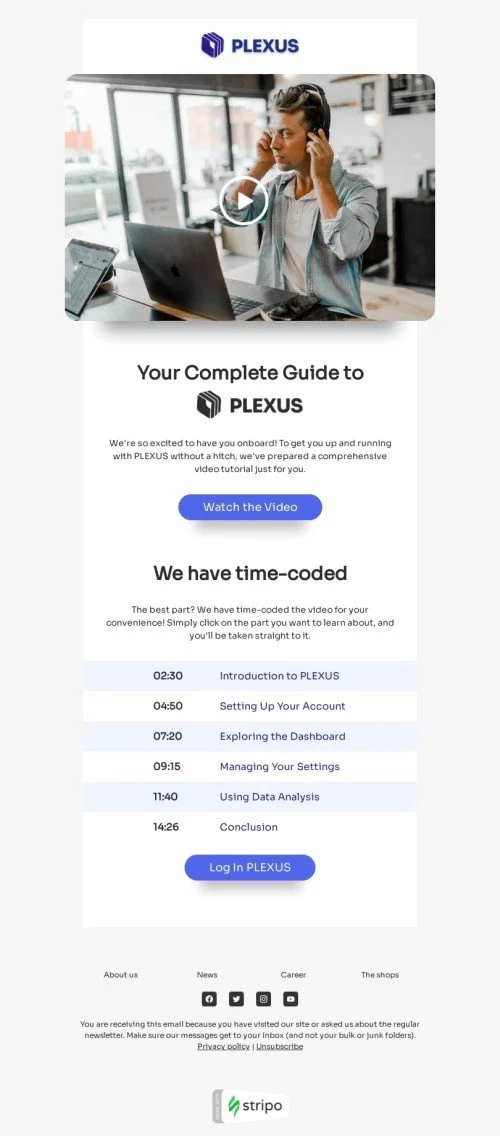
Customer onboarding
A purchase or sign-up is great but only if the person knows what to do next. A well-made, concise onboarding video lowers the entry barrier, increases feature adoption, and improves retention. Show subscribers exactly how to get started and what value they’ll unlock.
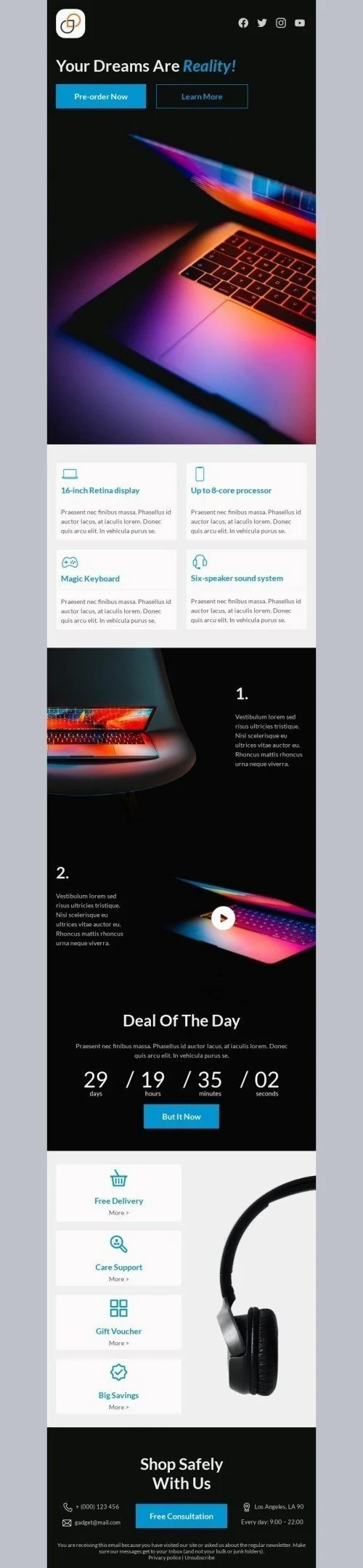
Product launch videos
Launching something new? Tell your customers about it. Highlight the emotions, the fresh features, and, most importantly, how this new solution tackles old problems. 82% of people say that they’ve been convinced to buy a product or service by watching a brand’s video.
Personalized video updates
Personalized video updates, such as progress summaries or dynamic content, help customers feel seen and create a stronger connection with your brand.
Annual brand review videos
Celebrate your wins with your customers. A video that highlights your company’s achievements or how the year looked from your customers’ perspective builds an emotional connection, reinforces the value your brand brings, and maybe bring more clicks to the website, with new products or offers for customers who know.

For this purpose, you are welcome to use our annual review email templates.
Case studies and customer testimonial videos
Nothing convinces potential buyers more than other people’s real experiences. Video testimonials and success stories help demonstrate genuine results and highlight the features that deliver the most value. Instead of telling people how great your product is, show them how others use it and why they love it.
Welcome email videos
In welcome emails, we usually greet new subscribers, thank them for joining, and briefly share key facts about the company. However, a more engaging format would be a short video in which the CEO conveys the same message.

Wrapping up
- Video in email is a great tool for boosting brand loyalty and drives more clicks on your website, YouTube channel, or TikTok.
- The two main ways of adding video in email in Stripo are inserting a link to YouTube/Vimeo/TikTok or adding HTML embed code.
- You need to account for all possible scenarios of embedded video across email clients. The HTML we use in Stripo covers everything, including the specifics of Gmail, Yahoo, Outlook, and Apple Mail.
- If watching the video directly isn’t possible, use alternatives: GIFs, static images with “Tap to play” icons, or animated buttons.
- Best practices include using short videos, subtitles, sound-off autoplay, clear CTAs, and compelling thumbnails to enhance customer experience.
- Different video types serve different goals, so choose them based on your needs to drive engagement and build loyalty.


0 comments