
Deliverability signals: How mailbox providers decide where your emails land


It’s the nightmare that every email marketer has: you send emails as usual, without changing anything in your approach or settings, but suddenly they start landing in the spam folder. Why does this happen?
Email marketers like to think it’s just a matter of following the rules. However, mailbox providers consider a variety of factors and signals before anyone even opens your email: your sending habits, engagement metrics, and design.
In this article, based on our webinar session with Laura Atkins, Word to the Wise co-founder, speaker, educator, writer, and email specialist, we’ll share what really influences inbox placement, how your email design affects email filters and subscriber experience, and how to focus on the important signals rather than chasing useless details.
You can watch the full webinar on the Stripo YouTube channel:

Key takeaways
- Deliverability is driven by reputation, which is always changing. Mailbox providers continuously evaluate your domain based on authentication, sending behaviors, audience quality, and recipient interactions.
- Inbox placement matters more than delivery. Monitoring open rate trends helps detect deliverability issues early, since declining opens often indicate that emails are no longer reaching active inboxes.
- Subscriber-focused sending beats technical tricks every time. The strongest signal is still how recipients respond. If subscribers find your emails useful and expected, mailbox providers are far more likely to deliver them to the right place.
What is deliverability, and why does inbox placement matter?
In 2025, despite a Global Deliverability Health Score of 86 out of 100, only 60% of emails reached a visible mailbox location globally.
The other emails ended up in the following places:
- 36% of messages landed in spam;
- 4% were blocked or went missing entirely.
Statistics tell us that email deliverability has a significant impact on the overall effectiveness of email marketing.
Delivery vs. deliverability
You may see the terms “delivery” and “deliverability” used interchangeably. However, understanding the difference can also impact the effectiveness of your email strategy.
Therefore, let’s be clear and define these two parts of the email journey:
- the delivery rate confirms that the email reached the subscriber’s mailbox server without bounces (technical success);
- the deliverability rate determines whether the email lands in the inbox or Gmail promotions tab, rather than the spam folder (strategic success).
Why inbox placement matters more than “delivered”
Mailbox providers make critical placement decisions before an email is ever opened, determining whether it appears in the primary inbox, promotions tab, or spam folder, and this placement directly impacts how recipients interact with your message or whether they see it at all.
Importantly, not all inbox placements are equal, and not all are bad. Many marketers aim for the primary inbox tab, but this isn’t always the optimal outcome. In fact, forcing promotional emails into primary can backfire.
The primary inbox is a more personal, interruption-sensitive space. When people go there, they’re often looking for specific communication, not marketing messages. The promotions tab, on the other hand, is where people expect to engage with offers and newsletters, making it a more appropriate and less intrusive environment for marketing emails.
Ultimately, the key to successful email delivery is meeting subscribers’ expectations. If your emails reach the right place for the right context, they’re far more likely to be welcomed, opened, and acted on.
So, what influences mailbox providers’ decisions? And how can email marketers predict these decisions?
Actually, this article is about two types of signals:
- the pre-open signals that mailbox providers use to decide whether your email will land in the inbox or spam folder before the recipient even opens it;
- the signals that help you, as an email marketer, understand whether you have any deliverability issues or if everything is fine.
Sender reputation: The core factor of deliverability
Sender reputation sits at the center of every deliverability decision. One of the most important mindset shifts is understanding that reputation is not a fixed score. It is constantly evolving based on your behavior and your audience’s response.
That is an interesting perspective: thinking that reputation isn’t a static thing. Reputation is a process that changes with every send. That metric modifies, and the reputation of a domain in particular is a mix of the emails that you’re sending from that domain.

Mailbox providers continuously evaluate your identity — your domain, your infrastructure, and your sending behavior — and connect that identity to historical performance. This identity includes authentication signals, the types of emails you send, and how recipients respond to them over time.
If recipients engage positively, your emails are more likely to land in the inbox. If they ignore, delete, or mark them as spam, future emails may be filtered more carefully, even if they are technically “delivered.”
Reputation is broader than email marketers expect because it’s not limited to your marketing emails alone.
It can be influenced by:
- affiliate campaigns that use your domain;
- other teams sending emails from the same domain;
- your overall domain activity across the web.
Mailbox providers, especially large ones such as Gmail, use every available signal to build this profile. For example, if you send cold emails or conduct corporate mailings through Google and have seven or ten domains in a single Google Workspace account, Google shares the reputation of all these domains in that account because it knows that they all belong to the same organization, since you’ve told them so.
Google is the most demanding email provider in this regard. If they can glean the information, they’ll use it.
Laura Atkins,
In the context of reputation, it is also important to remember the service provider’s IP address.
We don’t always have control over our IP reputation because we’re sharing an IP address, but we do have control over which email service provider we choose. And part of the decision in choosing an email service provider is choosing one that does a decent job of keeping the bad guys off their shared IPs. So if you’re coming in off an IP, even if it’s a shared IP, if that shared IP has a good history because your ESP is taking care of things, then you’re going to have a better introduction into the mailbox.
Laura Atkins,

Pre-open signals: How mailbox providers decide where to land emails
During delivery, mailbox providers analyze multiple signals to determine whether your email should be trusted. These pre-open signals form the foundation of sender reputation.
But overall, what’s important to know about signals is that they depend on the information the provider has. So Google, Microsoft, and Yahoo, the consumer mailbox providers, have one set of data. Apple Mail or other companies have a completely different set of data.
Laura Atkins,
Among all the signals that arrive before an email even reaches inbox, the following are particularly important during delivery:
1. Authentication (SPF, DKIM, and DMARC)
Authentication is the first and most essential step in establishing trust. It confirms that your emails are legitimate and that your domain is authorized to send them. Without proper authentication, mailbox providers cannot verify your identity with confidence, increasing the risk of filtering or blocking your messages.
Make sure that you have all your authentication in place, and make it clear to both your subscribers and the filters who you are.
Laura Atkins,
2. Sending patterns
Mailbox providers closely monitor how your sending behavior evolves over time. Sudden changes in volume, frequency, or audience size often trigger suspicion. For example, sending large volumes immediately from a new domain can signal risky behavior:
If you’re just starting up and this is the first mail or the first bulk mail you’re sending from this domain, don’t start with a million addresses. For one thing, with a million addresses, there’s no way a million people opted into your brand-new domain before you even sent mail. And so, a big volume for a brand-new domain is a signal that this list was purchased, this list doesn’t opt in, maybe there’s something going on here.
Laura Atkins,
Instead, providers expect growth patterns that resemble natural, permission-based expansion. Consistent sending habits help build trust, while unpredictable spikes weaken it.
3. Historical engagement
Your past performance strongly influences future deliverability. Mailbox providers track how recipients have interacted with your emails over time. If recipients regularly engage with your emails, the system interprets your messages as relevant and trustworthy.
On the other hand, low engagement or reporting as spam signals declining interest, which increases the likelihood of filtering.
4. Complaint rates
Spam complaints are among the strongest negative signals affecting reputation. When subscribers mark emails as spam, mailbox providers interpret this as a clear rejection of your content. Even a small number of complaints can significantly impact deliverability, particularly for smaller senders.
Providers are constantly asking: Are recipients satisfied, or are they pushing back? That feedback directly shapes where your emails are placed.
5. Audience quality
Another critical factor is the quality of your contact list. Mailbox providers analyze patterns across addresses and recognize behaviors associated with purchased or low-quality lists.
The actual addresses on your list can also signal whether this is a good list or a bad one.
Laura Atkins,
Mailbox providers can identify:
- well-known spam traps (there are addresses that are not used or have never been used, and therefore, if you try to send an email to them, it is clearly spam);
- addresses associated with suspicious contact lists;
- recipients who have never interacted with similar emails.
Even if the rest of your setup looks correct, poor audience quality can undermine your reputation.
The main signals that give email marketers clues to deliverability issues
Modern deliverability is driven by a combination of behavioral, technical, and content-related signals. However, one of the biggest challenges email marketers face today is not just identifying the right signals but also understanding which data can actually be trusted and how mailbox providers interpret it behind the scenes.
The reality is that senders and mailbox providers see different versions of the same story, and this difference explains why interpreting metrics requires more context than ever before.
Is it possible to collect data from different mailbox providers?
One of the first steps in understanding deliverability signals is to recognize that not all mailbox providers operate the same way, and, importantly, they do not share the same level of data visibility with senders.
From the sender’s perspective, all measurable engagement comes from interactions with tracking elements controlled by the sending infrastructure. However, mailbox providers see much more than that.
As senders, we can only get information from what happens on our systems, but they have a different set of data.
Laura Atkins,
For example, Gmail can collect behavioral signals depending on how a recipient accesses their mailbox, whether through the Gmail mobile app, the web interface, or third-party clients, such as Apple Mail. Each of these environments generates different types of engagement data, and some of these signals are invisible to senders.
Because of this asymmetry, analyzing performance across all recipients as a single group often masks important insights. Instead, deliverability diagnostics should begin with segmentation by mailbox provider.
If delivery issues arise, it becomes essential to group recipients by domain (e.g., Gmail, Microsoft (Outlook, Hotmail, Live), or Yahoo) and analyze each segment separately. Even though this method doesn’t capture every variation, it allows marketers to detect patterns that would otherwise remain hidden.
If you think you’re having delivery problems, you’ve got to go down to that very granular level in order to identify where the problem is.
Laura Atkins,
Open rate: A deliverability signal, not an engagement metric
Open rate has long been treated as the primary engagement metric in email marketing. However, modern mailbox behavior, including image caching and privacy protections, has significantly changed how opens should be interpreted.
Today, open rate is more valuable as a deliverability signal than as a measure of audience engagement.
This shift reflects how mailbox providers handle incoming messages. Many providers preload emails by fetching images before the recipient even opens the message, which makes it difficult to determine the exact moment of human interaction. This process generates what is commonly referred to as “bot opens.”
Despite this limitation, open rate remains an important indicator of inbox placement.
What open rates tell you is that the email went to the inbox, the recipient is using that mailbox, and the mailbox is active. I’ve kind of replaced my inbox testing and inbox seed account usage with just open rates. And then I just monitor open rates over time, and I watch them go.
And if I see those open rates fall even 10%, I’m like, we have a delivery problem.
Laura Atkins,
In practical terms, a stable open rate often indicates stable inbox placement, while a sudden drop may signal that messages are increasingly being filtered or redirected to spam folders.
Clicks: Stronger signals
Clicks are generally considered a more reliable signal than opens because they require additional interaction. However, even click data is not immune to distortion.
In many corporate environments, incoming emails are scanned by security systems that automatically detect malicious content in links. These systems can trigger artificial clicks that appear identical to human interactions.
For example, email marketers sometimes see clicks on an email before it’s delivered. This can happen because a security device intercepted the email, scanned all embedded links, and tracked them before the message was actually delivered to the recipient.
In other cases, suspicious activity can be identified when multiple links are clicked almost instantly:
If you have 65 links in an email and all 65 links were clicked within five seconds, that wasn’t a person.
Laura Atkins,
While these anomalies complicate analysis, clicks still provide valuable insights, particularly when interpreted alongside other signals and evaluated over longer periods.
Therefore, you should pay special attention to deliverability if you notice any issues, such as:
- drops in open rates, especially when sending to the same audience;
- emails suddenly landing in spam;
- reduced engagement across campaigns;
- increased unsubscribe or complaint activity;
- inconsistent results across mailbox providers.
To accurately diagnose problems, segmentation is essential. Instead of analyzing overall performance, separate your data by mailbox provider whenever possible.
Factors that may affect deliverability
In addition to the metrics that email marketers can track to assess deliverability, there are factors they can consider when creating emails and launching campaigns to prevent issues.
Email design
Email design rarely directly determines deliverability, but it can influence how mailbox providers interpret your content and classify your messages. Many providers rely on natural language processing to analyze the structure and content of emails, distinguishing between promotional content, transactional updates, and personal correspondence.
This classification process is influenced by language, structure, and overall presentation rather than by isolated design elements such as image count or layout style. Technical quality still matters. Using unreliable design tools or unknown frameworks can introduce hidden risks.
Using your own templates is fine. Using other people’s templates is okay. But one of the things that I would caution you about is free online services that will let you design an email, and then they’ll spit out the code that you can go ahead and put that into wherever. If it’s a free online service and not your ESP, you need to be really careful, because it could also be used by spammers.
And so they will leave clues in the content and the HTML structure, maybe in some of the signals they use, or even put in a comment or an advertisement for their coding platform, whatever they’re using. And if that kind of signal is in the body of the message, even if it’s hidden in the HTML and the recipient never sees it, and you don’t see it if you don’t go in and look at the HTML, then that can affect your delivery.
Laura Atkins,
Choosing reputable tools and maintaining clean, transparent code helps reduce these risks and ensures consistent message rendering across devices.
Accessibility as part of deliverability
Accessibility is often discussed in the context of subscriber experience, but it also plays a significant role in how mailbox providers interpret and trust your emails. Clear structure, readable text, and meaningful alternative descriptions help both human readers and automated systems process your content effectively.
Accessible emails typically include:
- readable text instead of image-only layouts;
- descriptive alt text for visual elements;
- a clear hierarchy and logical structure.
These same practices make emails easier for spam filters and natural language processing systems to interpret.
Important note: In Stripo, you can scan your email for accessibility issues with the Accessibility checker. This checks things like alt text, labels for buttons and form fields, descriptive link text, color contrast, language settings, semantic HTML, and ARIA structure validity, then flags problems for you inside the editor.
When you are in the editor, click the “Test” button above your template to open the “Testing Email Message” menu. Go to the “Accessibility” tab and click the “Run a Test” button.

Sending frequency and sending policy
Sending frequency is often misunderstood as a simple numbers game, but volume alone does not determine deliverability success. What matters more is how that volume evolves and how recipients respond to it.
Mailbox providers continuously evaluate sending patterns, including frequency, timing, and growth rates. Sudden spikes or overly aggressive campaigns may signal suspicious behavior, especially when they do not align with typical subscriber expectations.
At the same time, sending frequently is not inherently harmful if recipients find value in the messages they receive. Large organizations send hundreds of millions of emails every day without damaging their reputations, simply because their messages are expected and relevant.
However, persistent communication without sufficient value can quickly become overwhelming. Excessive messaging becomes a problem not because of the number of emails themselves but because of how recipients perceive those emails.

Keep acting: How to improve deliverability
The signals we’ve listed above will help you monitor your email reputation and evaluate deliverability from campaign to campaign. In addition, making use of specialized tools can assist you in monitoring changes.
Three essential tools to check before starting recovery
Before attempting to fix reputation issues, you need visibility into your current performance. Laura highlights the importance of reviewing your infrastructure and monitoring data before taking corrective action.
As a minimum, three types of tools should be running before starting recovery work:
- authentication monitoring tools: These verify that SPF, DKIM, and DMARC are configured correctly and functioning as expected;
- reputation monitoring tools: Platforms such as Google Postmaster Tools provide visibility into domain performance, spam rates, and delivery signals;
- engagement analytics tools: Your ESP reporting helps identify changes in opens, clicks, and audience behavior over time.
Expert recommendations: The most impactful steps to take in the next few months
If you only have time to focus on a few improvements, these actions will have the biggest impact on your deliverability and sender reputation:
- Set up and verify all authentication protocols first. Make sure SPF, DKIM, and DMARC are properly configured and working across your domain. This is the foundation of trust and should be completed before optimizing anything else.
- Monitor your reputation data regularly. Check tools like Google Postmaster Tools to understand how mailbox providers see your domain and whether your reputation is stable, improving, or declining.
- Avoid image-only emails — always include meaningful text. Make sure your emails contain readable text that clearly explains who you are and what you’re sending. This helps both recipients and filters understand your message.
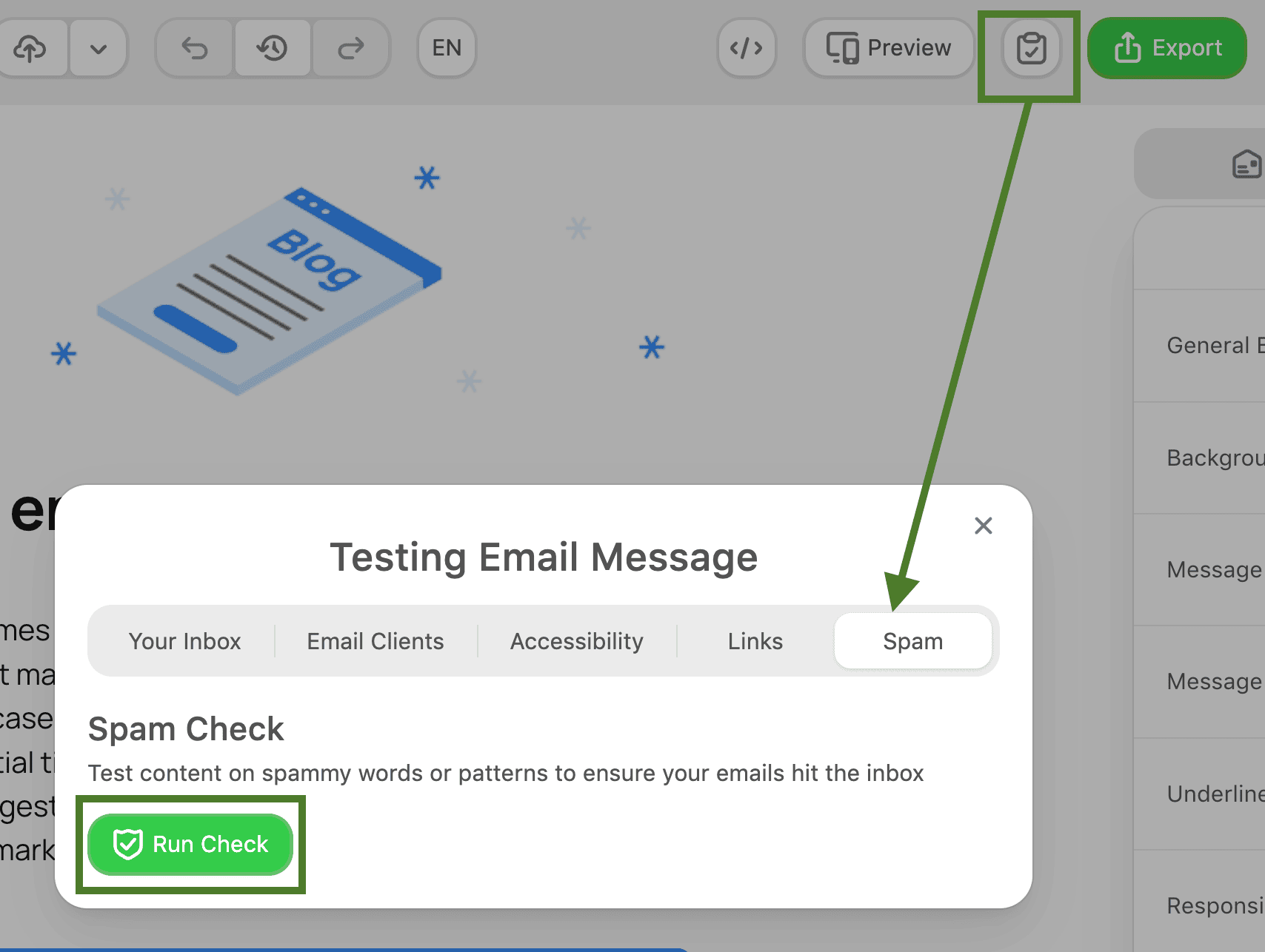
- Use spam-testing tools to test email content. For example, you can run a spam test directly in the Stripo editor without using any external tools and test emails before sending to identify common spam triggers in your content, such as risky wording, suspicious formatting, and structural red flags, so you can fix them before launch.
To get started, open the email editing area. In the upper-right corner of the top panel, next to the “Preview” button, you’ll find the “Test” button. Click it to open a menu with all available testing options for your email. Select “Spam,” then click “New Check.”
- Review your audience and remove inactive subscribers. Pay attention to engagement history, especially who has opened your emails in the last 90 days and who has not interacted for months. Sending to disengaged subscribers weakens your reputation.
- Be transparent about your identity and intent. Clearly show who you are, why the recipient is getting the email, and what the message contains. Trust signals matter to both subscribers and mailbox providers.
- Focus on helping your subscribers, not just optimizing technology. Once authentication and data monitoring are in place, shift your attention to relevance and usefulness. If your emails provide value and match subscriber expectations, deliverability improves naturally.

Wrapping up
Deliverability conversations often focus on technical workarounds: how mailbox providers work, how Gmail classifies messages, or how to influence inbox placement. However, as the expert discussion highlighted, the most reliable path to strong deliverability isn’t chasing hidden tricks or trying to outsmart mailbox algorithms; it’s focusing on your audience and consistently sending emails they actually want to receive.
If your emails are interesting, useful, and relevant, subscribers will engage with them, and those positive signals naturally strengthen your sender reputation. When recipients value your messages, concerns about spam placement or tab position become less critical, because mailbox providers will recognize your emails as trusted and expected communication.
In the end, strong deliverability is built on a simple principle: care about your subscribers, respect their attention, and send emails that genuinely help them.
FAQ
1. Why are my emails suddenly going to spam?
Most often, this happens due to changes in your sender reputation, for example, lower engagement, a spike in sending volume, or sending to inactive recipients. Mailbox providers react quickly to these signals, so even small shifts in behavior can impact inbox placement.
2. How long does it take to fix a damaged reputation?
There’s no fixed timeline. Reputation improves gradually as mailbox providers observe consistent, positive sending behavior, so recovery can take from a few weeks to several months, depending on the severity of the issue.
3. If I have a bad reputation, can I just change my domain and continue sending?
Changing your domain essentially resets your identity, but it doesn’t solve the underlying problem. If your sending behavior stays the same, your new domain will likely develop the same reputation over time. In some cases, mailbox providers may even connect the new domain to your previous activity based on similarities in content, structure, or infrastructure, which means the issue can follow you.
4. Does BIMI improve deliverability?
No, BIMI does not directly affect deliverability. BIMI is not a deliverability signal; it is an inbox display signal. It helps display your brand logo in supported inboxes, improving visibility and recognition. However, implementing BIMI requires strong authentication (including full DMARC), which can indirectly improve your reputation. That said, achieving full DMARC compliance can be complex and costly, especially for large organizations, so BIMI should be seen as part of a broader trust and infrastructure strategy, not a quick fix for deliverability.


0 comments