9 ways to solve enterprise email production challenges with Stripo: The ultimate guide


In our previous article, we explored the challenges that large enterprise email marketing teams face. The reasons behind them are easy to understand. When email production involves multiple stakeholders creating campaigns for dozens of brands, complexity quickly becomes part of the process.
Most enterprise teams face challenges in three key areas:
- people and collaboration;
- standardization and scaling;
- control and operational efficiency.
These areas are closely connected. Solving enterprise email production challenges requires more than implementing individual features. Teams need a structured approach that moves along the chain of people → process → operations, and they should develop a holistic system for solving enterprise challenges based on it.
In this article, we’ll look at each of these areas and explore practical ways to improve team efficiency. We’ll cover common workarounds used by enterprise organizations, Stripo features designed to support large-scale email production, and expert advice from email marketing leaders who manage complex workflows every day.
Key takeaways
- Create a controlled collaboration environment with custom roles, commenting, and approval workflows.
- Maintain brand consistency at scale through brand guidelines, synchronized modules, and reusable assets.
- Improve quality and reduce risk with integrated testing, security controls, and compliance-focused workflows.
- Eliminate operational bottlenecks by centralizing email production, asset management, and export processes.
Build a controlled collaboration environment
The first step in improving email production team efficiency is figuring out how to organize a large team’s work without creating chaos. Focusing on a single environment where your team works will eliminate many unnecessary steps and subsequent errors.
1. Delegation with clear role distribution across projects
Many enterprise teams report a need to clearly define user roles for the email builder. It’s important for them to not simply assign a single user the viewer or admin role but to be able to assign different roles across different projects to minimize the potential risks of uncontrolled changes to each email or the use of export or testing limits.
Why it matters for enterprise teams: The larger the team, the more important it is to prevent unauthorized changes, maintain brand consistency, and ensure that each contributor has access only to the tools and content they need.
Without proper access controls, teams often resort to workarounds, such as:
- creating multiple accounts for the same employee;
- relying on manual governance rules outside the email builder;
- hiding templates, modules, or resources to prevent unauthorized changes;
- limiting access to testing and export tools through internal policies.
These approaches increase complexity and create additional opportunities for mistakes.
To help enterprise teams maintain control while keeping collaboration efficient, Stripo offers custom roles and permissions. Teams can create custom roles with unique names, descriptions, and permission sets tailored to their workflows. This allows organizations to define exactly who can access specific features and resources without giving unnecessary permissions.
To configure custom roles, go to Settings → Team → Roles → Create New Role.

Coming soon: Stripo is expanding its role management capabilities even further. Planned enhancements include roles per project, block-level permissions, and resource-level permissions, giving enterprise teams more granular control over who can edit specific content, use certain resources, or access particular projects.
2. Centralized approval and review processes
Designers, copywriters, legal teams, product marketers, brand managers, and stakeholders all need visibility into the process. When feedback is scattered across email threads, messaging apps, project management systems, and design tools, collaboration becomes harder to manage.
These issues not only slow down production but also often increase the risk of miscommunication, missed edits, and inconsistencies in the final email due to the long wait and the subsequent need to determine which part and version of the email the feedback refers to.
Team members typically duplicate messages across tools or manually move comments to a single place to at least track the process.
A common document that everyone works on and signs off on is cut back and forth drastically, making the whole production process auditable in case something goes wrong.

Cal Singh,
The best thing a large email team lead can do is eliminate the tendency to let feedback exist in various places and choose a single place where all comments, approval requests, and revision requests must reside. One of our clients took that step with us, and we had to transfer all review rounds to a common Google Doc, where each part of the email corresponded to a comment thread, and the rule was straightforward. Unless it was written there, it did not count. Stakeholders who would send Slack messages redirected to that doc each and every time until it became the default behavior. Our average of four revision rounds per campaign was reduced to two, and the time between first draft and final approval decreased by about three days on average across the board.

Tyler Desjardins,
Stripo helps centralize communication by bringing feedback directly into the email creation process with the following features:
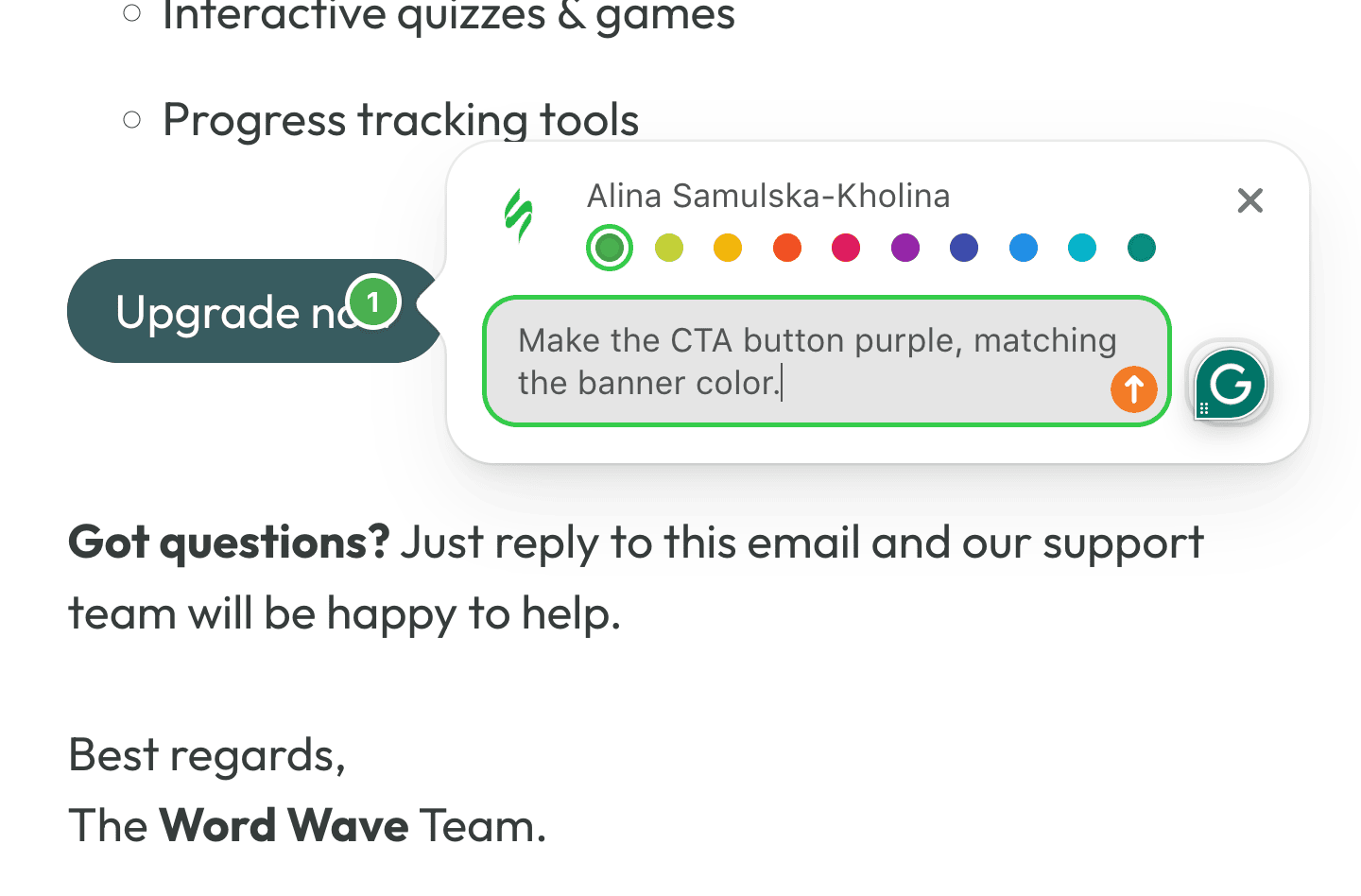
- Commenting in the editor lets reviewers leave notes on specific elements, including images, buttons, and text blocks. Team members can reply to, resolve, and track comments in context, making feedback easier to understand and act on. To ensure nothing gets overlooked, Stripo sends notifications through multiple channels, including email, the in-app notification center, and web push notifications.
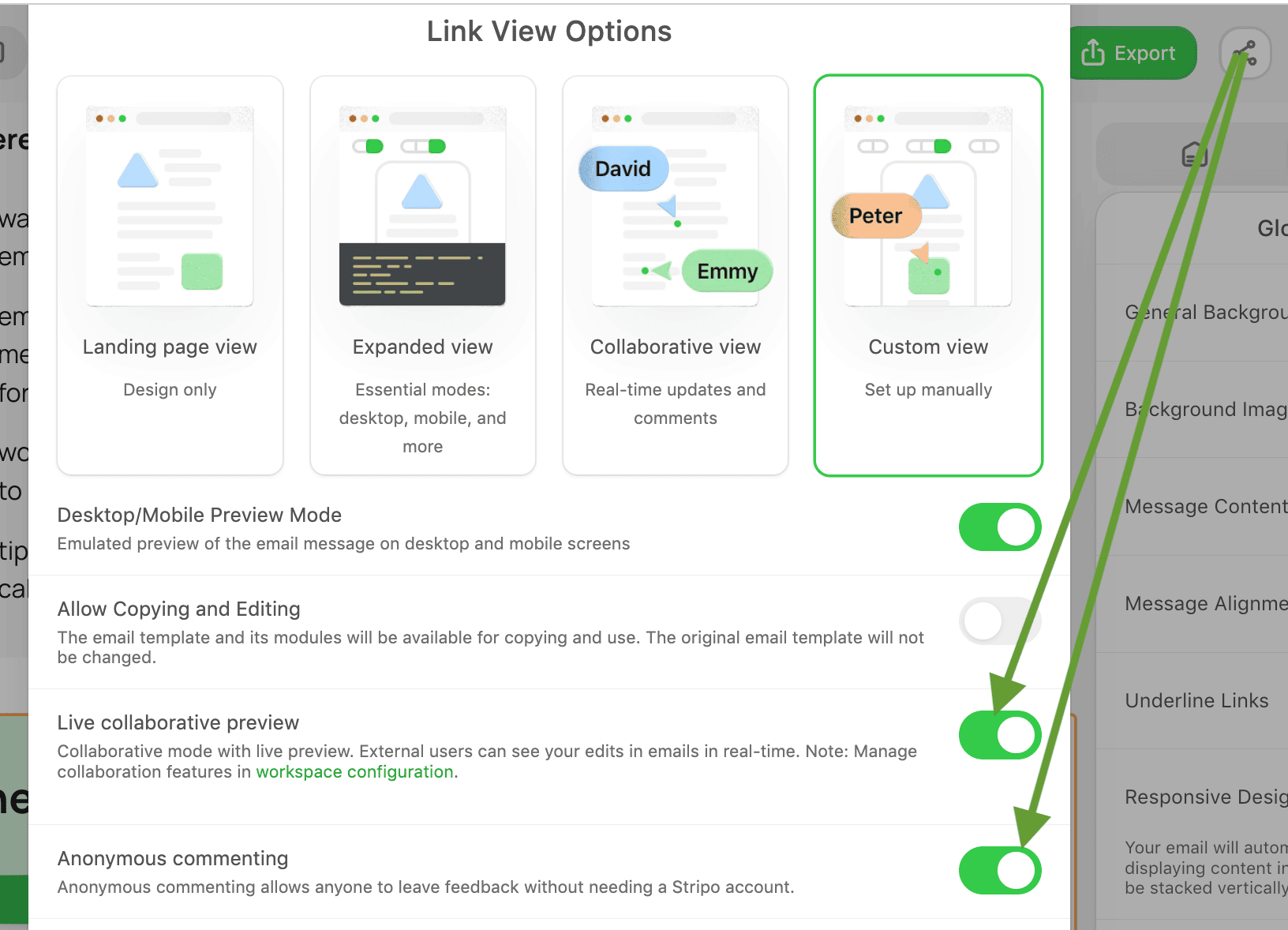
- For stakeholders who don’t need editing access, share links with options provides a simple way to review emails. The collaborative view mode displays live updates and supports commenting, allowing external reviewers to participate without entering the editing environment.
- Stripo also supports anonymous commenting, enabling reviewers without Stripo accounts to leave feedback by simply entering their name and email address. This removes access barriers while keeping all discussions connected to the email itself.


By keeping conversations, reviews, and approvals closer to the production process, teams spend less time searching for feedback and more time moving campaigns toward launch.
Note: Many enterprise organizations already have established approval systems in tools such as Jira, Adobe, or internal workflow platforms. Even in these cases, centralized commenting inside the email builder can reduce context switching and help teams discuss email-specific changes where the work actually happens.

3. Сontrol email template versions
Many teams report that with a large number of contributors, it’s difficult to understand who made what changes and which version is final. The complexity of managing all created email versions grows proportionally with the number of team members involved in their creation and the tools they use.
This lack of visibility makes collaboration risky and reverting to a safe version time-consuming. When you’re not satisfied with a new version of your email, reverting to a previous superior version often requires redesigning it, consuming additional time and effort from your team.
One of the fastest ways to delay your email campaign is to leave version control outside of systems in conversation.

To solve this problem, Stripo has a version history feature that allows:
- users to stay informed about who made changes to the emails and when;
- users with editing permission to restore a previous version with a single click;
- users to experiment with new design ideas, knowing they can easily revert to any previous version if needed;
- users to dive into a detailed log of edits to pinpoint exactly who made what changes and when.

Each user’s name is accompanied by a tab displaying the number of changes they’ve made, allowing you to track individual contributions to the project.

Once you’ve created an environment where your team can collaborate effectively on projects, you can move on to standardizing processes.
Standardize and scale email production
Your second area of focus is how to achieve uniform standards and scale email production. This set of challenges for enterprise teams requires guidance on maintaining a consistent brand, establishing effective processes, and ensuring content reuse.
4. Сentralized brand control
Enterprise organizations often manage dozens of projects simultaneously, with multiple teams creating campaigns based on shared brand guidelines. The brand consistency problem scales across multiple business units, regions, or brands. Without centralized controls, even small deviations can gradually lead to inconsistent designs, outdated content, and fragmented customer experiences.
Without dedicated tools, teams often rely on copying templates, manually updating assets, or maintaining separate documentation. As the number of emails grows, these approaches become increasingly difficult to manage.
Stripo provides several features that help enterprise teams maintain brand consistency while reducing manual work:
- Synchronized modules
Synchronized modules help teams manage reusable content across multiple emails. This is especially valuable for elements such as headers, footers, legal disclaimers, contact information, and promotional blocks.
When a synchronized module is updated, the change can be propagated wherever that module is used, eliminating the need to manually edit dozens or even hundreds of emails. For enterprise teams managing large email libraries, this significantly reduces maintenance time and lowers the risk of inconsistencies.

- Brand settings for projects and groups in the Stripo account
In project settings, you can define important parameters that influence brand consistency:
- brand colors that can be used by default for all projects;
- custom fonts for each project;
- custom templates and saved modules;
- other parameters for all email templates to suit your clients’ needs.

Important note: The design or data for some brand-critical email elements should not be modified by any contributor. The Stripo Element Lock feature allows organizations to lock individual elements of an email — stripes, structures, and containers — so that other collaborators cannot modify them. Locking protects brand-critical areas (headers, footers, legal blocks) from accidental or unauthorized changes, while still enabling team members to work on the rest of the email.
Together, these capabilities will help enterprise teams create a scalable email production environment where brand consistency is built into the workflow rather than enforced through manual reviews.

5. Standardized workflows across teams
Different teams often develop their own ways of organizing projects, naming templates, storing assets, and managing email production. This creates significant challenges when organizations try to scale operations, onboard new employees, or coordinate work across multiple teams and business units.
Common issues include inconsistent folder structures across projects and different naming conventions for templates and assets, making it difficult to locate emails and resources and lengthening onboarding periods for new team members.
To address these challenges, many organizations rely on manual governance, internal documentation, naming conventions, or external project management systems. However, these solutions often depend heavily on team discipline and become harder to enforce as the organization grows.
A more scalable approach is to combine clear operational standards with built-in workflow controls.
- Standardized naming rules
Establishing consistent naming conventions for templates, modules, folders, and projects helps teams find resources faster and reduces confusion when multiple departments collaborate in the same environment.
- Using organizational tools in a production environment
Stripo helps teams organize email production environments using the following structural components:
- organizations, projects, and groups of projects to separate the email creation environment and configure basic parameters;
- libraries for emails, templates, and modules for storing various units of content;

- email template folders for a clear hierarchy and tags for cross-campaign classification.

Coming soon: Stripo is working to create an even more intuitive and convenient organizing system with folder, tag linking, and filtering, allowing you to create a unified system and easily find the templates and emails you need.
By creating predefined organizational structures, teams can ensure that new projects follow the same logic and standards from day one.

6. Efficient reuse of assets and knowledge
Teams often repeatedly build similar email sections, templates, and content blocks because they cannot easily find approved assets or are unaware that another team has already created them. Over time, this leads to duplicated work, inconsistent branding, and slower production cycles.
The problem becomes even more noticeable when organizations manage multiple brands, regions, or departments and regularly onboard new team members. Without a centralized source of truth, valuable knowledge remains scattered across projects and individual teams.
Stripo helps enterprise organizations reduce duplication and scale proven practices through centralized asset management.
- Centralized template and module libraries
Template and module libraries provide teams with a single location for storing approved email templates. Instead of starting from scratch, marketers can build new campaigns using preapproved assets that already comply with brand and design standards.
This not only speeds up production but also helps onboard new team members faster by giving them access to proven examples and established best practices.

- Reusable modules
Reusable modules allow teams to create content blocks once and use them across multiple campaigns. Common elements, such as product cards, promotional sections, event invitations, banners, and informational blocks, can be stored in a shared library and reused whenever needed.

A great example comes from LIONS, one of Stripo’s enterprise customers, who manage 10 brands and 33 users within a single organization. Their team actively uses reusable, synchronized modules to standardize content production across brands while enabling individual teams to move faster without rebuilding common email elements from scratch.
Another example is from a case study with our client, the Flo brand, whose team worked on a project involving personalized welcome emails that required creating 94 distinct versions. Using Stripo’s module feature, they could simply drag and drop prebuilt blocks, reducing what could have been a time-consuming process to just a few steps.
I used the module feature in Stripo to build the different options, so when creating the 94 emails, it was simply a case of dragging and dropping the modules in. I don’t want to consider how long that would have taken without this feature!

Together, these capabilities help enterprise teams preserve institutional knowledge, accelerate onboarding, reduce duplicated effort, and scale email production more efficiently.
Improve quality, security, and operational efficiency
The next step in optimizing the work of large email production teams is to maintain quality and control as the team grows while ensuring operational efficiency and reducing manual work in large-scale processes.
7. Unified testing workflows
Different stakeholders often validate different aspects of an email, from rendering and accessibility to brand compliance and dynamic content. As a result, testing frequently happens across multiple tools, teams, and stages of the production workflow. This fragmented approach creates switching between multiple testing environments, inconsistent testing processes across teams, and limited visibility of who performed testing and when.
Stripo helps streamline this process by bringing testing capabilities closer to where emails are created. Teams can run email testing directly in Stripo without constantly switching between tools.
In Stripo, you can test your message by sending it to an inbox, 80+ email clients with Email on Acid (EoA) integration, mobile and desktop versions and checking dark mode, accessibility, links, and spam.

Important note: Enterprises can now connect their own EoA account and run tests through it. The testing pop-up will not display the number of EoA tests used. This reduces context switching and helps teams maintain a more centralized workflow without Stripo-imposed restrictions.
Accessibility and dark mode testing
As accessibility requirements become increasingly important, enterprise teams need reliable ways to identify potential issues before emails reach subscribers. Stripo includes an email accessibility checker and continues to expand its support for dark mode optimization.
By incorporating testing earlier in the production process, teams can improve email quality, reduce approval cycles, and launch campaigns with greater confidence.

8. Security and compliance-driven workflows
Large companies typically operate under strict security policies, compliance requirements, and internal governance standards. Every new platform must fit into existing identity management and access control frameworks before teams can begin using it.
A common challenge occurs during onboarding. New employees, contractors, and agency partners may need immediate access to email production environments before receiving a corporate account or company domain credentials. Enterprise teams need a way to support these scenarios without compromising security standards.
Stripo addresses these requirements through enterprise-grade authentication and access management capabilities:
- SSO for centralized user management
Single sign-on (SSO) allows organizations to manage authentication through their own identity provider rather than relying on separate credentials for every platform.
Instead of maintaining individual Stripo logins, companies can authenticate users through their existing corporate systems, simplifying access management and strengthening security controls.
- Flexible access scenarios
Stripo supports flexible access models that allow organizations to provide workspace access via alternative authentication methods when required, helping new team members become productive while broader onboarding processes are still underway.
By combining centralized authentication, enterprise-grade security controls, and flexible access management, organizations can maintain compliance requirements without creating unnecessary barriers to collaboration.
9. Reduce manual work with automation and export management
Enterprise teams often need to deliver the same email in multiple formats for different stakeholders and systems. Marketing teams may need HTML files for deployment, compliance teams may require PDFs for documentation, and other departments may rely on screenshots or archived versions for approvals and record-keeping.
When these tasks are performed manually, teams spend valuable time repeating the same actions, increasing the risk of mistakes and slowing down campaign delivery.
Stripo helps reduce this workload through built-in export and conversion capabilities:
- Multi-format export management
Instead of creating and exporting files separately, Stripo allows teams to generate the formats they need from a single source. Teams can export email templates as HTML, PDF, image, and other file formats immediately after they are created in Stripo.

- Email Converter
With the HTML Email Converter, teams can convert existing HTML files into Outlook-specific formats, including OFT, EMLTPL, and EMP, directly within their workspace. This allows you to prepare files for deployment faster without opening the editor or rebuilding content manually.
To get started, enable the email converter functionality in your settings.

After this, you will be able to convert from an HTML file or a ZIP archive with images.

For teams managing large volumes of email assets, this can significantly reduce repetitive operational work and simplify collaboration with departments that rely on Outlook-based workflows.
Beyond tools: How successful enterprise teams streamline email production
The right technology can eliminate many bottlenecks in email production. However, the most successful enterprise teams combine tools with well-defined processes. When we asked email marketing leaders how they keep large teams aligned and campaigns moving forward, several common patterns emerged.
-
Align stakeholders before production starts
Many delays happen because teams begin building emails before everyone agrees on the campaign goals, requirements, and scope.
The crucial recommendation here is to create a brief before any production work begins:
Start every campaign with a five-minute “scope lock” call and a one-page brief that everyone signs off on before a single pixel moves. At Above Apex, we literally copy the brief into the top of the email project so anyone jumping in later can see exactly what was agreed — no more “but I thought we were doing X” surprises. It sounds basic, but it cuts the back and forth by more than half and keeps the team moving fast instead of rehashing decisions.

-
Reduce unnecessary handoffs
Several experts emphasized that production slows down when too many people are involved in every step.
Now with AI, it’s much simpler. Instead of having 8–10 people involved, we reduced it to a few. One person can handle content using AI and internal knowledge, another can manage CRM and email setup, and even design and development can be done by one person. So you reduce the number of people, reduce the friction, and once you spend the time building the foundation, the next iterations become much faster.

Create “subteams” of three or more members who are responsible for all aspects of a single email campaign’s production from start to finish, including creative, technical, and/or operational aspects. Cross-functional teams minimize the classic information-handling errors associated with version control. By sharing a more comprehensive set of tasks and deliverables, they can adjust the email format and campaign messaging in real time as priorities change.

-
Create a clear approval structure
As organizations grow, approval workflows become a major source of production delays.
The most successful fix is a cross-functional steering committee that brings all stakeholder groups together at the onset of a project to set objectives, timelines, and an explicit chain of approval that everyone must follow.

Large teams usually fail when launching requires approval from three department heads at every stage of the chain and when a copywriter has to wait one day to get a design fix from the team, although he could have done it himself if he had the necessary skills and permissions.
Lexi Petersen,
-
Limit the number of reviewers
More feedback does not always lead to better emails. Restricting the number of reviewers helps teams make decisions faster while reducing contradictory feedback and endless revision loops.
The main factor contributing to missed campaign launch dates is unclear feedback from multiple stakeholders. By establishing a limit of no more than three reviewers per draft, we will see a significant reduction in the amount of time spent internally revising drafts.

Ultimately, the most efficient enterprise email teams combine strong governance with streamlined collaboration. They align stakeholders early, reduce unnecessary handoffs, establish clear approval paths, and keep decision-making focused. When these process improvements are supported by the right technology, email production becomes significantly faster and easier to scale.
Wrapping up
Enterprise email production challenges rarely stem from a single issue. More often, they result from a combination of growing teams, complex approval processes, inconsistent workflows, and increasing demands for quality, security, and brand governance.
However, these challenges can be addressed systematically. By building structured collaboration processes, standardizing email production, and reducing operational overheads, enterprise teams can scale their email programs without sacrificing efficiency or control. Combined with the right processes and governance practices, Stripo’s enterprise capabilities help teams create a more streamlined, predictable, and scalable email production environment.
FAQ
1. What is the biggest bottleneck in enterprise email production?
In many organizations, the biggest bottleneck is not email creation itself but the review and approval process. Multiple stakeholders, unclear ownership, and fragmented feedback often slow production more than design or coding tasks. Establishing clear approval workflows and centralizing communication can significantly reduce delays.
2. How can large email teams onboard new team members faster?
Standardized workflows, centralized asset libraries, reusable templates, and clear role definitions help new employees become productive faster. Instead of learning processes from individual colleagues, new team members can work within established systems and documented best practices.
3. Should enterprise teams prioritize process improvements or new tools?
Both matter, but tools alone rarely solve operational challenges. The most successful teams combine structured processes with technology that supports them. Clear ownership, approval chains, and collaboration standards become significantly more effective when reinforced by the right platform capabilities.
4. How can enterprise teams adopt new email production tools without disrupting existing workflows?
One of the biggest challenges enterprise organizations face is not finding better tools but implementing them. Many teams have spent years building processes around platforms such as Jira, Adobe, internal approval systems, and custom workflows. Replacing everything at once often creates resistance and unnecessary risk.
A more effective approach is to introduce new tools gradually. Start by identifying a specific bottleneck, such as email reviews, template management, testing, or brand governance, and implement a solution that addresses that challenge first. Once teams see measurable improvements, adoption becomes much easier.
0 comments