Email overload statistics 2026: The inbox your email lands in


Since its introduction 50+ years ago, email has firmly established itself as the major channel for personal and business communication, with traffic volume increasing exponentially in that time. Are people handling the deluge well? What is the impact of the growing number of messages employees send and receive on their productivity and efficiency in the workplace? How do customers react to dozens of messages landing in their inboxes every day? Email overload statistics can help answer these questions.
Top email overload statistics every business should know
To get the general lay of the land, let’s explore some overall statistics related to email overload:
- In 2025, 4.55 billion people used email for various purposes worldwide. By 2027, this figure is expected to reach 4.97 billion.
- The global email market’s CAGR exceeds 13%, which will allow it to hit $17.9 billion next year.
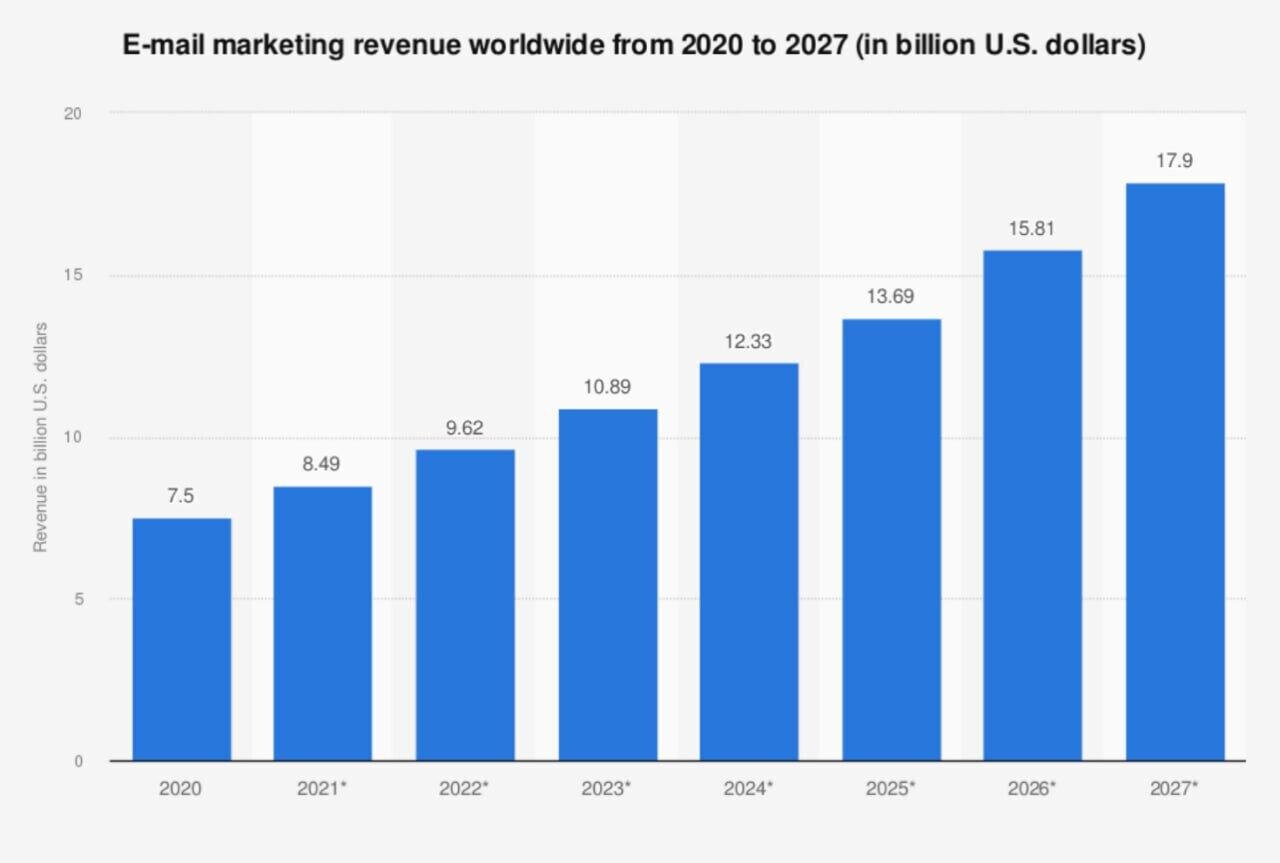
(Source: Statista) - 81% of companies rely on email as the primary element of their business strategy.
- 68% of B2C consumers and 77% of B2B companies consider email their principal channel for communication with brands.
- The average email-generated ROI is $40 for every dollar businesses spend, and for 18% of organizations, this ratio is 70:1.
- Recipients in Australia and Europe have the highest email open rates (47.69% and 45.08%, respectively), while in Latin America, the open rate is significantly lower (31.97%).
- Nearly 90% of marketers say that increasing investment in email marketing is their top priority.
- 86% of people have at least three business email addresses.
- Three to five checks of the inbox are all in a day’s work for 42% of workers.

What email overload actually means
Email overload is an endemic problem for many modern organizations, stemming from staff members’ inability to read, sort, and respond to the messages they receive. Email overload can take several forms, but three common ones are volume, relevance, and response pressure.
-
Volume overload
This is caused by the sheer number of emails an employee has to handle. If one message takes up two minutes to read and respond to (and it may take longer in case it requires a lengthy reply or serious thought), you will spend two hours dealing with 60 of them. Double that figure, and you will find workers spending half their day managing emails. What about the rest of their responsibilities?
-
Relevance overload
Here, the actual number of emails you receive may not necessarily be large. But because of poor filtering, you have to sift through a plethora of generic updates, CC threads, announcements, and administrative alerts that don’t concern you in order to find what you actually need.
-
Response-pressure overload
Many workers assume they should answer even non-urgent emails immediately. Such mistaken expectations lead to stress, anxiety, and hasty responses, which reflect negatively on the quality of business decisions and outcomes. To avoid this, take a look at some realistic benchmarks:

(Source: Swizero)
How much email actually arrives
Now that we know what we are talking about, let’s look at the numbers.
Global daily volume
The most recent studies show that the global number of emails sent daily is 392 billion, which means 4.5 million messages pass through servers every second. As you might expect, the US is the leader in this respect.

(Source: Statista)
Why three studies give three different numbers
When you want to find out how many emails a person receives, you may find three different figures: 117, 121, and 126. Which is correct? In fact, all of them are. Each index comes from different sources that approach calculations differently.
The Microsoft Work Trend Index is based on anonymized, aggregated Microsoft 365 telemetry data collected from people’s accounts. CloudHQ relies mostly on surveys in which people provide their sources and uses different calculation methods and a model that takes into account data from businesses and IT administrators. Microsoft’s figure provides a useful telemetry-based reference point, but it shouldn’t be treated as a universal average for all employees.
Where the growth comes from
Global email volume continues to grow, driven by an expanding user base and increasing message volume. What are the reasons behind it? The 4.2% CAGR of the latter index suggests that the global daily email volume will rise from the above-mentioned 392 billion to over 424 billion emails by 2028. Email marketing automation, projected to cross the $16 billion threshold by 2033 (a 148% increase over the past decade), also contributes to overload growth.

(Source: Consainsights)
What email overload costs
How do the numbers we spoke about translate into time and money?
How much time email takes
Like the number of emails employees receive, the time they spend working with messages depends on their positions.

(Source: Clean Email)
The data shown here suggest that people in more senior roles tend to spend more time handling business communications.
The attention and interruption cost
Every interruption can break a worker’s concentration and make it harder to maintain a continuous workflow. Workplace studies show that, on average, an employee needs 64 seconds to recover from an interruption and resume work. This fragmentation does nothing good for the staff’s performance or the quality of their work.
seconds is necessary for an employee to recover from an interruption and resume work.
What overload costs in money
The financial losses caused by employees spending time on email also correlate with their roles within the organization and vary across verticals.

(Source: alfred)
The human cost of an overloaded inbox
Email overload affects not only a company’s metrics but also its personnel’s emotional condition.
Stress and burnout
Given the time workers dedicate to email and the urgency some messages require, it is no wonder 70% of personnel call email the primary source of stress they experience at work, while 68% believe it causes burnout. What’s more, 34% of employees think that delaying email responses will harm their performance assessment.
After-hours email
Handling email outside working hours is normal for most employees. They check their inboxes and respond to messages late after work and on weekends. Moreover, three-fourths of them spend their mornings on email before they even get to work.
of employees think that delaying email responses will harm their performance assessment.

(Source: Clean Email)
Generational differences
Different generational groups are affected by stress and burnout (including those caused by email) differently, with higher rates among millennials (83%) and Gen Z workers (81%). Curiously, people across demographics prefer different ways of dealing with workplace stress. Younger workers favor digital detoxes and using mental health apps to battle mental fatigue. By contrast, older audiences rely on more traditional email overload solutions (for instance, taking days off or resorting to therapy sessions).
How much of the inbox is actually relevant?
The figure of 76% related to email signal-to-noise ratio requires explanation.
How much of an inbox needs action
When email overload sets in, employees increasingly fail to react to messages in their inboxes. In fact, 32% of emails remain totally unread. And having at least 50 unread messages in the inbox is common for 40% of workers. According to a 2025 study by SaneBox, only 24% of the emails in a business inbox are relevant and important, leaving the remaining 76% insignificant.
Spam and marketing emails are not the same thing
Does it mean that 76% of the emails an employee receives are spam? Of course not. By all accounts, spam fluctuates around 45%. Much of that “noise” consists of legitimate newsletters, internal updates, automated notifications, and other messages that simply aren’t relevant to a particular recipient.

Email overload from the sender’s side
Email overload affects both sides of the inbox: employees dealing with internal and business communication and consumers sorting through marketing messages. When we speak of email overload, it is vital to consider a subscriber’s perspective as well.
What overload looks like to a subscriber
Employees aren’t the only people suffering from email overload. Consumers can experience email overload, too. When promotional messages arrive too frequently, subscribers may ignore, delete, or unsubscribe from emails they would otherwise find useful.
Subscription fatigue and recurring sender overload
Receiving too many emails from an organization is the primary reason people hit the unsubscribe button.

(Source: Zero Bounce)
As 70% of consumers admit, they have unsubscribed from at least three brands in the past three months: a figure that significantly hurts businesses!
How send frequency affects overload
Subscriber email overload isn’t only about how many emails they receive but also how often brand messages arrive.
The cadence threshold
About 28% of consumers consider receiving promotional emails up to three times a week an acceptable email frequency. With that in mind, nearly half of companies limit their campaigns to two to four messages a month. As the send frequency grows above that sweet spot, open rates decline, pulling down other engagement benchmarks.

(Source: Neil Patel LinkedIn)
What unsubscribe rate actually signals
A low unsubscribe rate is a telltale sign that your email campaigns are healthy, relevant, and on target. Watch for changes relative to your own baseline. A sudden increase in unsubscribes after increasing frequency can indicate that the new cadence exceeds what some subscribers expect.
How to find your own threshold
To determine the optimal send frequency, start by dividing your subscribers into categories based on activity level (low, medium, and high engagement). Then, subject each group to a different email cadence and monitor core metrics (such as clicks per send, unsubscribe rates, and spam complaints) during the 8-12-week test period. Once you identify the point above which the indices degrade, set corresponding frequency caps on your automated campaign flows.
How email design affects processing time
Email design is another factor that influences how recipients handle emails.
How people scan email under load
When faced with a large number of emails in a short time, people don’t read each one as they would under normal circumstances. Instead, they skip dense text blocks and focus on the sender name, subject line (it is crucial for 47% of recipients), and the very first sentence to understand whether it is worth continuing to read. They also fixate on visual anchors (bolded phrases, bulleted lists, and subheadings) and look for a clear call to action with a value proposition.
Design choices that reduce processing load
When designing your emails, you should prioritize four aspects:
- Visual layout. Opt for a single-column format and an inverted-pyramid hierarchy. The copy and buttons should have plenty of white space around them, and the text should be left-aligned.
- Typography. Stick to readable fonts, short paragraphs, and bold visual anchors (key phrases or metrics). Bullet points are also welcome.
- Imagery. Use icons as eye-catching tools, not decorations, and rely on contrasting colors to draw attention. The email should also have one clear CTA.
- Mobile-responsive design. Ensure that your emails are optimized for mobile devices, since most recipients open emails on mobile devices. What’s more, optimized emails have a 15% higher click-through rate than their non-optimized counterparts.
Designing for AI-summarized inboxes
The advent of artificial intelligence has changed multiple spheres of human activity, and email marketing is no exception.
What AI assistants extract from an email
According to a 2026 study by Validity Inc., 55% of consumers decide whether to open an email based on AI-generated summaries. This is an astounding percentage, given that only 25% of people use AI to summarize emails and even fewer recipients (10%) actually trust such summaries.
Email clients and AI assistants can summarize or surface key information from messages in different ways, including previews and post-open summaries. To summarize an email, the machines pull out its vital elements (deadlines, dates, numbers, etc.) and present them to the reader.
What that changes for subject lines, layout, and CTAs
If you want your promotional emails to be opened after AI-powered software summarizes them, you should:
- Be direct and specific in your subject lines to convey relevance and urgency. Moreover, the subject line should include keywords from the opening sentence of the body text.
- Put the most important information near the beginning of the email rather than hiding it in long copy, tables, or images. The copy should consist of short paragraphs or bulleted lists.
- Use direct verbs in CTAs (download, sign up, review, etc.) and avoid competing links or secondary messages.
How to send an email that survives an overloaded inbox
With overloaded inboxes becoming a harrowing problem for both workers and consumers, you should go the extra mile to ensure your message reaches the addressee.
Here are practical ways to make an email easier to process:
- use action tags (Action Required or For Information Only) in the subject line for workplace communication;
- keep paragraphs short;
- use bullet lists;
- start with the main point;
- announce clear deadlines;
- choose sending time wisely;
- if your message doesn’t require immediate reply, say it explicitly.
Wrapping up
Both employees and customers struggle to manage a high volume of emails (many of which are irrelevant) and feel pressured to respond on short notice. As a result, they never open or even delete a fair share of them and increasingly experience related stress and burnout.
For marketers, the practical takeaway is simple: Inbox competition makes clarity, relevance, and thoughtful frequency increasingly important. Email design tools, such as Stripo, can help teams create consistent, readable campaigns with reusable modules and templates, while the sending platform remains responsible for delivery and campaign execution. Stripo can help you leverage ready-made templates, reusable modules, collaboration features, and seamless integration with over 90 ESPs to create campaigns of any volume.
Try Stripo’s free Demo Editor. If you are satisfied with the quality of the result, choose a pricing plan that fits your operational needs and budget.
FAQ
1. How many emails does the average person receive per day?
The available statistics cover only office workers, who receive an average of 117 emails per day, with those in more senior roles tending to spend more time on business communications.
2. How many emails are sent globally every day in 2026?
This year, the number of emails sent worldwide each day equals 392 billion. By 2028, the figure is expected to exceed 424 billion.
3. What percentage of the workweek goes to email?
The average figure across industries equals 28%. That’s about 13 hours per week, or 2.2 hours a day.
4. Is email overload getting worse?
As the number of emails people send is growing exponentially, email overload is exacerbated by message volume, response-time pressure, and after-hours interruptions.
5. How many marketing emails per week is too many?
There is no universal number that defines “too many” emails. The right cadence depends on your audience, content, expectations, and campaign type. Test frequency by monitoring clicks, unsubscribes, complaints, and conversions, and consider setting different frequency caps for highly and less engaged subscribers.
6. Does email overload affect open rates?
It can, but open rate alone is not enough to determine whether you are sending too many emails. A sustained decline compared with your usual performance, especially alongside lower click-through rates, more unsubscribes, or spam complaints, may indicate that your audience is experiencing email fatigue. Monitor these metrics together and adjust your sending frequency based on your own audience and campaign goals.
0 comments