Abandoned cart emails: Best practices, examples & templates (2026)


Cart abandonment is something that any eCommerce business faces and tries to reduce. The average cart abandonment rate in the industry is around 70.22%. However, why do buyers leave? Is there any way to get them back? This is what we will explore in this article. We'll look at the top reasons for leaving, as well as must-know practices for creating abandoned cart emails that will help you bring customers back.
Key takeaways
- A three-email sequence works best when each message has a different purpose. Start with a simple reminder after 1-2 hours, follow up with trust and social proof around 24 hours later, and finish with an incentive or urgency after 48-72 hours.
- Personalization and segmentation make cart recovery more relevant and profitable. Show the exact abandoned products, use behavioral recommendations, and adapt incentives and messaging based on cart value and whether the shopper is a first-time or VIP customer.
- Successful cart recovery goes beyond email but it requires careful orchestration and consent. SMS, push, and in-app notifications can complement email, while channel-specific consent, behavioral-data transparency, opt-outs, quiet hours, and suppression rules help keep the experience compliant and customer-friendly.
What are abandoned cart emails?
An abandoned cart email is an automated message sent to customers who add an item to their cart (as well as their email address to initiate the checkout process on the dedicated checkout page) but do not complete their purchase. They are sent specifically to return lost customers and remind them about the items they left in their cart.

(Source: Stripo template)
Cart vs. checkout vs. browse abandonment
The customer journey from the thought of buying to the completed order is full of moments when the process can be abandoned. It may sound confusing, but it’s all about the journey stage and how close it is to the actual purchase. There are three stages where your customer can abandon you.
Browse abandonment
It’s all about leaving you on the product page. Customers can browse categories or specific products, but leave without adding any product to their carts.
Cart abandonment
It’s today’s subject: your customers add desired products to their carts but leave without taking any further action. This type of abandonment often covers itself and the checkout abandonment among the marketing conversations, and there’s nothing criminal. However, separating them helps you better understand when and why your customers drop off.
Checkout abandonment
This one is the most painful to see, as a customer can leave you during the checkout process, even when all the billing information is filled in, right when the complete purchase is a matter of one click.
Why the email address (and consent) is a prerequisite for abandoned cart emails
The key nuance of abandoned cart emails is that they don't work without one crucial element. If a customer isn't logged in to your eCommerce store, adds something to their cart, and then leaves the cart abandoned, it's impossible to send an abandoned cart email because the required email address won't be in your database.
However, there's one caveat. You can't simply send someone an abandoned cart email, even if they've registered with your store. The person's consent to receive emails from you is required, as abandoned cart emails are considered commercial emails under many regulations (GDPR, CAN-SPAM, and others) and require opt-in and opt-out options. Simply put, your audience must consent to receive emails from you before you can legally start reminding them about their abandoned carts.
It is considered good practice to include a clear option to receive future newsletters upon registration, which a person can unsubscribe from at their own discretion (for example, simply by not checking the box).
The reasons why the customers leave
Some customers can leave you during their shopping process; this is inevitable. All you have left to do here is analyze why they decided to leave. We’ve gathered several of the most common reasons to help you have a clearer picture.
Unexpected costs: Shipping, taxes, and fees
It’s always distracting when extra costs significantly increase the total amount. Even an extra dollar can disappoint your customers and make them leave, especially if they are not extremely interested in your products. So it is always wise to mention that the shipping costs are not included in the product’s price. Or, for your customers’ convenience, include them in the price.
Another thing worth talking about is taxes and various fees. In the EU, all retailers (brick-and-mortar, and online) are obligated to display prices that already include taxes/VAT. While in the US, a tax is a separate thing. There are no boundaries between countries online, so we can choose any shop we like. To not confuse your customers, we strongly recommend mentioning whether the tax fee/VAT is included in the product’s price or not, well before the customers add items to their carts, as customers, we want to know what to expect.

(Source: Email from Bonobos)
Complicated or forced-account checkout
The more complicated your checkout process, the higher the chance that the customer will abandon the purchase. Various additional steps and confusing forms to fill out may scare away your potential customers. And please, don’t lock the completed checkout behind the forced account creation. Give your audience a choice. If they want to make a one-time purchase, they won’t need an account on your website, no matter what benefits their experience may bring. Just provide an option to create an account in a polite way, but don’t force it, and don’t create additional hoops your customers must jump through to buy what they want.
Distraction and not being ready to buy
This reason is hard to counter because it's based on the simple human factor. It happens that someone initially wants to buy something, but while they're still choosing the item, once it's in their cart, they change their mind.
There could be countless reasons. Perhaps they've weighed the financial costs and realized now isn't the best time to purchase something. Perhaps they were distracted by an alternative good or a more advantageous offer. Or perhaps they no longer need the item. There are so many "perhaps" and so little you can do about it. All you can do is remind them about adding the item to their cart and hope they change their mind and come back.
Trust and security concerns
For various reasons, your customers may not trust your company and may be hesitant to share personal information such as credit card numbers, CVV codes, and home addresses. Let them know that they may print out the order agreement with the seal or signature to feel secure.
You may also offer an alternative payment method: PayPal or Amazon. This way, the customers will not have to share their personal and card information with you.
Missing payment methods
There are some interesting statistics behind this matter.
of shoppers will leave if their preferred payment method isn’t available.
And it’s just that simple. People don’t want complications and waste much of their time on the way to completing an order. The absence of their preferred payment option will force them to make detours to other websites to create necessary accounts, credit cards, and other things to complete the purchase on your website, and not many customers will do that. So they’ll just simply leave.
Price comparison and cart-as-wishlist
Another reason, and a rather mundane one. Clients just add the needed items to the eCommerce cart to compare the total amount with two or three specific websites. It saves them from the necessity of remembering prices for various products and shipping fees. Must confess, I also do this.
And don’t forget simple wishlisting: customers can use your website cart to store their desired products for later purchase. Most of the websites save items in carts for a long time, so it’s pretty common for people to use carts like that.
Technical issues: Broken CTAs, poor mobile responsiveness, dead coupons
Besides prices, taxes, or distrust, technical hiccups can directly impact the customer experience to the point that they drop off during an almost completed purchase. Every CTA that doesn’t respond to clicks, every poorly displayed part of the email on mobile devices, every font that is hard to read on small screens, makes that frustration meter grow to the point where nothing matters to the customer anymore, and they just leave.
When the website is unable to give a flawless shopping experience from a technical side, no amount of discounts and special offers can save you from customers who will run away from you. Making your website and email functionality flawless (on both mobile and desktop) must be your top priority, even before you start your eCommerce journey, as it will save you a lot of headaches in the future.
Now for the coupons. It’s very frustrating when clients don't know where to enter the coupon number (no designated line on the order form). Or it happens to some companies that you see this line, insert the coupon, but nothing changes and the price remains the same. This incident happens for 2 reasons: the site doesn’t work properly, or the coupon has expired. It can feel to customers like they’ve been lied to, and getting them to return to you after that is pretty hard, to say the least. Your coupon functionality must be flawless, and all coupons must be “fresh” to avoid monetary losses and reputational damage.
Are cart abandonment emails effective?
As we said earlier, the global cart abandonment rate is 70.22%, which is pretty high. In such cases, cart abandonment emails are a great help because they bring lost sales and lost revenue back.
According to statistics:
- over 35% of cart abandonment emails encourage recipients to open them;
- more than 39% of clicks turn into abandoned cart recovery;
- every cart abandonment email you send generates about $2.5 in revenue thanks to abandoned cart recovery.
As you can see, cart abandonment emails are a great tool to help recover lost customers and recover abandoned carts, and every online sales business should adopt them in its business strategy.
When to send cart abandonment emails
While cart abandonment emails are quite effective, they need to be perfectly timed. Your online store can’t just flood a person with this kind of email and hope that he will return. Send cart abandonment emails too quickly, and go straight to your spam folder. Send them too slowly, and the customer will forget about the abandoned product. As a result, you must follow a clear abandoned cart email series.
Abandoned cart email sequence
Abandoned cart emails should be sent in a specific way to have the right impact. And this way is always tied to perfect timing.
The three-email sequence (1 hour, 24 hours, 48 hours)
As the name implies, three abandoned cart emails should be sent after a specific time has passed:
- The first cart abandonment email must be sent within the first hour or a few hours after the customer has left. Thanks to this, you will get the best chances for cart recovery. The faster you send an email, the more likely customers are to still be at a computer or on a smartphone when they open it.
- To send a second email, wait at least 24 hours to avoid overwhelming or spamming your customer.
- If you would like to send a third cart abandonment email, wait at least another 48 hours.
Send windows and time-zone edge case
When sending abandoned cart emails, you should always account for time zones and adjust your send times accordingly. Abandoned cart email will go to waste if it is sent at 3 AM, when your customer is asleep on the other side of the planet.
However, this time zone matter can be a bit confusing, so here are a few tips for you:
- Schedule abandoned-cart emails based on the shopper's time zone, not your company's.
- Keep emails between roughly 8 AM and 10 PM local time.
- If an email is scheduled during the night, hold it until the morning send window.
- If the time zone is unknown, use a reliable market/location signal or your store's default time zone.
- Use location-based time zones instead of fixed UTC offsets for the most precise timing.
- Base consequent abandoned cart emails primarily on the original abandonment time.
How to structure an abandoned cart email sequence
As we said above, abandoned cart emails usually come as a sequence of three emails, and each email in this sequence serves a specific purpose that contributes to the overall structure. Here’s how it looks:
Email 1: The reminder
As the name implies, its main purpose is to remind your customers about items left in their carts. The perfect timing for them is around 1-2 hours after the cart was left, when purchase intent is still strong, but it politely leaves room for the customer to return naturally. Just number the items left in the cart and add something like: “We have your cart saved. Want to see it again?” It’s a polite way to remind and make a small push towards the completed purchase.

(Source: Email from Nixon)
Email 2: Trust and social proof
The next email goes out around 24 hours after the cart was abandoned. It doesn’t matter whether they’ve read your previous email; this one’s goal is to address any hesitations about the purchase that may arise and prevent the buyer from completing the purchase after the first email. You can use a wide range of approaches, such as customer ratings for goods in the shopping cart, positive reviews, promo codes, special discounts, additional explanations of fees and taxes, and much more. Your goal here is to erase any mistrust or worries between you and your buyer while still sending a polite message to push the purchase to the finish line.

(Source: Email from Ned)
Email 3: Incentive or urgency
The last email in the sequence, and if it does not work, nothing will. You should send it around 48 or 72 hours after the cart was abandoned. The main goal of the third email is to give the final incentive or create a sense of urgency with special deals that will never come back. Add an impactful message about an exclusive offer on all items in abandoned carts that expires soon, encouraging buyers to complete their purchase before they miss out on a great deal.

(Source: Email from GOODONYA)
Suppression logic: Stopping the flow after purchase
The most important thing to remember is that this sequence must stop once the purchase is placed. Before every email in the sequence, your automation flow must check whether the purchase is complete. If all is set and done, the whole sequence stops. If not, it continues to the next message, and the check happens again.
Besides that, you should also set specific suppression rules for abandoned cart emails that will engage once:
- item in the abandoned cart is out of stock;
- the recipient unsubscribed from your newsletter without finishing the purchase;
- the abandoned cart has expired.
No one wants to see abandoned cart messages after they’ve made a purchase, as it not only bombards recipients' inboxes with now-useless information but also shows that you are not paying attention to their purchase case.
Abandoned cart email best practices
To take advantage of abandoned cart emails, you need to follow some rules and trends that will boost the design of this email type. We’ve gathered the five best to use in your email campaign.
Write a concise, personalized subject line
Any abandoned cart email template starts with compelling email subject lines. A perfect subject line hints at what’s inside the message.
The best way to create a good subject line is to left a hint that recipient missed something. Like “You left something in your cart” or “You forgot to check out.” But this is not the best idea.
One of the great abandoned cart email examples with such a subject line is an email from jewelry manufacturer Monica Vinader.

(Source: Email from Monica Vinader)
Use a dynamic product block
When customers choose a product, there’s always something that catches their eyes. It can be price, shape, manufacturer, and the whole list of various characteristics. As a result, you can use them to bring your customers back by displaying this product again in an abandoned cart email.
Usually, it works like this. You create an email, then the support in your ESP service inserts the necessary variables into the email. And only then, when sending this trigger, the necessary data is pulled up instead of variables, namely: price, description, picture, and link to the product.
For example, you can add a product photo, its price, color, and the number of items left in stock, and so on. Just like the ASICS brand of sports shoes and clothing did. Seeing the product again might remind you of why he or she wanted to buy it.

(Source: Email from Mint Velvet)
Creating such emails can take a lot of time, and in such cases, ready-made abandoned cart email templates are real lifesavers. Stripo provides a wide range of abandoned cart email templates for various industries that you can apply to your eCommerce business.

Add one clear, mobile-friendly CTA
Even though you can remind your customers why they left your product in the cart, it might not be enough to encourage them to buy it. So it would be wise to use time-tested call-to-action buttons for maximum effect.
Work out your buttons to make them eye-catching and easy to read. Besides that, use your imagination to make them both unique and impactful. Also, remember that your emails will be opened on mobile devices. As a result, you must keep in mind mobile screen nuances when creating your call-to-action buttons.
Stripo can help you create flawless call-to-action buttons for mobile devices. For example, you can stretch the button across the entire width of the mobile screen or use a larger font than on the desktop version of the email. And most importantly, you can make all changes without a single line of code. Discover best practices for making an exceptional call-to-action button with Stripo.
![Email call to action best practices: The complete guide [2026]](https://live-content-worker.stripocdn.email/media/article/19962/conversions/01kwmgd4fbkn09c2vd2dyb94hs-150x150.png?v=1783099728)

(Source: Email from Cult Beauty)
Include support contact details
You should always remember that your target audience has various technical skills as well as technical issues that may occur during the customer journey on the checkout page. As a result, your abandoned cart emails must have customer support email addresses that your buyers can use to resolve all questions.
Even though non-tech-savvy customers can reply to your abandoned cart email in search of help, you must provide an email address and phone number to contact your customer support.

(Source: Email from Ninja Kitchen)
Keep it short and scannable
When your buyer adds a product to the cart, he or she already know about it, so there’s no need to make an abandoned cart email long to change their mind. Besides that, your customers can be busy and have no time to read long emails. Make your text block short and go straight to the point.

(Source: Email from Scotchandsoda)
Show social proof
The research concluded that more than 98% of buyers make their purchases based on reviews and ratings. Use it to your advantage by adding it or any other type of social proof to your abandoned cart emails.
For example, customers left a specific product in their shopping cart. It’s great. A chance to remind shoppers about how good this product is by showing positive reviews.
There can be situations when some products don't have reviews yet, and that's totally normal. To emerge from the situation as a winner, you can use general reviews about your brand or online store to change your customers' minds.

(Source: Stripo template)
If you want to amaze your customers with great customer testimonials and business reviews in an abandoned cart email, then you need to create an email with a separate block to fit them all. This can take up a lot of precious time, so it's better to use a prebuilt abandoned cart email template. Stripo has developed a special free template for creating abandoned cart emails with customer reviews.
Upgrade with interactive elements
Interactive elements and gamification are not only about making your emails stand out from the competition. It’s also a powerful tool to raise their performance, especially in the case of returning customers to their carts.
Statistics for eCommerce, interactive elements, and gamification boost the click-to-open rate (CTOR) by 220%, from 12% to 26%. Additionally, the average check increases by 15%, leading to a rise in ROI by 225%, from 150-600% to 700-1100%.
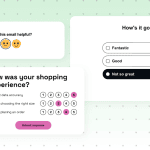
So it would be wise to implement interactivity in your abandoned cart emails. For example, you can add image carousels to show cart goods from different angles.
(Source: Email from Ecwid)

Utilize well-thought-out timing
Sending such emails at random times is not the best strategy. The first email should be sent within an hour for the best chance of getting your client back. The faster you catch them, the more likely they are to still be on your website or surfing the internet for shopping.
The next emails should wait a little longer. The second email is best sent after 24 hours so as not to overwhelm the client with spam. The third email is best sent after 48 hours.
Use incentives strategically and protect margin
Various incentives may bring customers back, but on the contrary, they may tank your margin, so a strategic approach is required. First of all, don't put a discount in the first abandoned-cart email by default. The shopper has already demonstrated strong purchase intent, and many people abandon carts because they were distracted or wanted to compare options. Don’t rush with the discounts.
Secondly, applying the same discount to all carts is not a wise choice, so it’s better to review each case separately and provide conditional offers to protect margin. Depending on the cart value, whether it’s a first purchase or not, your offer may vary to find that golden mean between retaining the customer and keeping your profit reasonable.
Thirdly, discounts are not the only way to encourage customers to finish their purchase. Use various gifts, free shipping, loyalty points, limited-time offers, promo codes for next purchase, and more. Make your incentives diverse while protecting your margin.

Personalization and segmentation
Abandoned cart emails work pretty well as they are. However, there is always room for improvement. Utilizing personalization approaches and thoughtful segmentation can make your abandoned cart emails even more effective.
Behavioral personalization: Name, browsing, recommendations
Even emails that just remind about left goods in the cart can be sprinkled with a bit of personalization. It’s all about the value your personalization brings to the recipient.
There are several things you can personalize in your abandoned cart emails:
Abandoned products
It’s a cornerstone of the abandoned cart email, and they are the personalization itself. Using just a cliché phrase like “You left something in your cart” and giving a link to the website cart won’t do much. So it would be wise to add these products to the actual email, including all the necessary information about them, like product name, quantity in cart, color, size, current price, and the overall cart total. It would be much more useful to the recipient, as they can see everything they need to know in one email.
Names
It’s a good thing to have, but it's pretty much secondary. Using names in emails can make them more personal, but in our abandoned cart case, the first name is not a primary conversation driver.
Product recommendations
In our case, personalized recommendations based on browsing activity and items already in the cart help increase the average order value, but they also demonstrate to the recipient that you're committed to providing the best possible experience and want to offer only what they're likely to find useful. The key here is that the recommendations are truly personalized and offer items that are closely related to what the recipient might be interested in and what they searched for or left in their cart.
Segmenting high- vs. low-value carts and VIP vs. first-time buyers
Taking into account a cart value and a buyer type is another way of enhancing your abandoned cart flow. It helps you create more effective incentives that both satisfy customer needs and maintain your margin.
Low-value and high-value carts
Different cart values require different approaches in terms of the tools you want to use to return the customer. Simple discounts may not work well in your favor, as 15% off $300 hits your margin much harder than the same discount off the $30 cart. In the meantime, giving a small discount to a high-value cart to save your margin will seem like a joke to the customer.
While recovering a low-value cart can be made with any approach (discounts, special offers, promo codes), high-value carts may instead benefit from free shipping, a fixed-value incentive, extended returns, customer support, or stronger reassurance. However, if discounts are all you can offer, you should calculate them against gross margin, not just cart value.
First-time customers and VIP buyers
Different customer levels, different reasons to abandon carts, different ways to return them. It’s vital to understand who exactly left the cart and adapt your strategy accordingly. New buyers see your store for the first time, so they have a lot of hesitations that you need to dispel with customer reviews, secure checkout, return policy, delivery information, guarantees, and overall product quality.
In the meantime, your VIP customers already know you, so if they leave their carts abandoned, you need to approach them with previous experiences in mind. Instead of generic offers and discount coupons, provide them with a loyalty program, recurring purchase benefits, special delivery options, personalized gifts, and more.
Going beyond email: SMS, push, and in-app notifications
If you still feel that a simple abandoned cart sequence is not enough, you can always go further and use other tools like SMS, push, and in-app notifications to remind your customers about items left in their carts. And this approach can be quite beneficial too.
For example, a simple abandoned cart SMS has a conversion rate of around 3.7%-10.2%. SMS messages work well when purchase intent is particularly high. The message should be short and lead directly back to the saved cart.
Besides that, your go-to solution can be push notifications with the same content, as they drove 15% of sales from just 3% of volume.
The last one is a bit tricky, as your business must have a full-fledged eCommerce app to pull this approach out. However, if you have one, it is wise to implement in-app abandoned cart notifications, since they can help you recover 17% more abandoned carts compared to using email or SMS only.
Compliance and consent
Abandoned cart emails and other ways to remind customers about goods left in the cart rely heavily on customer data. To keep your business in the legal green zone, we’ve compiled a short table on various areas of data concerns and what you should do to make things by the book.
|
Area of concern |
Tip |
|
Email collection |
Clearly explain why the email address is being collected and how it may be used. Don’t assume that entering an email at checkout automatically permits all marketing. |
|
Email legal basis |
Verify that you have the required consent, soft opt-in, or other applicable basis/exception before sending. |
|
SMS consent |
Collect and record SMS-specific marketing consent where required. Avoid treating an email opt-in or providing a phone number for delivery as SMS marketing consent. |
|
Push notifications |
Obtain notification permission and explicit permission for promotional push messages (if needed). |
|
In-app messages |
Make promotional use consistent with the customer's permissions, privacy disclosures, and applicable law. Don’t think that your app is a workaround for customers who opted out of other channels. |
|
Channel-specific consent |
Maintain permissions separately for email, SMS, push, and other channels. |
|
Consent language |
Tell customers what messages they are agreeing to receive. Make choices understandable. |
|
Opt-out option |
All your channels must have a clear and easy-to-find opt-out option. |
|
Behavioral tracking and personalization |
Disclose relevant tracking and obtain cookie/device consent where required. Explain relevant uses of browsing, cart, and purchase data in your privacy disclosures. |
|
Quiet hours |
Apply appropriate sending-hour restrictions, particularly for SMS/push, and where legally required. |
|
Audits |
Periodically review consent records, suppression rules, tracking technologies, and legal requirements. Don’t assume that received consent is timeless. |
Wrapping up
Bringing your customers back is a tricky task. An abandoned cart email sequence is the first and most useful tool every eCommerce business uses to politely push customers to complete a purchase. These emails cover all buying incentive stages and provide you with additional tools to remind you, like SMS, push notifications, and more.
However, where you see a noticeable impact, there are always nuances to keep in mind. Compliance and consent are vital considerations long before you start sending abandoned cart emails. Keeping your eCommerce newsletters within a legally compliant zone today will save you from reputational and financial losses in the future.
FAQ
1. How many abandoned cart emails should I send?
The usual abandoned cart email sequence consists of three emails. The first one is to remind customers about left goods, the second one is to dispel various hesitations, and the last one is a final notification and the last chance to bring your customer back.
2. When should the first email go out?
The first abandoned cart email in the sequence must be sent 1-2 hours after the cart was left.
3. Should I offer a discount?
It’s the most common offer to bring customers back. However, you should think strategically and offer discounts depending on the cart value, customer level, and your margin requirements.
4. Do abandoned cart emails work on mobile?
They not only work, but they must always work on mobile devices to cover all possible devices your lost customer can have.
5. Are abandoned cart emails legal?
They are totally legal as long as you meet compliance, have all the needed consents, keep customer data safe, and respect your recipient's decision to opt out.
6. What is the difference between cart and checkout abandonment?
The whole difference is in the purchase stage. Cart abandonment happens when items are added to the cart, but no further actions are taken. Checkout abandonment is at a higher level, as the drop-off happens when the cart is confirmed, and all that is left to do is finish the purchase.
0 comments