Email marketing for musicians: The complete guide to building a fanbase you own


You can have thousands of followers and still have no reliable way to reach them when a new song drops, tickets go on sale, or you announce a show in their city. Email gives musicians a permission-based channel for those moments with subscriber data they can use across releases, tours, merch, and fan communication.
This guide covers the practical foundations needed to make email a consistent and measurable part of an artist’s marketing strategy, along with actionable email marketing tips for musicians that you can apply to your own campaigns. You will also get ready-to-use email templates that can help you launch campaigns faster. By the end of the guide, you will have a practical framework for running email campaigns and evaluating their contribution to audience engagement and revenue.
Key takeaways
- Email gives musicians a direct channel to people who have already expressed interest, so a strong program starts with a permission-based subscriber base and clear campaign goals tied to releases, tickets, merch, or ongoing fan communication.
- Relevant campaigns depend on useful segmentation, reliable deliverability, and a clear email structure, with location data especially helpful for tour announcements, presales, and post-show communication.
- Campaign reporting should focus on clicks, conversions, and direct revenue outcomes, using UTMs, ticket and merch sales, and revenue per subscriber to evaluate how email contributes to commercial results.
Why email marketing works for musicians
Musicians often depend on platforms they don’t control. A social network can change its recommendation system, a streaming service can adjust discovery features, and paid reach can become more expensive. Email gives artists a permission-based channel they can manage directly and use across different stages of a release or tour cycle.
You own the list, and no algorithm decides who sees it
An email list is a valuable marketing asset that you can manage directly. When someone subscribes with appropriate consent, you can contact that person according to their communication strategy and stated preferences.
Social platforms still play an important role in discovery, but their algorithms influence how widely individual posts appear. Inbox providers also apply filtering and deliverability rules to email. Even with those systems in place, you can maintain direct access to a permission-based subscriber base.

This access becomes useful around specific dates, such as a ticket presale, album release, or merch launch.
What email actually returns for artists
Email can contribute at several points between initial fan interest and purchase. A subscriber who joined after hearing one song may later receive an album announcement, tour update, or early-access offer.
Email can support several measurable outcomes:
- drive traffic to ticket pages, streaming platforms, and online stores;
- promote new releases to subscribers who have already expressed interest;
- support merch launches, presales, and limited offers;
- maintain communication during periods between major releases;
- provide campaign data that marketers can connect with website activity and purchases.
The value of the channel depends on list quality, campaign relevance, deliverability, and measurement. A large subscriber count alone says little about commercial impact.
Where email fits next to streaming, social, and SMS
Each channel serves a different purpose in your marketing mix.
Social media can support discovery, conversation, and frequent content distribution. Streaming platforms help listeners find and consume music. SMS can work well for time-sensitive updates when subscribers have agreed to receive texts.
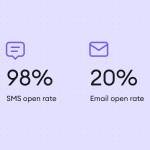
Email gives you more room for context. A campaign can combine an announcement, artwork, tour dates, product details, and a clear CTA in one message, while giving subscribers the option to return to it later.
A practical channel mix may look like this:
- social media introduces music and keeps the artist visible between campaigns;
- streaming platforms support listening and music discovery;
- SMS communicates selected time-sensitive updates;
- email maintains communication with subscribers and directs them toward releases, tickets, merch, or other offers.
These channels can support each other. For example, social content can attract new subscribers, while an email campaign can direct them toward a ticket page or a new release.
When email is not the right channel
Email doesn’t suit every message. Some updates need immediate visibility, while others work better in environments designed for conversation or music discovery.
A last-minute venue change may justify SMS or a social post alongside email. Short backstage clips usually fit social platforms better. A new listener who wants to hear a track should reach a streaming service with minimal friction.
Email also has limited value when you don’t have a permission-based subscriber base or send messages without a clear purpose. In those cases, you should first improve subscriber acquisition and define a campaign goal before increasing sending frequency.
If you are not a performing artist: Producers, teachers, session players, and labels
The same principles apply beyond performers, although the desired action changes.
A producer may use email to share recent work, availability, or project updates with an opted-in professional audience. Music teachers can communicate about lessons, courses, workshops, or educational resources. Session players may use campaigns to stay connected with collaborators and people interested in their services.
Labels can use email across several audience groups, including fans, industry contacts, and artist communities, provided each list has an appropriate consent basis and relevant content. For labels and music platforms that create campaigns inside their own software, the Stripo plugin can embed an email editor directly into that workflow.
The channel works best when its purpose reflects the relationship with the subscriber. For a touring artist, this may mean ticket sales. For a teacher, it may mean course enrollment. For a producer or session musician, the goal may be qualified inquiries or repeat work.
How to build your email list from zero
For marketers searching “how to email marketing for musicians,” the first practical step is to create a permission-based subscriber base. Give fans clear reasons to subscribe and make the signup process easy wherever they already interact with your music.
Set a realistic first target
A first target helps you focus on consistent acquisition without chasing a large subscriber count too early. For an emerging artist, the first 100 or 500 engaged subscribers can be more useful than a much larger list collected through weak incentives.
Choose a target that reflects your current audience size, release schedule, and promotional reach.
Use a simple four-step process to turn that target into an acquisition plan:
- Define a subscriber goal for the next 30 or 90 days.
- Choose the main channels that will direct people to your signup form.
- Track how many subscribers each channel brings in.
- Review which channels attract people who continue opening and clicking.
This gives you a baseline for improving acquisition while keeping attention on subscriber quality and list size.
Add lead magnets that actually convert music fans
A generic promise to “join the newsletter” gives fans little context about what they will receive. A stronger offer connects the subscription with something the audience already values.
The incentive should also fit the artist. An unreleased demo may work for one audience, while early ticket access may carry more value for another.
Useful lead magnets for musicians can include:
- early access to a new track or video;
- an unreleased demo, acoustic version, or remix;
- presale access for selected shows;
- a discount or early-access window for merch;
- exclusive behind-the-scenes content;
- downloadable artwork, sheet music, tabs, or sample packs where relevant.
Keep the exchange clear. Tell people what they receive after subscribing and what types of emails they can expect.
Work on signup forms, popups, and landing pages
Your website should give interested visitors several natural opportunities to subscribe. A single form hidden in the footer can miss people who never scroll that far.
Place forms where intent is already high, such as an artist homepage, tour page, merch page, or release page. Popups can also help when they appear at a reasonable moment and don’t obstruct the main content.
A signup form should collect only the information you need for the next stage of communication:
- keep the form short: Ask for an email address first and add more fields only when they serve a clear purpose;
- set expectations: Explain what subscribers will receive and how often;
- make consent clear: Include the appropriate consent language for the audience and region;
- use a specific CTA: Connect the button copy with the offer;
- check mobile usability: Make sure the form is easy to complete on a phone.
A dedicated landing page is useful when several channels point to the same signup offer. It keeps the message focused and gives you one URL for social profiles, ads, QR codes, and partner promotions.
Use link-in-bio, smart links, and social CTAs
Social profiles often provide one of the easiest paths from follower to subscriber. Your link-in-bio page can include an email signup alongside streaming, merch, and ticket links, while smart-link pages can connect subscription offers to a release campaign.
The CTA should explain the benefits clearly. “Get presale access” or “Hear the demo first” gives people more context than generic “Subscribe.”
Use social posts and stories to mention the offer when it connects naturally with what you are promoting. Repeating the same generic signup request in every post can make the message easier to ignore.
Collect emails at live shows
Shows give you access to people who have already invested time in the artist. This makes the venue a useful place to invite fans to the email program.
QR codes can direct attendees to a mobile-friendly signup page from posters, merch tables, seat cards, or venue screens. Staff can also mention the offer when it relates to merch, presales, or post-show content.
Keep on-site signup simple enough to complete within a few moments:
- use a short mobile form: Ask only for the information needed at signup;
- connect signup with a clear benefit: Give attendees a specific reason to subscribe;
- make QR codes easy to scan: Place them where attendees have enough time and space to use their phones;
- test the process before the event: Check the page, confirmation message, and incentive delivery;
- handle offline collection carefully: Use paper forms only when you have a clear process for consent and secure data entry.

A post-show incentive can extend the interaction. For example, subscribers could receive photos, a recording from the set, or early notice about the next date in that city.
Benefit from contests, cross-promotion, and paid ads
These tactics can accelerate subscriber acquisition, but the quality of the incentive matters. A prize with broad appeal may attract entrants who have little interest in the artist after the contest ends.
Choose offers closely tied to the music or fan experience. Signed merch, tickets, a private listening session, or limited-edition items can attract a more relevant audience than a generic high-value prize.
Cross-promotion can work with supporting artists, venues, festivals, creators, or music businesses that serve a similar audience. Each partner should use clear consent practices and avoid adding people to another party’s mailing list without permission.
Paid ads can direct prospects to a dedicated signup page when you have a strong offer and a clear audience. Track acquisition cost and subsequent engagement, so subscriber volume doesn’t hide poor list quality.
Your list-building checklist
Before increasing acquisition activity, make sure the basics support a permission-based and measurable email program.
Use this checklist to review your subscriber acquisition setup:
- define a realistic subscriber target for the next 30 or 90 days;
- create at least one signup offer connected with fan interest;
- add clear forms to high-intent pages on your website;
- create a mobile-friendly landing page for external traffic;
- add the signup option to relevant link-in-bio or smart-link pages;
- prepare QR codes for shows and in-person promotions;
- use clear consent language and explain what subscribers can expect;
- tag or otherwise identify acquisition channels where your email platform allows it;
- test every form, confirmation message, and delivery step;
- review subscriber quality alongside total list growth.

Choosing an email platform as a musician
An email platform should match the audience size, campaign frequency, automation needs, and services already used for tickets, merch, and analytics. Price matters, but a cheaper plan can become restrictive if it limits the features the artist relies on.
The five features that matter for artists
Focus on five capabilities when comparing platforms:
- subscriber management: Forms, consent records, tags, and segmentation;
- automation: Welcome emails, release sequences, presale reminders, and other triggered campaigns;
- segmentation: Options to group subscribers by location, engagement, purchases, or interests;
- integrations: Connections with eCommerce, ticketing, analytics, and other marketing services;
- reporting and deliverability: Campaign metrics, bounce data, unsubscribe management, and authentication support.
The priorities depend on the artist. Geographic segmentation may be more important during a tour, while eCommerce integrations become more useful for frequent merch campaigns.
Music-specific tools versus general email platforms
Music-specific services may combine email with artist websites, smart links, pre-saves, ticket promotions, or merch tools. Bandzoogle, for example, includes mailing list functionality in its website plans and offers different subscriber and daily email limits by plan.
General email platforms usually provide broader automation, segmentation, and campaign management features. They can suit artists who already use separate services for their website, tickets, and store.
Neither category fits every artist. Compare the functions that support your current marketing process and the data you expect to use as the audience grows.
List-size versus send-volume pricing
Some platforms charge mainly according to subscriber count. Others place more emphasis on how many emails you send.
This difference matters when campaign frequency changes throughout the year. A list may receive only a few campaigns during a quiet month and several messages around a release, presale, or tour announcement.
Estimate both the number of subscribers and the expected monthly sends before choosing a plan. Also check whether automations count toward the send allowance.
What it costs at 500, 5,000, and 50,000 subscribers
Pricing varies significantly because providers use different billing structures. Current rates from MailerLite, Kit, and Brevo offer examples of how costs can change as the subscriber base grows:
|
Subscribers |
MailerLite Power |
Kit |
Brevo |
Pricing model |
|
500 |
$25/month |
$0 |
From $9/month |
Subscriber- or send-volume-based |
|
5,000 |
$69/month |
$0 |
Depends on send volume |
Different limits apply by provider |
|
50,000 |
$389/month |
Paid tier required |
Depends on send volume |
Campaign frequency has a larger effect |
Use the table as a budgeting reference, and then compare each plan against your expected campaign frequency, automation needs, and growth rate. A lower monthly price may work well at one stage but become restrictive if send limits or feature access no longer support your campaign schedule.
Design layer versus sending layer
The tool used to create an email doesn’t need to be the same service that sends it. A design platform handles layout, reusable modules, responsive behavior, and visual consistency. The ESP manages subscribers, segmentation, automations, delivery, and campaign reporting.
For example, you can create campaigns with Stripo’s music email templates and export them to your selected ESP. Stripo supports direct integration with more than 90 ESPs and HTML exports for other services.
This setup gives you more choice when an ESP has suitable automation and audience features but limited email design capabilities.
Switching platforms without losing your list
A platform migration should preserve subscription status and useful subscriber data, including consent information where available.
Before moving regular campaigns to the new service, check these points:
- export active subscribers and retain records of unsubscribed and suppressed addresses;
- preserve relevant fields, tags, signup data, and segmentation information;
- map subscription statuses correctly in the new platform;
- reconnect forms, automations, and integrations;
- configure domain authentication and sender details;
- test signup, unsubscribe, and campaign flows before full migration.
Keep a secure export from the previous platform for reference. This can help resolve questions about consent, subscriber fields, or historical subscription status after migration.
What to send: The 10 email types every musician needs
A useful email program needs variety. Some campaigns support sales, while others keep subscribers informed between releases, shows, and merch launches.
Each email for musicians should have a clear purpose and primary action. The right mix depends on your schedule and audience. These 10 email types cover the main situations across a typical release and promotion cycle.
1. Welcome email
Send a welcome email soon after signup. It should confirm what the subscriber signed up for, deliver any promised incentive, and explain what kind of communication they can expect.
Keep the first message focused. A brief introduction and one clear next step give the subscriber an easy way to continue the relationship.
Example email
Subject: Welcome. Here’s your first listen.
Preheader: Thanks for joining the list. Your track is ready.
Hi [First name],
Thanks for signing up. Here’s the acoustic version of [Song title] I promised.
I’ll occasionally share new music, show announcements, early-access offers, and updates from [Artist name].
For now, here’s your first listen.
CTA: Listen to [Song title]
Thanks for being here,
[Artist name]
2. New release announcement
A release announcement gives subscribers a direct route to a new song, EP, album, or video.
Include enough context to make the message personal without distracting from the release. One primary CTA can direct recipients to a smart-link page or the main destination selected for the campaign.
Example email
Subject: [Song title] is out today.
Preheader: The new release from [Artist name] is ready to hear.
Hi [First name],
[Song title] is out today.
We started working on this track in [Month/Year], and I’m excited to finally share the finished version with you.
Use the link below to listen on your preferred platform.
CTA: Listen to [Song title]
Thanks for supporting the music,
[Artist name]
3. Tour and show announcement
Tour emails should make dates, locations, venues, and ticket access easy to scan. Geographic segmentation can help keep the campaign relevant by showing recipients the dates closest to them.
When tickets become available at a specific time, state the date and time clearly.
Example email
Subject: New shows in [Region].
Preheader: Tickets for [Artist name] go on sale [Date].
Hi [First name],
We’re heading to [Region] this [Month].
[City 1] | [Date 1] | [Venue 1]
[City 2] | [Date 2] | [Venue 2]
[City 3] | [Date 3] | [Venue 3]
Tickets go on sale [Day] at [Time].
CTA: View tickets
Hope to see you there,
[Artist name]
4. Pre-save, pre-order, and presale
These campaigns encourage action before a release, product launch, or general ticket sale. The email should explain what is available, when access begins, and what the subscriber needs to do.
Keep the main action clear, especially when access has a defined start or end time.
Example email
Subject: Your presale access starts [Day].
Preheader: Get early access to tickets for [Tour name].
Hi [First name],
Tickets for [Tour name] go on general sale on [General sale date], but subscribers can access the presale from [Presale date and time].
Use the button below when access opens. Ticket availability depends on the allocation for each venue.
CTA: Access the presale
See you on the road,
[Artist name]
5. Merch drop
A merch email should help subscribers quickly understand the offer. Clear product images, pricing, key details, and a direct store link can support the purchase journey.
If quantities or sales periods are limited, state the real restriction clearly.
Example email
Subject: New [Artist name] merch is here.
Preheader: Explore the new collection, available from [Date].
Hi [First name],
The new [Collection name] collection is now available.
It includes [Product 1], [Product 2], and [Product 3]. [Limited product] is available in a limited quantity of [Number].
See the full collection below.
CTA: Shop the collection
Thanks,
[Artist name]
6. Behind-the-scenes update
Behind-the-scenes emails can maintain communication during periods without a major sale or release.
Studio stories, tour preparation, artwork development, songwriting notes, and production updates can give subscribers additional context around the artist’s work.
Example email
Subject: A look behind [Project name].
Preheader: See what we’ve been working on this week.
Hi [First name],
We’ve spent the past few days working on [Project or song title], and I wanted to share a little of the process with you.
The update includes a few photos from [Studio/location], a short note about the project, and a preview of what comes next.
CTA: See the update
More soon,
[Artist name]
7. Milestone and thank-you
Milestones create a natural reason to acknowledge subscriber support. An album anniversary, completed tour, streaming milestone, or sold-out show can all provide useful context for the message.
Specific details can make the thank-you feel more personal and credible.
Example email
Subject: [Milestone]: Thank you!
Preheader: A quick note from [Artist name].
Hi [First name],
[Song/Album/Tour name] reached [Milestone] this week.
Thank you for listening, sharing the music, coming to shows, and following the project along the way.
I collected a few photos and memories from [Period or project] to mark the occasion.
CTA: See the highlights
With appreciation,
[Artist name]
8. Playlist and recommendation email
Recommendation emails give subscribers useful content during quieter promotional periods. The artist can share music, books, films, or other material that connects naturally with their work.
A clear theme helps give the email a specific purpose.
Example email
Subject: [Number] songs I’ve had on repeat.
Preheader: A playlist from [Artist name].
Hi [First name],
I’ve been listening to a lot of music while working on [Project name], so I put together a playlist of [Number] tracks that have stayed in rotation.
Some influenced the new project, while others are simply records I’ve enjoyed recently.
CTA: Open the playlist
Enjoy,
[Artist name]
9. Post-show follow-up
A post-show email can continue communication after an event. Location or purchase data can help marketers send the campaign to people connected with the relevant date. The message may include photos, recordings, remaining merch, or information about future shows when those elements relate to the event.
Example email
Subject: Thank you, [City].
Preheader: A few memories from [Venue].
Hi [First name],
Thank you for spending [Day/date] with us at [Venue].
We put together a short collection of photos from the show, including a few moments from backstage and the final part of the set.
You can see them below.
CTA: View the [City] photos
See you next time,
[Artist name]
10. Re-engagement email
A re-engagement campaign helps identify subscribers who still want to receive messages after an extended period of inactivity.
Give recipients a clear way to confirm their interest, update preferences where available, or unsubscribe. After the campaign, inactive addresses can be reviewed according to the sender’s list maintenance policy.
Example email
Subject: Still want updates from [Artist name]?
Preheader: Confirm whether you’d like to keep receiving emails.
Hi [First name],
It’s been a while since you interacted with an email from [Artist name], so we wanted to check whether you’d still like to receive updates.
Use the button below to keep receiving new music, show announcements, and occasional news.
You can also update your preferences or unsubscribe using the links in this email.
CTA: Keep me subscribed
Thanks,
[Artist name]
Email type cheat sheet
Use this overview to match each campaign with its main purpose and timing:
|
Email type |
Main purpose |
When to send |
Primary CTA |
|
Welcome email |
Introduce the email program |
After signup |
Explore music or content |
|
New release announcement |
Promote new music |
Release day or campaign window |
Listen or watch |
|
Tour and show announcement |
Promote upcoming dates |
After dates are confirmed |
Buy tickets |
|
Pre-save, pre-order, and presale |
Support early action |
Before release or sale |
Pre-save, pre-order, or access presale |
|
Merch drop |
Promote products |
At launch |
Shop merch |
|
Behind-the-scenes update |
Maintain engagement |
Between larger campaigns |
View or read more |
|
Milestone and thank-you |
Acknowledge audience support |
After a relevant milestone |
View the update |
|
Playlist and recommendation email |
Share useful content |
During quieter periods |
Open the playlist or recommendation |
|
Post-show follow-up |
Continue post-event communication |
After the show |
View content or merch |
|
Re-engagement email |
Identify continued interest |
After sustained inactivity |
Remain subscribed |
Writing and designing emails fans open
Strong copy gets attention, while clear design helps subscribers understand the message and find the next action. Both should support the campaign goal without adding unnecessary elements.
Subject lines: Four formulas that work for artists
The best email subject lines for musicians usually give subscribers a clear reason to open the message. Keep them specific, concise, and consistent with what appears inside the email.
Four simple formulas can cover most artist campaigns:
- Announcement + key detail: “[Song title] is out today”;
- Event + location: “[Artist name] is coming to [City]”;
- Benefit + timing: “Presale access starts [Day]”;
- Personal update + curiosity: “A note from the studio about [Project name].”
Avoid urgency that the campaign can’t support. If tickets remain available for weeks, a subject such as “Last chance” may create the wrong expectation.

Preheader text as the second subject line
The preheader adds context beside or below the subject line in many inboxes. Use that space to extend the message instead of repeating the same wording.
For example:
Subject: [Album title] is out today.
Preheader: Listen to the new record and read the story behind it.
Or:
Subject: New dates in [Region].
Preheader: Tickets go on sale [Day] at [Time].
Keep important information near the beginning because email clients can display different amounts of preheader text.
Anatomy of an artist email
Most artist campaigns don’t need a complicated structure. The best email for musicians usually has a clear purpose, relevant content, and one primary action that subscribers can find quickly.
A practical structure includes:
- Sender identity: Make the artist or project name easy to recognize.
- Headline: State the main message clearly.
- Supporting copy: Give subscribers enough context to understand the release, event, or offer.
- Visual: Use artwork or photography when it supports the message.
- Primary CTA: Direct recipients toward one main action.
- Secondary information: Place additional dates, links, credits, or details below the primary content.
- Footer: Include the required sender information, preferences, and unsubscribe link.
Keep the hierarchy consistent. If the goal is ticket sales, the ticket CTA should receive more visual attention than streaming, social, or merch links.

Mobile-first and dark mode
Many subscribers will read an email on a phone, so the layout should remain easy to scan on a narrow screen. Keep body copy at around 16 px on smaller devices to support readability, and give buttons enough space for touch interaction; WCAG 2.2 sets 24 x 24 CSS pixels as the minimum target size under its Level AA criterion.
Responsive styles can also adapt the layout according to screen width. Gmail, for example, supports CSS media queries for width, orientation, and resolution, so marketers can adjust selected elements for smaller screens where the client supports them.
Dark mode can change background, text, and brand colors depending on the email client. Test key campaigns across several environments, and check whether logos, artwork, buttons, and text remain legible. Transparent assets deserve extra attention because a dark logo designed for a light background may lose visibility when surrounding colors change.
Artwork, images, and file weight
Album covers, tour photography, merch images, and artist portraits can make a campaign recognizable, but image-heavy emails may load slowly and provide little context when images are blocked.
Use the dimensions the layout needs and compress image files before upload. Keep the total message size as small as practical, especially when a campaign contains several high-resolution assets.
Text that subscribers need to understand the offer should remain real email text where possible. Avoid placing essential dates, prices, or CTAs only inside an image.
Interactive elements: Polls, countdowns, and RSVPs
Interactive elements can give subscribers another way to participate in a campaign. A poll might ask which track they want to hear at a show, an RSVP can measure interest in an event, and a countdown can show how much time remains before a relevant deadline.
Email client support varies, so the campaign should still make sense if an interactive feature does not render as intended.
Choose an interaction according to the campaign goal:
- polls: Collect preferences or lightweight feedback;
- countdowns: Support real deadlines such as presale or launch times;
- RSVPs: Collect event interest or attendance;
- interactive menus or carousels: Present additional content when client support and testing justify the extra complexity.
Provide a clear fallback link when the action depends on functionality that some inboxes may not support.

Accessibility and alt text
Accessible emails help more subscribers understand and navigate the message. Start with semantic structure, readable contrast, descriptive links, and a logical content order.
Alt text should explain the purpose of an image when that information is useful without the visual. For example, Album cover for [Album title] by [Artist name] gives more context than image1.jpg.
Decorative images do not need detailed descriptions. For linked images, the alt text should also help subscribers understand where the link leads.
Buttons and text links should use descriptive wording, such as Buy tickets for [City] or Listen to [Song title], when context allows. Generic labels such as Click here provide less information.

Five templates you can copy
Starting with a ready-made template can save production time while still leaving room to adapt the copy, artwork, colors, and CTA to the artist’s campaign. The five examples below cover several common email scenarios.
1. New album
The new album template works as a starting point for an album, EP, or single announcement. Its structure gives the main release prominent visual space and leaves room for supporting information and additional promotional content.

2. Music festival
This template suits concert, festival, and other event campaigns. It includes space for key event information and uses interactive features, such as a carousel and image rollover, which can help present several artists, dates, or event details within one email.

3. Musical pause
The musical pause template provides a flexible promotional layout for a new release or upcoming concert. It can work well when the campaign needs a strong visual focus and a clear route to the primary offer.

4. Year together
You can adapt this template for an event reminder, tour recap, anniversary, or year-end update. Its layout provides room for key details alongside photos and other visual content, which makes it useful for campaigns that combine information with a broader artist story.

5. Reignite your music experience
We created this template for recently lapsed subscribers. Artists can adapt the same structure for a re-engagement campaign by highlighting recent music or updates and giving inactive subscribers a clear way to continue receiving emails.

These templates provide the starting structure; the final version should still reflect the artist’s visual identity, campaign goal, and primary CTA.
Segmenting, automating, and how often to send
For musicians, segmentation becomes especially useful when the same subscriber list needs to support very different campaigns. A fan in London may care about a tour date there, while a subscriber in Toronto may have no reason to receive the same announcement.
The setup doesn’t need to start with dozens of rules. A few useful segments and short sequences can cover many common artist campaigns.
Location: The segment that matters most
Location is especially useful for artists who promote shows and regional offers. A subscriber in Berlin usually doesn’t need the same tour information as someone in Los Angeles. Collect location data through signup forms, ticket purchases, event registrations, or subscriber preferences, where appropriate.
Location data can support campaigns such as:
- tour and show announcements for the relevant city or region;
- presale access for selected dates;
- post-show follow-ups;
- local merch pickup or event offers;
- reminders when another nearby date becomes available.
Avoid requesting highly detailed location information if a city, region, or country already provides enough context for the campaign.
Engagement, source, and buyer segments
Location is only one way to organize the list. Engagement and purchase behavior can help differentiate regular readers from recent buyers or inactive subscribers.
Useful segments can include:
- engaged subscribers: Recipients who recently clicked campaigns or interacted with key content;
- new subscribers: People who joined within a defined period;
- signup source: Subscribers acquired through a show, website form, social campaign, or another channel;
- ticket buyers: People with purchase data connected to specific dates or regions;
- merch buyers: Customers who purchased products and may respond to related offers;
- inactive subscribers: Recipients with little recent engagement who may need a re-engagement campaign.
Clicks and purchase activity can provide stronger behavioral signals than opens alone, since privacy features and image loading can affect open data.
Welcome series: Day 0, day 3, day 7
A short welcome series gives new subscribers several opportunities to learn about the artist without placing everything in the first email.
A simple three-email sequence can work like this:
- Day 0: Deliver the promised content, thank the subscriber, and explain what they can expect from future emails.
- Day 3: Introduce a key song, album, video, or part of the artist’s story, and provide one clear CTA.
- Day 7: Share another useful piece of content and introduce the next relevant action, such as following a release, viewing upcoming shows, or exploring merch.
The sequence can change according to how people join. Someone who subscribed for presale access may need different follow-up content from someone who downloaded an acoustic track.

Release-day sequence
A release campaign often works better as a short sequence than as one announcement.
One practical structure is:
- Before release: Announce the date and offer a pre-save or pre-order when relevant.
- Release day: Make the new music the primary focus and provide a direct link to listen.
- A few days later: Add context through a video, story, behind-the-scenes content, or another release-related asset.
- Later in the campaign: Follow up with subscribers who showed interest if there is another relevant action to promote.
Keep each email focused on one main action. Repeating the same message several times without adding new context can reduce its usefulness.
Post-show follow-up by city
A show creates a useful reason for location-based follow-up. Subscribers associated with the relevant city can receive a message tied directly to the event.
A post-show campaign may include photos, a thank-you note, remaining tour merch, or information about the next nearby date. Timing can vary, but sending while the event is still recent helps maintain context.
Purchase data, RSVP information, or city-based segmentation can make the campaign more precise. Avoid assuming that every subscriber in the region attended the show unless the data confirms it.
90-day re-engagement
A subscriber who has shown little engagement for an extended period may need a different message than those on the regular campaign list. At around the 90-day point, marketers can review recent clicks, purchases, and other available signals and create a re-engagement segment where appropriate.
A simple re-engagement process can include:
- sending an email asking whether the subscriber still wants updates;
- highlighting recent music, shows, or other content they may have missed;
- providing a clear way to remain subscribed or update preferences;
- reviewing subscribers who remain inactive according to the list-maintenance policy.
Ninety days is a practical checkpoint, not a universal rule. Artists with infrequent release schedules may need a longer evaluation period.
How often should you email your fans?
There is no single cadence that suits every artist. Frequency can change with the campaign calendar, audience expectations, and the amount of useful content available.
A practical starting point may look like this:
|
Situation |
Example frequency |
|
Quiet period |
1-2 emails per month |
|
Active release campaign |
1-2 emails per week |
|
Tour announcement or presale |
Several planned emails around key dates |
|
Major merch launch |
Launch email plus relevant follow-up |
|
Welcome automation |
3 emails across the first week |
These ranges provide a planning reference and can change with your campaign schedule. Monitor clicks, unsubscribes, conversions, and complaint rates as frequency changes.
A clear reason for each send is more useful than following a rigid calendar. If there is no relevant update, offer, or useful content, adding another campaign simply to maintain frequency may reduce subscriber interest.
Deliverability and the law
Good email design has limited value when campaigns reach spam folders or create compliance problems. Deliverability depends on authentication, list quality, sender behavior, and the signals recipients send to inbox providers.
Email regulations also vary by country and subscriber type. That’s why you need to confirm the rules that apply to the audiences you are about to contact.
Why your emails go to spam
Inbox providers evaluate several signals before deciding where to place a message. Google and Yahoo both place strong emphasis on authentication, complaint rates, permission, and sender reputation.
Several issues can increase the risk of spam placement:
- authentication records are missing or configured incorrectly;
- recipients frequently report campaigns as spam;
- the list contains invalid, stale, or low-quality addresses;
- sending volume increases sharply after a long quiet period;
- subscribers have difficulty leaving the mailing list;
- campaigns regularly reach people who show little interest in the messages.

SPF, DKIM, and DMARC explained without jargon
Three authentication mechanisms help receiving servers verify email sent from your domain:
- SPF lists the servers authorized to send email for the domain. Google provides a practical SPF setup guide for configuring the required DNS record;
- DKIM adds a digital signature to outgoing messages. Receiving servers compare that signature with a public key published for the domain. Google explains the process in its DKIM configuration guide;
- DMARC checks whether the domain shown in the From address aligns with SPF or DKIM and lets domain owners define a policy for authentication failures. Google recommends a gradual DMARC rollout after SPF and DKIM are working.
Most established ESPs provide instructions for adding these records through the domain’s DNS settings.
Google and Yahoo bulk sender requirements
Both providers introduced stricter sender standards in 2024. The current Google sender guidelines and Yahoo Sender Hub requirements cover authentication, spam complaints, DNS configuration, and unsubscribe functionality:
|
Requirement |
|
Yahoo |
|
Bulk sender definition |
Around 5,000+ messages/day to personal Gmail accounts |
Significant volume; no fixed threshold published |
|
Authentication |
SPF + DKIM for bulk senders |
SPF + DKIM for bulk senders |
|
DMARC |
Required for bulk senders |
Required for bulk senders |
|
Spam rate |
Keep below 0.3%; Google recommends below 0.1% |
Keep below 0.3% |
|
One-click unsubscribe |
Required for bulk marketing messages |
Required for bulk marketing messages |
|
DNS |
Valid forward and reverse DNS |
Valid forward and reverse DNS |
Google also requires a clearly visible unsubscribe link in the email body for bulk marketing messages. Yahoo asks bulk senders to honor unsubscribe requests within two days.
List hygiene and sender reputation
Sender reputation develops through factors such as complaint history, domain and IP reputation, authentication, and mailing behavior. Yahoo documents several of these signals in its sender reputation guidance, while Google Postmaster Tools reports spam rate, reputation, authentication, and delivery errors for Gmail traffic.
Because Google and Yahoo evaluate complaint rates and other sender signals, regular list maintenance helps reduce avoidable deliverability problems:
- suppress hard bounces and addresses that have unsubscribed;
- review subscribers with sustained inactivity;
- use a re-engagement campaign before removing inactive subscribers;
- monitor complaint and bounce trends after major campaigns;
- preserve suppression records when changing ESPs.
Opt-in, CAN-SPAM, and GDPR
Permission requirements depend on jurisdiction.
In the United States, the CAN-SPAM Act requirements cover accurate sender information and subject lines, a valid postal address, a clear opt-out mechanism, and processing opt-out requests within 10 business days.
For audiences in the EU, the GDPR governs the processing of personal data and gives individuals the right to object to processing for direct marketing. Email-specific rules also come from the ePrivacy Directive and national implementations. Article 13 generally provides for prior consent for direct marketing email to individuals, with a limited customer relationship exception under defined conditions.
Keep records of how and when subscribers joined, what they agreed to receive, and any later changes to their preferences.
Why buying a list is unrecoverable
Purchased lists can introduce several problems at the same time: unclear permission, outdated addresses, low engagement, complaints, and spam traps.
Mailchimp notes that purchased and other third-party lists carry a particularly high risk of spam traps and prohibits these lists under its platform rules. The European Commission also explains that marketers acquiring third-party contact data need evidence that the data was collected in line with GDPR and can lawfully support the intended advertising use.
Cleaning addresses later may reduce some technical problems. Permission still depends on how the contacts entered the database, so the safer approach is to grow a permission-based audience through the artist’s own signup channels.
Reviving a dead or dormant list
A long period without email can change both subscriber interest and sender reputation. Start by checking permission records, suppressions, and data age.
If your list has been inactive for a while, use these steps to restart communication carefully:
- Check consent records, unsubscribe status, and recent activity.
- Start with the subscribers who interacted most recently.
- Explain why they are receiving the email and provide a clear preference or unsubscribe option.
- Increase volume gradually while monitoring complaints, bounces, and clicks.
- Remove subscribers who remain inactive after the re-engagement campaign.
This approach gives the sender a way to evaluate the remaining audience before returning to a regular campaign schedule.
Measuring results and turning subscribers into revenue
Email performance becomes more useful when campaign reporting connects with commercial outcomes. Clicks show interest, while ticket purchases, merch orders, and membership revenue show what happened after that interest.
The metrics that matter, in order
For revenue-focused campaigns, review metrics in the order that reflects the campaign goal:
- Revenue and conversions: Track ticket purchases, merch orders, memberships, or another defined conversion.
- Conversion rate: Measure how many recipients or visitors completed the intended action.
- Revenue per subscriber: Compare attributed revenue with the size of the active subscriber base.
- Click rate: Use clicks to assess whether recipients moved from the email to the offer.
- Unsubscribe, complaint, and bounce rates: Monitor these signals for changes in list quality and campaign relevance.
A release announcement may prioritize clicks to streaming platforms, while a presale campaign should place ticket conversions higher in the reporting hierarchy.
Why open rate is no longer reliable
Open tracking usually depends on a small image loading when someone views an email. Privacy features can interfere with this process.
Apple’s Mail Privacy Protection privately downloads remote content in the background and prevents senders from seeing whether a recipient has opened a message. This can register activity that doesn’t represent a person reading the email.
Open rate can still provide directional context, especially when comparing similar campaigns over time. Clicks, conversions, and revenue provide stronger evidence of subscriber action.
Benchmarks for music and entertainment
Benchmarks help provide context, but the most useful comparison is usually the artist’s own historical performance across similar campaigns.
MailerLite’s 2026 email marketing benchmarks, based on more than 3.6 million campaigns from 181,000 approved accounts, include the following figures for music and entertainment:
|
Industry |
Open rate |
Click rate |
Click-to-open rate |
Unsubscribe rate |
|
Music and musicians |
45.93% |
1.70% |
5.42% |
0.23% |
|
Entertainment and events |
46.00% |
1.28% |
3.70% |
0.24% |
UTM tagging: Proving email sold the ticket
UTM parameters help connect a click from an email with activity recorded in Google Analytics. Google recommends using utm_source, utm_medium, and utm_campaign consistently, while utm_content can distinguish between different links or CTAs within the same campaign.
Your tour campaign can use the following structure:
- utm_source=artist_newsletter
- utm_medium=email
- utm_campaign=fall_tour
- utm_content=buy_tickets_button
If the ticketing or eCommerce setup preserves these parameters and records the purchase, analytics can connect the campaign with the resulting session and conversion. Keep naming consistent across campaigns, so reporting doesn’t split one campaign into several variations.
UTMs support attribution, but they only cover activity the tracking setup can record. Compare analytics data with ticketing or store transaction data when possible.
Revenue per subscriber
Revenue per subscriber shows how much attributed email revenue the active subscriber base generates over a selected period.
Revenue per subscriber = attributed email revenue ÷ active subscribers
For example, if email contributes $12,000 in tracked ticket and merch revenue during a quarter, and the list has 6,000 active subscribers, revenue per subscriber for that period is $2.
Keep the timeframe consistent when comparing results. Campaign frequency, ticket prices, merch launches, and tour schedules can change the figure substantially from one month to another.
For individual sends, revenue per recipient can provide a more precise campaign-level view.
Tickets, merch, and memberships: Where the money comes from
Different revenue streams require different conversion data.
Connect each campaign with the transaction it is designed to support:
|
Revenue stream |
Track |
Useful metric |
|
Tickets |
Purchases by campaign or city |
Revenue per recipient |
|
Merch |
Orders and order value |
Revenue and conversion rate |
|
Memberships |
New paid signups |
Membership conversion rate |
|
Presales |
Early ticket purchases |
Presale revenue |
|
Bundles |
Orders containing promoted items |
Revenue per campaign |
Ticket campaigns can also benefit from city-level reporting. Comparing sends with purchases for the promoted market helps show which locations respond strongly and where future segmentation may need adjustment.
The value-to-promotion ratio
A mailing calendar filled with sales requests can give subscribers fewer reasons to stay engaged between purchases. Content-led emails can maintain communication through studio updates, recommendations, behind-the-scenes material, and useful fan information.
As a practical starting point during quieter periods, a four-email month could contain three content- or relationship-focused messages and one direct promotion. Treat that 3:1 mix as a planning baseline and adjust it according to releases, tour dates, subscriber response, and commercial activity.
Release and tour periods naturally require more promotional emails. The key is to give every message a clear purpose and monitor whether clicks, unsubscribes, complaints, and revenue change as frequency increases.

Mistakes to avoid and your first 90 days
A practical email program gets easier to manage when the first few months follow a clear sequence. The plan below starts with setup and subscriber capture and then moves into regular campaigns, automation, segmentation, and measurement.
Nine mistakes musicians make with email
These nine mistakes can reduce campaign relevance, weaken deliverability, or make results harder to measure:
- Buying email lists: Purchased contacts can bring poor engagement, complaints, and unclear permission.
- Sending every campaign to the full list: Tour dates, presales, and local offers often work better with relevant segments.
- Relying heavily on open rate: Privacy features can distort opens, so clicks, conversions, and revenue provide stronger evidence of subscriber action.
- Using several competing CTAs: One clear primary action helps subscribers understand what the campaign asks them to do.
- Sending only during launches: Occasional useful communication between releases can help maintain subscriber interest.
- Ignoring authentication: SPF, DKIM, and DMARC support sender verification and deliverability.
- Skipping mobile and rendering tests: Layouts, images, buttons, and dark mode behavior can vary across email clients.
- Changing campaign tracking conventions: Inconsistent UTM names can make attribution harder to analyze.
- Keeping inactive subscribers indefinitely: Re-engagement and regular list maintenance can help protect list quality.
Days 1-30: Set up and capture
The first month should establish the basic system and give people clear ways to subscribe.
By the end of day 30, aim to complete these tasks:
- choose an email platform that fits the expected list size, sending volume, and automation needs;
- configure SPF, DKIM, and DMARC for the sending domain;
- create a signup form and dedicated landing page;
- define at least one clear subscription incentive;
- add signup opportunities to the website, social profiles, and relevant campaign pages;
- prepare a welcome email;
- establish UTM naming conventions for email campaigns;
- test signup, confirmation, unsubscribe, mobile, and rendering flows.
Send a first campaign during this period if the list already has permission-based subscribers. This gives you an initial set of engagement and delivery data before more complex automation begins.
Days 31-60: Send and automate
The second month focuses on consistency. Start using the formats that match the artist’s current calendar and automate the messages that follow predictable subscriber actions.
Focus on a small set of repeatable campaigns:
- send regular updates connected with releases, shows, merch, or relevant fan content;
- create the day 0, day 3, and day 7 welcome series;
- prepare a release or event sequence when a campaign date is approaching;
- add location data where the signup or purchase process provides it;
- monitor clicks, unsubscribes, complaints, bounces, and conversions;
- review subject lines, CTAs, and campaign layouts based on early results.
At this stage, consistency provides more useful information than adding many complex automations at the same time.
Days 61-90: Segment and measure
By the third month, the list should contain enough behavioral and acquisition data to support more focused decisions.
Use days 61-90 to improve targeting and connect email activity with business results:
- create useful segments based on location, engagement, acquisition channel, and purchase behavior;
- compare full-list sends with segmented campaigns where the campaign allows it;
- review subscribers approaching the selected inactivity threshold;
- connect ticket, merch, and membership conversions with campaign UTMs;
- calculate revenue per subscriber or revenue per recipient where attribution data is available;
- compare campaign performance with the benchmarks and internal results collected during the first two months;
- identify the email types, segments, and acquisition channels that contribute the strongest results;
- use those findings to plan the next 90 days.
After the first 90 days, the goal is to have a repeatable process for subscriber acquisition, campaign production, segmentation, deliverability checks, and revenue measurement.
Wrapping up
Email gives you a direct, permission-based way to stay connected with people who have already shown interest in your work. A strong program starts with a relevant subscriber base, clear campaign goals, reliable delivery, and measurement that connects email activity with ticket, merch, and membership revenue.
There is no need to introduce every tactic at once. Start with signup points, a welcome sequence, and a consistent sending process, and then add segmentation, automation, and revenue tracking as more data becomes available. The 90-day plan in this guide gives you a practical sequence for putting those elements into practice and reviewing the results.
With those foundations in place, email can support releases, tours, and fan relationships while giving marketers a clearer view of which campaigns contribute to measurable outcomes.
FAQ
1. How do I start an email list as a musician with no fans?
Start with a simple signup form and one clear reason to subscribe, such as early access, exclusive content, or a useful download. Add the form to the website, social profiles, smart links, and any in-person touchpoints that already attract interested listeners.
2. How often should musicians email their fans?
During quieter periods, 1-2 emails per month can provide a practical starting point. Release campaigns may support 1-2 emails per week, while tours and presales often require several messages around specific dates. Frequency should follow the campaign calendar and subscriber response.
3. What is a good open rate for a musician's email list?
MailerLite’s current benchmark for music and musicians is around 46%, but there is no universal “good” open rate. Open tracking is affected by privacy features, so use your own historical performance as the primary benchmark, and compare open rates with clicks, conversions, and revenue.
4. What is the best email platform for musicians?
For most independent musicians, a platform such as MailerLite can be a practical starting choice for subscriber management, automation, and sending. If you want more control over email design, you can use Stripo as the design layer, and export finished campaigns to your selected ESP. Stripo currently supports direct export to 90+ email service providers.
5. Can I email fans for free?
Yes, you can email fans for free if your list size and sending volume fit within a provider’s free plan. Free tiers usually come with limits on subscribers, monthly sends, automation, or advanced features, so check those restrictions before choosing a platform.
6. What should I put in my first email to fans?
A welcome email should confirm the signup, deliver any promised incentive, and explain what subscribers can expect. Keep the message focused and give the recipient one clear next action, such as listening to a track or viewing current content.
7. Is it legal to email people who signed up at my show?
It can be, provided the signup process collected the appropriate consent, and the campaign follows the rules that apply to the recipient’s jurisdiction. Keep records of how subscribers joined, what they agreed to receive, and any later preference changes.
8. Why do my emails go to spam?
Spam placement can result from authentication problems, high complaint rates, stale addresses, sharp changes in send volume, or poor engagement. SPF, DKIM, DMARC, regular list maintenance, and clear unsubscribe processes can help reduce avoidable delivery problems.
9. How do I email only fans in the city I am playing?
Create a location-based segment using data collected through signup forms, ticket purchases, event registrations, or subscriber preferences. Then send the campaign to the relevant city or region while excluding recipients who do not need that information.
10. I have not emailed my list in two years. What now?
Review consent records, unsubscribes, and recent activity before restarting regular campaigns. Begin with the subscribers who interacted most recently, increase volume gradually, monitor complaints and bounces, and use a re-engagement campaign to confirm continued interest.
11. How do I know if email actually sold any tickets?
Use consistent UTM parameters on ticket links and connect campaign traffic with analytics and transaction data where the setup allows it. Track ticket purchases, conversion rate, attributed revenue, and revenue per subscriber or recipient alongside click data.
12. Do I need a designer to make emails look good?
A dedicated designer can help with complex campaigns, but many artist emails can use a clear structure, responsive layouts, reusable templates, and consistent brand assets. Focus on readable text, strong hierarchy, useful visuals, and one primary CTA.
0 comments