Dynamic content in emails: 8 types, setup guide, and QA checklist


Dynamic email content sounds great in theory, but putting it into practice raises plenty of questions. Which personalization method should you use? How do display conditions work? And what happens when subscriber data is missing?
In this guide, we’ll cover 8 types of dynamic email content, explain how to set each type up, and make sure everything works before sending.
Key takeaways
- Dynamic content allows marketers to display different text, images, offers, and recommendations based on subscriber data, predefined conditions, or real-time information. Unlike static emails, dynamic emails can show different content to different recipients within the same campaign.
- There are several ways to make emails dynamic, from personalized greetings and conditional offers to product recommendations, RSS feeds, countdown timers, AMP-powered content, and gamification. The right choice depends on your campaign goals and available data.
- Successful dynamic content starts with reliable subscriber information and clear display conditions. Merge tags, conditional logic, and fallbacks help ensure recipients see appropriate content, even when some information is missing.
- There is no universal limit on dynamic blocks, but starting with 1 to 3 dynamic areas is a practical approach. Adding more variations increases testing complexity, maintenance effort, and the risk of errors. That’s why each block should serve a clear purpose.
- Dynamic content requires testing beyond visual previews. Check conditions, merge tags, fallbacks, links, and rendering across email clients, and verify how your ESP processes variations using representative subscriber records.
What is dynamic content in emails?
In emails, dynamic content refers to any element that changes based on recipient data, behavior, preferences, predefined rules, or real-time context. Instead of sending exactly the same version to all recipients, marketers use a single email template to display different content for different subscribers.
For example, an online marketplace may show running shoes to subscribers who have browsed the running category and skincare products to subscribers looking for beauty products. The email structure can remain the same while the product block changes for each recipient.
Today, relevant email content is the most effective tool for email marketers to boost engagement and improve campaign performance.
Here’s why it matters:
- according to Optimove’s 2026 and 2025 reports, 41% of consumers say relevant offers are their main reason to open marketing emails, while 67% are more likely to purchase when product recommendations reflect their past behavior;
- in Twilio’s 2025 global survey of 7,640 consumers and 637 business leaders across 18 countries, 88% of consumers said they were more likely to buy when brands personalized their engagement in real time. However, only 44% of surveyed brands reported delivering real-time personalization, highlighting a gap between expectations and implementation.
What counts as dynamic content
Usually, an email includes at least one part that changes based on data, rules, or an external source rather than remaining identical for every recipient.
Common examples of such parts:
- a subscriber’s name, company name, or other details inserted with merge tags;
- different text, images, or offers shown according to conditions;
- product recommendations based on subscriber data or behavior;
- content pulled from external data sources;
- real-time content that updates when the recipient opens the email.
Data used for changes might come from subscriber profiles, preferences, purchase or browsing behavior, external feeds, or other sources available to the email platform.
Dynamic vs. static emails
A static email is created once and delivered in essentially the same form to every recipient. Its subject line, copy, images, offers, and links remain fixed unless the campaign is manually changed before sending.
A dynamic email uses rules or data to change selected content for different subscribers. The email may still use a single shared template, but certain blocks, values, images, or CTAs are assembled differently.
|
Static email |
Dynamic email |
|
The same version is sent to every recipient |
Different versions can be shown to different recipients |
|
Content is fixed before sending |
Content is selected using data or rules |
|
Easier to create and test |
Requires data validation and variant testing |
|
Lower risk of broken personalization |
Greater opportunity for relevance |
|
Useful for broad announcements |
Useful for segmented or behavior-based messages |
|
Usually has fewer technical dependencies |
May depend on fields, feeds, APIs, or integrations |
For example, a static retail email might show the same summer collection to the entire list. A dynamic version of this email might show fitness-related products to one subscriber, swimwear to another, and a general bestseller block to recipients whose interests are unknown.
Dynamic content vs. email personalization
These terms overlap, but they are not identical. So, how can the difference be defined?
|
Email personalization |
Dynamic content |
|
Broader marketing strategy |
Specific email technique |
|
Can change the audience, timing, subject line, or message |
Changes content blocks, images, offers, CTAs, or products |
|
May use segmentation or send-time optimization |
Uses data, conditions, variants, and fallbacks |
|
Example: Sending an email to French customers |
Example: Showing French shipping information inside the email |
In short, personalization describes the strategy, while dynamic content describes how selected email content changes to support that strategy.
What you need before you build anything
Dynamic content relies on data. The information must be accurate, available, and connected to your email platform. Before creating content variants, define what data you have, how you collect it, which rules you use, and what recipients should see when the data is missing.
4 data types you can personalize on
Most dynamic email content can be based on several types of data:
|
Type |
What it includes |
Example use |
|
Profile data |
Name, location, language, company, job role, or subscription plan |
Showing a subscriber’s name or regional information |
|
Preference data |
Product interests, content topics, email frequency, or selected categories |
Sending content about the topics the subscriber has chosen |
|
Behavioral data |
Pages viewed, links clicked, products browsed, or email interactions |
Showing a follow-up after a subscriber views a product |
|
Transactional data |
Purchases, order value, subscription status, or renewal date |
Recommending complementary products or displaying a renewal offer |
You are free to combine these data types. For example, an eСommerce campaign could use purchase history together with product interests to decide which recommendation block to display.
How to collect subscriber data
You can collect data through direct interactions, connected platforms, and observed behavior. Each method should have a clear purpose and a transparent explanation of how you'll use the data.
Keep in mind that asking for too much information at the beginning makes your setup more complicated and adds more fields that must be maintained.
|
Collection method |
How it works |
Best for |
|
Signup forms |
Asking for basic information when someone subscribes |
Name, email address, language, location, and broad interests |
|
Preference centers |
Letting subscribers update their interests and email preferences |
Topics, product categories, frequency, and communication preferences |
|
Surveys and quizzes |
Asking subscribers to provide information in exchange for useful content or recommendations |
Needs, preferences, product interests, and feedback |
|
Website and app tracking |
Recording pages viewed, searches, clicks, and other permitted actions |
Behavioral recommendations and triggered campaigns |
|
eCommerce and CRM integrations |
Syncing customer and account data with the ESP |
Customer status, plan type, loyalty tier, and lifecycle stage |
|
Purchase and subscription records |
Using transaction and account history |
Recommendations, replenishment reminders, and renewal campaigns |
|
Email engagement tracking |
Using clicks, replies, downloads, and other interactions |
Re-engagement and interest-based content |
|
Customer support and sales systems |
Connecting support requests, demos, and sales activity |
Follow-ups based on customer needs or sales stage |
Segments, groups, and custom fields
3 parameters serve different purposes, and ESPs refer to them by different names:
- Segments build targeted audiences and use conditions based on subscriber data, groups, tags, or behavior to identify recipients who meet specific criteria. For example, you could create a segment of customers in France who have made a purchase within the previous 90 days and show them relevant offers.
- Groups (and tags) organize subscribers and typically reflect subscriber-selected interests or preferences, while tags are labels that can be applied to track actions, statuses, or other attributes.
- Custom fields store individual subscriber details such as first name, country, subscription plan, or loyalty status. You can use these values in merge tags and display conditions.
8 types of dynamic content in emails
As you may have already noticed, dynamic content can be as simple as inserting a subscriber’s name or as advanced as pulling fresh data into an email after it has been sent. Here are 8 common types marketers can use.
1. Personalization by name in email copy and subject line
One of the simplest forms of dynamic content is adding subscriber data, such as a first name, to the email copy.

You can also use the recipient’s name in the subject line to make the email feel more personal.

Personalized greetings work well in welcome emails, newsletters, transactional messages, and wherever else they fit naturally. However, we recommend skipping the name in promos unless the offer is personalized as well, because a name alone rarely changes subscriber behavior.
How to add a name in Stripo:
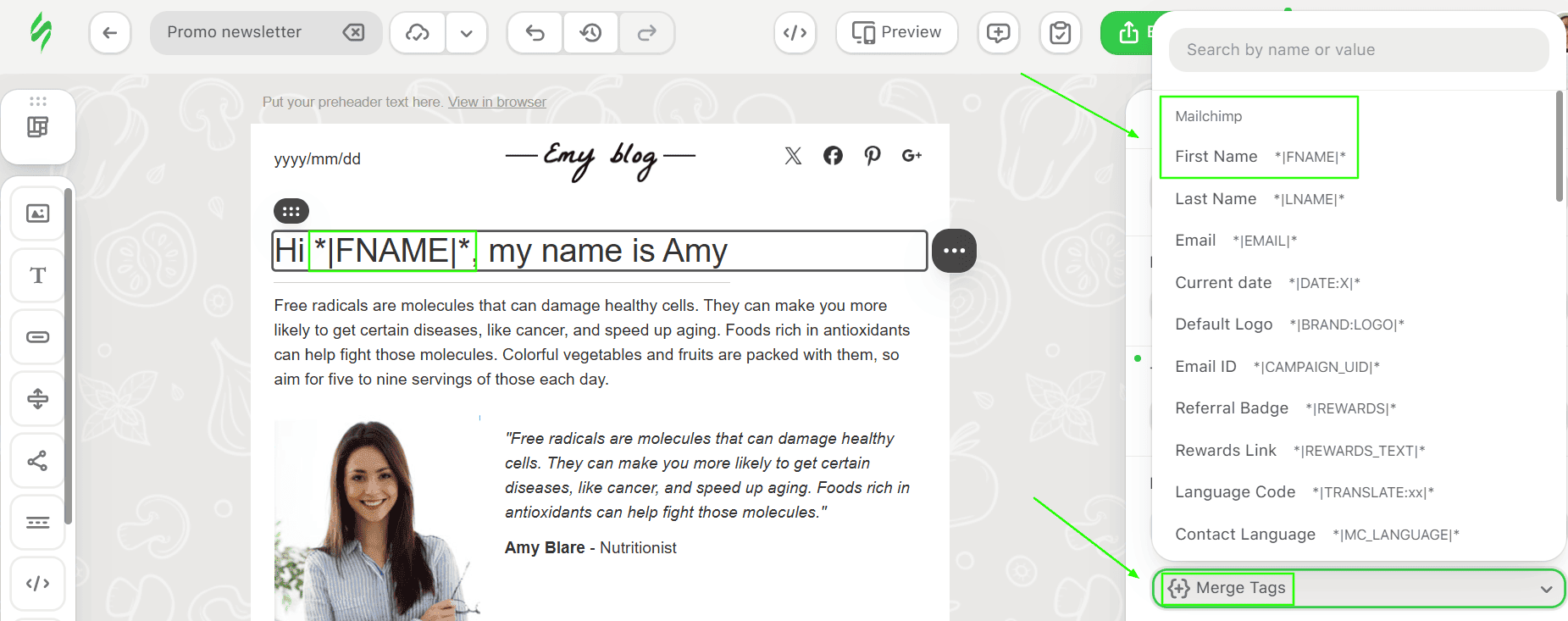
- For email copy, place the cursor where you want the personalized value, click Merge Tags in the text formatting panel, and select the tag you need.
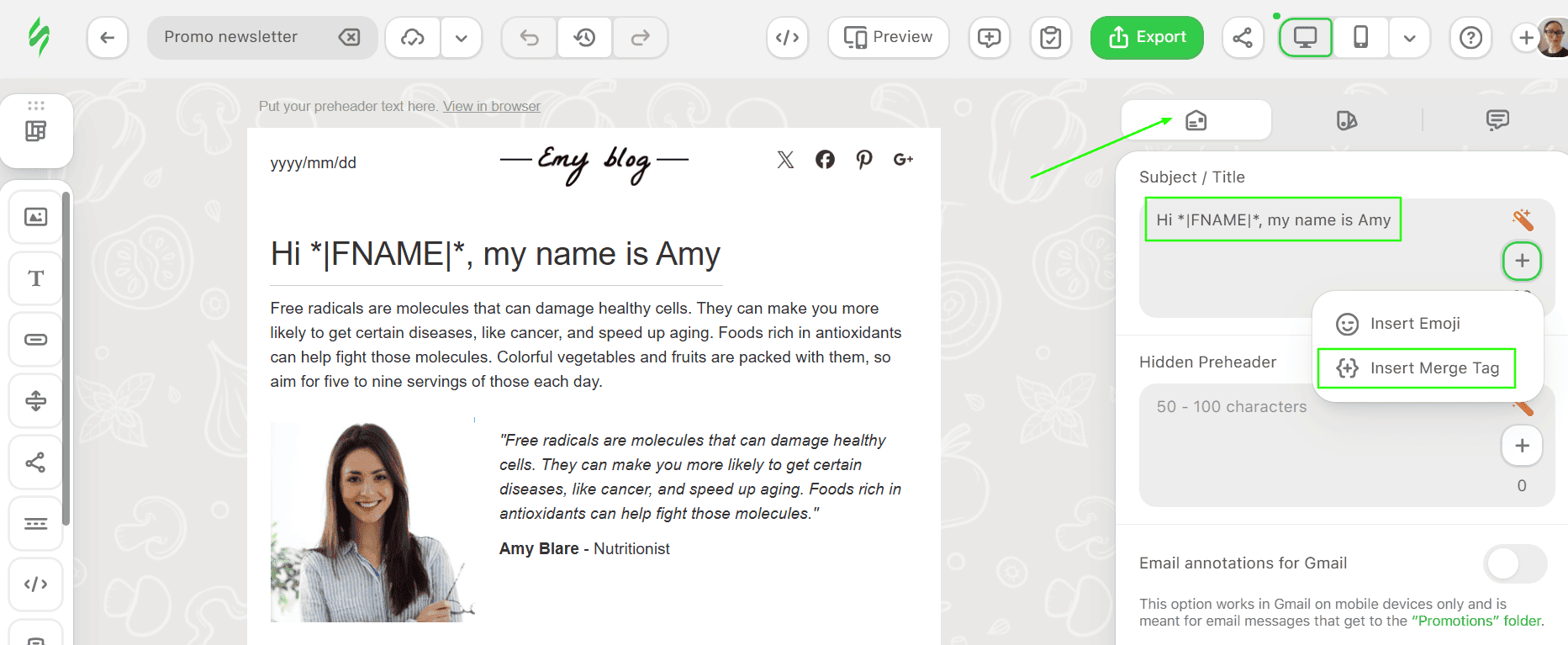
- For a personalized subject line, paste the copied merge tag in the “Subject/Title” field in the email settings and enter the rest of your subject line text.


Please be advised that different email services use their own tags for displaying personalized content based on their requirements. The Stripo editor simply allows adding merge tags and special links to the body of an email template. When the email template is sent to the recipient, your email service should replace these merge tags with the recipient’s data.
You can turn on necessary tags by going to “My Project” settings → Workspace → Personalization.

At the moment, Stripo supports custom tags from more than 20 ESPs, including Mailchimp, ESputnik, Klaviyo, Braze, HubSpot, and others.
2. Personalized offers via display conditions
Display conditions let you show different content based on subscriber data. You can use this approach whenever the offer itself should differ: by country, gender, plan, loyalty tier, or season. This is usually the highest-value type for most senders.

How to do this in Stripo:
Select the container, structure, or stripe you want to personalize and enable Display Conditions in its settings. Check your ESP's documentation for the correct expressions and field names, then add them to the “Code before module” and “Code after module” fields in Stripo. The ESP processes the condition when the campaign is sent. All other parts of your email will be displayed to all segments, no matter the condition.

3. Personalized imagery
Personalized imagery creates a sense of closeness and trust. However, it rarely drives clicks directly. You can use personalized images in hero banners, coupons, or badges where seeing a name adds a memorable touch.

To create an image with the subscriber’s name, use the NiftyImages personalization service.
Just pick the image that best fits the goal of your email campaign, and set a fallback in case your recipient has not shared their name.

If you like what you see, save the image and give it a title. Then, copy the embed code.

Next, open your email template in Stripo, add an HTML block, and replace the default code with the embed code to display your image. Remember to replace the placeholder in the image URL with your ESP’s merge tag, as shown above.

4. Countdown timers
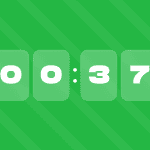
Countdown timers are widely used in promotional emails. They create a sense of urgency by showing how much time is left before a sale ends. In event reminders, countdown timers build anticipation by counting down to the event’s start.
How to add a countdown timer in Stripo:
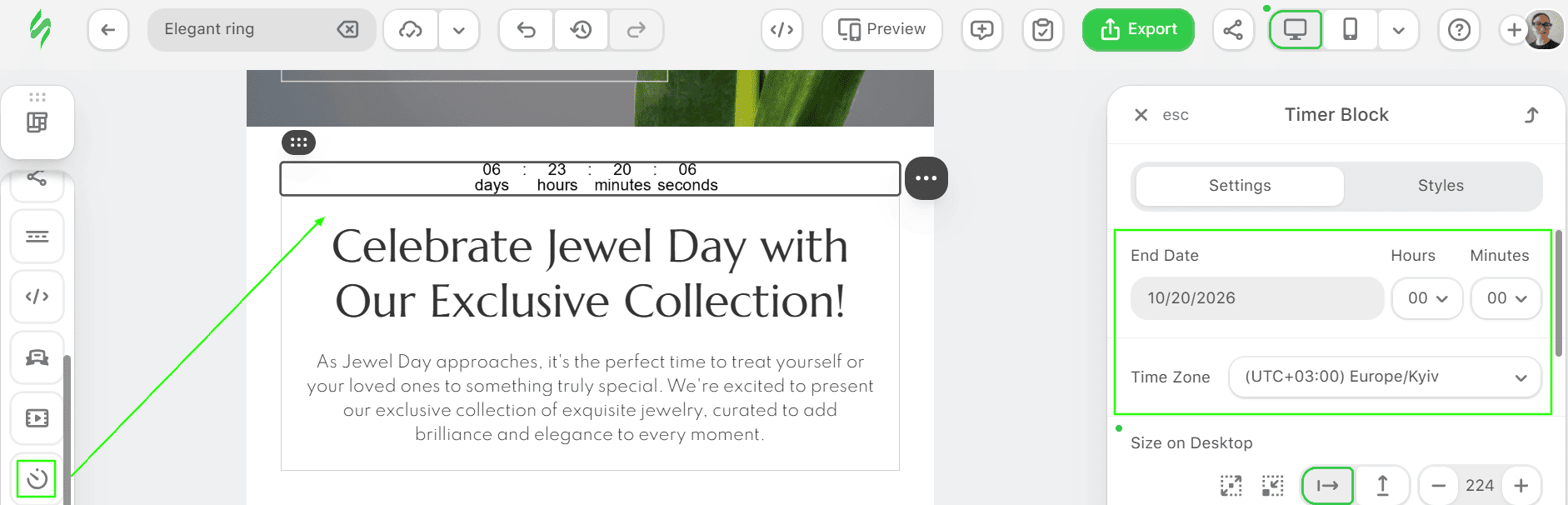
- Drag the basic Timer block into your email template, specify the day when your offer expires, and set the appropriate time zone. You can also work on the countdown timer design by setting colors, fonts, etc.
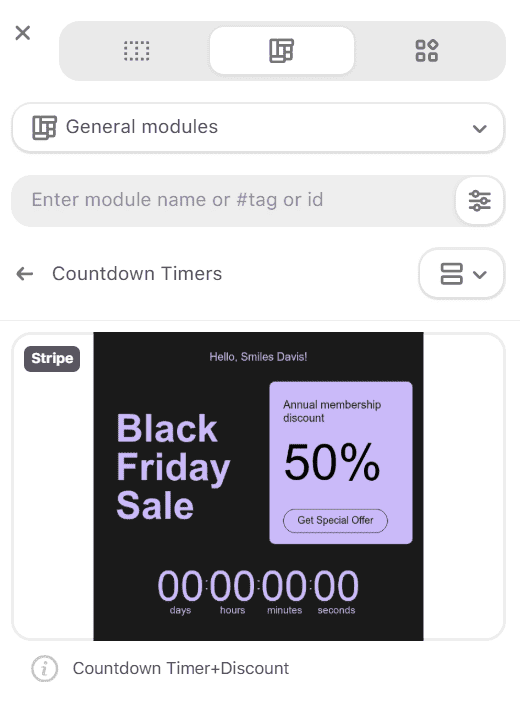
- Additionally, there are many countdown timers in the General modules section.


You can also insert a static image or an animated GIF that your customers will see in their inboxes once the sale is over. That way, they won’t have to guess why the offer is no longer available.

5. RSS feeds
RSS allows updated content to be delivered to recipients. In email marketing, we use it in digest newsletters and welcome series.
Instead of manually adding new articles to every campaign, you can reuse an email template and automatically populate it with the latest content from your website's RSS feed.
Stripo supports public RSS 2.0 and Atom 1.0 feeds. No authorization is needed – just the URL.

In standard RSS campaigns, your ESP typically retrieves the latest content before sending, so delivered emails don’t update automatically. For real-time updates after delivery, you can use AMP-powered content in supported email clients. Stripo's Data Sources feature supports building such content.
6. Product blocks and recommendation feeds
Dynamic product blocks display relevant products based on subscriber preferences, browsing behavior, or purchase history. For example, an online store can recommend recently viewed items, complementary products, or bestsellers.
How to add dynamic product blocks to emails:
- Connect your product catalog to your ESP or recommendation platform.
- Choose a recommendation strategy, such as recently viewed products, related items, or bestsellers.
- Design product cards in Stripo with images, prices, and CTA buttons.
- Configure recommendations in your ESP, adapting the layout if necessary.
- Add fallback products and test the results for different subscribers.
Important note: Stripo lets you design product blocks and display real-time information from external sources using its Data Sources feature and AMP. Personalized product selection based on customer behavior typically happens in your ESP or recommendation platform.
7. Real-time content in AMP emails
AMP emails let you display up-to-date content when recipients open or interact with an email, rather than relying only on information available at send time.
For example, you can show the latest blog posts, current product availability, or updated offers without sending a new email.
In Stripo, you can also use the Data Sources feature to connect to external data and build AMP-powered content that dynamically retrieves information.

Important note: Real-time updates require a supported AMP implementation and an email client that supports AMP. Always include an HTML fallback for recipients whose email clients don't support it.
8. Gamification: Quizzes, crosswords, and chatbots
Gamification turns emails into interactive experiences that encourage subscribers to be active participants rather than passive readers. Quizzes, crosswords, puzzles, and chatbot-style interactions can increase engagement, help collect customer preferences, and make campaigns more memorable.
For example, a beauty brand can engage customers with a Valentine’s Day compatibility calculator that reveals how well 2 people match and offers a discount.
Stripo offers interactive widgets and an interactive module generator to help marketers create engaging email experiences without coding everything from scratch.

Important note: Gamification becomes dynamic when content or results change based on subscriber data or interactions. Some interactive elements require AMP support, so an HTML fallback or web-based alternative is important for unsupported email clients.

How display conditions actually work
Display conditions tell an email platform which content variant to show to each recipient. Instead of creating separate emails for different audiences, you can build several content variations in a single template and let your ESP decide which one to display.
The logic behind a condition: Data, rule, variant, and rendering
Usually, every condition includes 4 parts:
- Data: A value stored on the contact (a country, a plan, a tag, a purchase count, or a signup date). If the value isn’t in the record at send time, the condition has nothing to test.
- Rule: A test on that value, such as “country equals FR” or “orders greater than 3”. The result is true or false for each recipient.
- Variant: The block that appears when the rule is true. You build it in the template like any other stripe or structure.
- Rendering: At send time, the ESP evaluates the conditions for each recipient and generates an email containing the appropriate content. In most cases, the recipient receives the rendered HTML rather than the original conditional rules.
Stripo lets you configure display conditions, but your ESP evaluates them using subscriber data when sending the email.
This has 2 important implications:
- conditions depend on your ESP’s data: Make sure the required fields exist and contain the expected values in your subscriber records. Stripo cannot verify this for individual recipients;
- the Stripo previews show the design, not the actual recipient targeting: You can check how individual content variants look, but you need to test them in your ESP to confirm which subscribers receive each version.
Anatomy of a display condition
A display condition typically consists of an opening expression, the content to be displayed, and a closing expression.
For example, the logic might look like this:
IF customer_status = "VIP"
SHOW "Get early access to our sale"
ELSE
SHOW "Explore our latest offers"
END IF
Please note that this is illustrative pseudocode, not code to be pasted into an ESP.
Common operators and what they do
Operators define how subscriber data is evaluated. The exact syntax depends on your ESP, but the most common comparisons include:
|
Operator |
What it checks |
Example |
|
Equals (==, =) |
A value matches a specified value |
Country equals France |
|
Not equals (!=) |
A value differs from a specified value |
Status is inactive |
|
Greater than (>) |
A value exceeds a threshold |
Orders greater than 3 |
|
Less than (<) |
A value is below a threshold |
Loyalty points less than 100 |
|
AND |
All conditions must be true |
Country France AND plan Pro |
|
OR |
At least one condition must be true |
Interested in “travel” OR “fashion” |
|
Contains |
A field includes a particular value |
Interests contain “running” |
|
Does not contain |
A field does not include a particular value |
Interests do not contain “travel” |
|
Is set/exists |
A field exists or has a value, depending on the ESP |
First name is set |
|
Is not set/does not exist |
A field is missing or has no value, depending on the ESP |
Phone number is not set |
|
Matches any |
A value matches at least one option from a list |
Country matches Germany, France, or Italy |
|
Else/else if |
The branch used when earlier rules fail |
Default banner |
You can combine operators to create more specific content variations, but not all ESPs support the same operators or handle subscriber data in the same way. For example, a field that exists but is empty may be treated differently from a missing field.
Before setting up display conditions, check your ESP’s documentation and keep the following points in mind to avoid incorrect matches and broken personalization:
- Check how missing and empty values are handled: Some conditions distinguish between a field that doesn’t exist and one that exists but is empty. Others treat both as unset. Test both scenarios to make sure recipients don’t see incomplete greetings or empty content blocks.
- Use “is set” to protect personalization: Check whether a first-name field contains a usable value before displaying a personalized greeting. Otherwise, show a generic greeting. Similarly, use “is not set” to display prompts such as “Add your phone number to get delivery alerts” when this information is missing.
- Use “matches any” instead of multiple OR conditions when supported: For example, checking whether a country matches DE, FR, or IT is easier to maintain than 3 separate equality checks. If your ESP doesn't support this operator, use OR conditions or an equivalent list comparison.
- Keep data formats consistent: Values such as “Germany,” “DE,” and “Deutschland” won’t match under exact-value comparisons. Standardize your subscriber data and check whether your ESP's matching rules are case-sensitive.
Merge tags and condition syntax by ESP
Merge tags let you insert subscriber-specific information into emails, but their syntax varies by ESP.
Merge tag syntax comparison
Each platform has its own delimiters, field names, and way of handling missing values. That's why syntax copied from one platform may not work in another.
|
ESP |
Merge tag example |
Typical use |
|
*|FNAME|* |
Subscriber’s first name |
|
|
{{ contact.firstname }} |
Contact property |
|
|
{{ first_name }} |
Profile property |
|
|
{{customer.first_name}} |
Customer attribute |
|
|
%%FirstName%% |
Subscriber attribute |
|
|
[firstname] |
Subscriber’s first name |
|
|
{{${first_name}}} |
Profile attribute |
Before adding merge tags to your template, keep these points in mind:
- field names depend on your ESP setup: Platforms provide standard fields, but custom fields have their own identifiers. Always check that your merge tags reference the correct subscriber attributes;
- custom fields may require different syntax: For example, Klaviyo supports the lookup filter for accessing profile properties, whereas Braze uses custom_attribute tags for custom attributes. Check your ESP’s documentation for the correct syntax;
- in Stripo, use the appropriate personalization configuration: Select the configuration for your ESP in the Merge Tags settings. If a required tag isn’t available, you can add a custom one using the syntax supported by your ESP.
Condition syntax comparison
Conditional syntax also varies by ESP. However, many platforms use a similar structure:
- an opening condition;
- the content to display;
- an optional alternative;
- a closing statement.
You can see illustrative examples below. Some platforms use code-based conditions, whereas others provide visual tools for configuring conditional content. Field names, values, and supported operators must match your ESP setup.
|
ESP |
Conditional example |
What it does |
|
Mailchimp |
*|IF:FNAME|*Hi *|FNAME|**|ELSE:|*Hi there*|END:IF|* |
Shows a personalized greeting when the first name exists |
|
HubSpot |
{% if contact.firstname %}Hi {{ contact.firstname }}{% else %}Hi there{% endif %} |
Displays content based on a contact property |
|
Klaviyo |
{% if first_name %}Hi {{ first_name }}{% else %}Hi there{% endif %} |
Shows a fallback when the profile field is empty |
|
Customer.io |
{% if customer.first_name %}Hi {{ customer.first_name }}{% else %}Hi there{% endif %} |
Uses Liquid logic to personalize a greeting |
|
Salesforce Marketing Cloud |
%%[IF @tier == "Gold" THEN]%%VIP offer%%[ELSE]%%Standard offer%%[ENDIF]%% |
Uses AMPscript to apply conditional logic |
|
Campaign Monitor |
[if:CustomField=x]VIP offer[else]Standard offer[endif] |
Shows a variant based on a custom-field value |
|
Braze |
{% if {{custom_attribute.${loyalty_tier}}} == 'Gold' %}VIP offer{% else %}Standard offer{% endif %} |
Displays content based on a profile attribute |
ESPs handle conditional content differently. Klaviyo, Customer.io, and Braze use Liquid-based logic, whereas HubSpot relies on HubL in coded templates. Salesforce Marketing Cloud uses AMPscript, Mailchimp offers conditional merge tags, and Campaign Monitor provides its own conditional content tools.
Why is syntax not portable between ESPs?
Even when ESPs support similar personalization features, their syntax isn’t always interchangeable.
The main differences include:
- delimiters: {{ }}, *| |*, %% %%, or [ ];
- field names and data objects: How subscriber attributes are stored and referenced;
- supported operators and functions: Which conditions and filters can be used;
- fallback methods: How default values are displayed when data is unavailable;
- missing data handling: How empty, missing, or invalid values are processed;
- preview and testing: How each platform evaluates and displays personalized content.
For example, {{ first_name }} may work in Klaviyo but appear as plain text in Mailchimp, which uses *|FNAME|*. Even ESPs that support Liquid-based logic can use different objects, filters, and event data.
Before exporting an email from Stripo, make sure your merge tags and display conditions match your destination ESP’s syntax, then test the personalized content in the sending platform using different subscriber profiles.
Fallbacks: What recipients see when the data is missing
A fallback is default content displayed when subscriber data is unavailable or doesn't meet a predefined condition. It helps prevent empty spaces, incomplete greetings, and irrelevant content.
Fallbacks can help you handle 4 situations:
- Missing data: A subscriber hasn’t provided a value, such as their first name.
- Invalid data: A field contains an unusable value, such as “N/A” instead of a name.
- Outdated data: Information is no longer accurate, such as an old location or subscription plan.
- No matching condition: A subscriber doesn’t qualify for any of the personalized variants, such as when their country isn’t included in your display conditions.
Keep in mind that missing values can often be handled with default merge tag values or conditional logic. Invalid and outdated data usually require additional validation, data updates, or specific rules before a fallback can be displayed.
Why every dynamic block needs a fallback
Subscriber data isn’t always complete or accurate. Some contacts sign up with only an email address, whereas others are imported from older systems with missing or inconsistent information. Data synchronization can also fail, leaving dynamic content without the information it needs.
Without a proper fallback, recipients may see:
- incomplete greetings, such as “Hi ,”;
- empty spaces where personalized blocks should appear;
- unprocessed merge tags, such as *|FNAME|* or {{ first_name }};
- product recommendation blocks with no products;
- offers that aren't relevant to them.
A fallback helps keep the email useful and readable even when personalization doesn’t work as expected. However, it must be configured for the relevant failure scenario; a default value alone won’t fix broken syntax or a failed data feed.
Fallbacks for merge tags
Merge tag fallbacks replace missing subscriber information with a default value. For example, if a contact's first name is unavailable, the email can display “Hi there!” instead of “Hi ,”.
Most ESPs let you configure default values or use conditional logic to handle missing fields. The exact method depends on the platform.
|
ESP |
Fallback approach |
|
Mailchimp |
Set a default value in the audience field, or wrap the tag in *|IF:FNAME|* ... *|ELSE:|* ... *|END:IF|* |
|
Klaviyo |
{{ first_name|default:"there" }} |
|
HubSpot |
{{ personalization_token("contact.firstname", "there") }} |
|
Braze |
{{${first_name} | default: 'there'}} for standard attributes; {{custom_attribute.${loyalty_tier} | default: 'Standard'}} for custom ones |
|
Salesforce Marketing Cloud |
AMPscript IIF(Empty(@firstName), "there", @firstName) |
Use fallbacks for all important merge tags, including:
- first name;
- company name;
- location;
- product name;
- loyalty tier;
- renewal date;
- discount code.
Tips for getting it right:
- Use the correct field syntax: Standard and custom attributes may require different tags. For example, Braze uses {{${first_name}}} and {{custom_attribute.${name}}}.
- Choose natural fallbacks: Use “Hi there” instead of “Dear Customer.”
- Rewrite when necessary: If the name is missing, use “Your cart is waiting” instead of “Anna, your cart is waiting.”
- Check invalid values: Clean up entries such as “test,” “N/A,” or names in all caps.
- Test subject lines and preheaders: Make sure they work when personalization fields are empty.
- Avoid fallbacks for critical data: Verify missing order numbers, prices, or dates before sending.
Fallbacks for conditional blocks
Conditional blocks display content only when specified rules are met. If a subscriber doesn’t match a condition, an alternative block can keep the email relevant.
For example, a retailer might show VIP customers an early-access discount and everyone else a general promotion.
IF customer_status = "VIP"
SHOW "Get early access to our sale"
ELSE
SHOW "Discover our latest offers"
END IF
Please note that this is illustrative logic, not ready-to-use ESP syntax.
Tips for getting it right:
- Include a fallback option: Use an ELSE condition or a general-purpose content block.
- Cover unmatched subscribers: Make sure everyone receives relevant content, even if they don't match a segment.
- Test different scenarios: Check matching, non-matching, and missing-data cases.
Fallbacks for AMP content
AMP emails can include interactive elements and content retrieved from external sources. However, not all email clients support AMP. Popular clients such as Apple Mail and Outlook display the HTML fallback instead, so it's important to create both versions.
Treat AMP as an enhancement, not the only version of your email. The HTML fallback should communicate the same core message and include the primary CTA.
For example, if an AMP email contains an interactive quiz, the HTML version could include a button linking to the quiz on your website.
In Stripo, you can create AMP content alongside an HTML fallback and run tests before exporting the email to your ESP.
Before you send: QA checklist for dynamic content
Dynamic emails need more testing than static ones because their structure is more complicated. A template that looks correct for one subscriber might display an empty greeting, the wrong offer, or a broken product block for another.
Before sending, test the most important content variations, check how the email handles missing data, and make sure the final version renders correctly across email clients.
Why you cannot test every variant
Every additional condition creates more possible combinations. For example, an email with 3 audience segments, 2 language options, and 2 customer statuses can produce 12 variations. Adding more conditions makes testing every combination increasingly impractical and time-consuming.
Instead of checking every possible version, focus on the variations most likely to reveal problems. Each dynamic block can fail in several predictable ways (no data, no match, wrong match, too much content, feed down), and a small set of well-chosen tests can catch all of them.
Which variants to actually test
These scenarios should be your main priorities:
|
Test case |
What to check |
|
Default recipient (fallback) and no matching condition |
The email displays complete, relevant content without personalization, and no rule matches |
|
Largest audience segment |
The version most recipients will see works correctly |
|
Most valuable audience segment |
Important offers, pricing, and CTAs display correctly |
|
Each variant with unique links or CTAs |
Links lead to the correct destinations, and tracking works |
|
Variants with different pricing or legal copy |
Prices, terms, and regional information are accurate |
|
Missing, empty, or invalid data |
Merge tags and conditional blocks display appropriate fallbacks |
|
Overlapping conditions |
Subscribers matching multiple rules see the intended content |
|
First and last conditions in the rule order |
Rule priority and boundaries work as intended, where order matters |
|
Dynamic product blocks and external feeds |
Content loads correctly, including when feeds return no results or fail |
|
Mobile, desktop, and dark mode |
Layouts, images, and text remain readable across variations |
|
AMP and HTML versions |
Both versions work, and the HTML fallback provides the essential content |
How to preview each segment in Stripo
Before exporting your email, use View Options and Display Conditions in Stripo to check how different content variations look.
After exporting, test the email in your ESP using contacts with different subscriber data. This helps verify that the conditions work correctly and each recipient receives the intended content.
Pre-send checklist
Use this checklist before launching a dynamic email campaign:
- Check display conditions: Use the Preview → Display Conditions settings to review each configured variation.
- Review the layout: Assess the content blocks, images, and CTAs on desktop and mobile, and check their appearance in dark mode.
- Check merge tags: Use View Options and Merge Tags settings to inspect personalization tags and sample values.
- Review AMP fallbacks: If your email includes AMP content, use View Options and MIME Type to check both the HTML and AMPHTML versions.
- Test email rendering: Send test emails and check their appearance in different email clients.
- Verify personalization in your ESP: Test with different subscriber profiles, including missing-data scenarios, to confirm that conditions and fallbacks work correctly.
Important note: Stripo previews content variations but doesn’t evaluate conditions against actual subscriber data. Final personalization testing must happen through your ESP.
What goes wrong with dynamic content, and how to prevent it
The 4 failures below cover most issues.
Empty blocks and broken tokens
This can happen when merge tags use incorrect or incompatible ESP syntax, field names are wrong, subscriber data is missing or empty, conditional blocks lack a fallback, or required opening and closing tags are missing.
It might look like:
- a greeting that reads “Hi ,” or “Hello !”;
- a gap in the layout where a block should be, often with a stray divider or a button pointing nowhere;
- raw code in the inbox, such as *|FNAME|*, {{ first_name }}, or {% if ... %};
- a product block with headings but no products;
- a subject line with a blank or broken value.
How to prevent this:
- insert merge tags using the correct ESP-specific personalization configuration. In Stripo, select the appropriate configuration in the Merge Tags settings;
- configure fallback values for merge tags and default content for conditional blocks where needed;
- check that personalized fields contain usable values before displaying them, and provide a generic alternative when necessary;
- test the email through your ESP to verify that merge tags and conditions are processed correctly;
- test contacts with missing, empty, and unusual field values, such as long names or special characters;
- check the subject line and preheader in a real inbox;
- include related spacing, dividers, and other decorative elements within optional conditional content where possible, so hidden blocks don't leave unnecessary gaps.
Gmail clipping and email size
Gmail may clip an email when its HTML message size exceeds approximately 102 KB. Recipients then need to click “View entire message” to see the remaining content.

You already know that dynamic content can increase email size, especially when a template includes multiple conditional variants, product blocks, and additional code.
How to prevent this:
- check the final HTML size after ESP processing, test the largest personalized variations, and verify whether Gmail clips the email;
- limit the number of items in dynamic feeds and product blocks;
- avoid duplicating large blocks across variants. Share common content and change only what needs to be personalized;
- keep the code lean by removing unused styles and unnecessary HTML;
- place important content and the primary CTA early in the email;
- check whether Gmail clipping hides your open-tracking pixel, and remember that open rates are only approximate engagement metrics.
Failed data feeds and conditions that never trigger
A dynamic block can fail when its data source is unavailable or when its display condition doesn’t match the subscriber’s data. This can lead to empty product blocks, outdated information, incorrect offers, or content variations that never appear.
How to prevent this:
- monitor RSS feeds, product APIs, and integrations for errors or empty results, and configure fallback content when possible. For example, if an RSS feed returns no new articles, display a link to your blog instead;
- if personalized product suggestions aren't available, show bestsellers or popular products instead;
- check field names, values, and operators. For example, a condition looking for country="Germany" won’t match DE under an exact comparison;
- standardize field values such as Gold and gold, and check rule priority where order matters;
- check prices and availability before sending. For example, if a discounted product sells out, the linked product page should provide current availability information.
For content that updates when an email is opened, test what happens if the data source fails or returns outdated information, and configure fallback content where supported.
Dark mode and cross-client rendering
Email clients don’t always display the same HTML and CSS consistently. Dark mode can change background and text colors, reduce contrast, or make images and buttons difficult to see. Conditional content adds another challenge because different variants may contain different colors, images, or layouts.
How to prevent this:
- test important content variations in light and dark modes;
- check text contrast, button visibility, and transparent images;
- use consistent spacing and responsive layouts across conditional blocks;
- test rendering in major email clients, such as Gmail, Outlook, and Apple Mail;
- review the HTML fallback for interactive content that isn’t supported everywhere.
In Stripo, you can use the Custom dark mode feature to control background and font colors while editing.

You can also use the email client testing option to check rendering across supported clients and devices.

How many dynamic blocks are too many?
There’s no universal limit on the number of dynamic blocks an email should contain. The right number depends on the campaign’s goals, the complexity of its conditions, and how much testing each variation requires.
Adding more dynamic content doesn’t automatically make an email more relevant. Every additional block introduces more rules, potential fallbacks, and combinations to test.
Recommended limits and the reasoning behind them
For most campaigns, it’s enough to add up to 3 dynamic content areas, such as a personalized greeting, a targeted offer, and a product recommendation block. However, this isn’t an industry-standard technical limit; it’s more of a practical starting point for your experiments with dynamic content.
|
Campaign type |
Recommended number of dynamic blocks |
Practical guidance |
|
Newsletter or regular campaign |
1-2 |
Keeps the email easy to build, test, and measure |
|
Promotional campaign |
1-3 |
Focuses on the offer, product block, or CTA with the greatest impact |
|
Lifecycle or behavior-based campaign |
2-4 |
Allows relevant recommendations, offers, and CTAs without excessive complexity |
|
Complex eCommerce campaign |
3-4 |
Use only when each block has reliable data and a measurable goal |
|
Highly complex campaign |
More than 4 |
Consider separate templates instead of adding more branches |
Why the limit matters:
- 3 independent blocks with 3 options each can create 27 combinations. More variations mean more scenarios to test;
- when something goes wrong, you need to check individual blocks, conditions, and how they interact;
- additional variants and markup may increase HTML size and the risk of Gmail clipping, depending on how the ESP processes the content;
- when several elements change at once, it’s difficult to identify which one influenced engagement or conversions;
- each condition depends on accurate subscriber information. More conditions introduce additional opportunities for missing data and incorrect matches.
When not to use dynamic content
Dynamic content isn’t necessary for every campaign. Sometimes a static email is simpler, more reliable, and just as effective.
Consider limiting dynamic content when:
- Your audience has similar needs: If the same message is relevant to everyone, creating multiple variations adds unnecessary work.
- Subscriber data is incomplete or unreliable: If most recipients will see fallback content anyway, improve data quality before adding more personalization.
- The email contains critical information: For receipts, security alerts, and legal notices, keep essential details accurate and predictable. Avoid conditional logic that could hide or change important information.
- You can’t test variations properly: If you don’t have time to verify conditions, fallbacks, and rendering, use a simpler approach.
- Personalization could feel intrusive: Avoid referencing sensitive or unexpected information, such as detailed browsing behavior or precise locations, without an appropriate basis and clear subscriber expectations.
- The benefits don’t justify the effort: If a dynamic block adds little relevance or its impact is difficult to evaluate, a static version might be sufficient.
- Your ESP has technical limitations: If the platform doesn't support the required conditions, fallbacks, or testing capabilities, consider a simpler design.
A quick tip: if you can’t say in one sentence what a dynamic block does for the reader and how you’ll know it has worked, leave it out.
How to measure whether dynamic content is working
Dynamic content adds additional cost to production: setup time, testing, and risk. Measurement tells you whether the cost is worth it. Your goal is not to show that personalization “works” in general but to find which blocks improve results for your audience and drop the ones that don’t.
Metrics that matter
To measure the effectiveness of dynamic content, choose one primary metric based on your campaign goal. For example, track revenue for promotional emails, registrations for webinar invitations, or clicks for content-focused campaigns. Use supporting metrics to understand performance and identify potential issues.
Primary metrics that determine success:
- Conversion rate: The percentage of recipients who complete a desired action, such as a purchase, signup, or booking. It helps measure whether dynamic content achieves its campaign goal.
- Revenue per recipient (RPR): Total revenue divided by the number of recipients in each group. It accounts for both purchases and order value, making it useful for comparing dynamic and static versions.
- Click-through rate (CTR): The percentage of delivered emails that generate at least 1 click. It helps evaluate whether personalized content encourages engagement.
Supporting metrics that provide additional context:
- Unsubscribe and spam complaint rates: Watch for negative reactions, especially when using behavioral or location-based personalization.
- Block-level clicks: Track clicks on individual dynamic blocks to understand what sort of content attracts attention.
- Variant reach: Check how many recipients received each variation or fallback, as provided by your ESP. Unexpected results may indicate incorrect conditions or missing subscriber information.
Metrics to treat with caution:
- Open rate and click-to-open rate (CTOR): Privacy features such as Apple Mail Privacy Protection can distort open tracking, making these metrics less reliable for evaluating dynamic content.
- Increased clicks without conversions: More clicks don’t necessarily mean better business results. Compare engagement improvements with the campaign's primary goal.
How to A/B test dynamic vs. static content
A/B testing helps determine whether dynamic content performs better than a static alternative.
For meaningful results, compare 2 versions of the same email while keeping other elements consistent:
- Set a clear hypothesis: For example, displaying exclusive offers to loyalty members will increase purchases compared with showing the same general promotion to everyone.
- Choose one primary metric: Decide whether you’ll measure clicks, conversions, or revenue before launching the test.
- Split your audience randomly: Use your ESP’s A/B testing feature, if available, rather than manually grouping subscribers by segment. For example, comparing a control group from one country with a test group from another won't isolate the effect of dynamic content. Differences in results could come from the audiences themselves.
- Change only the dynamic element: Send a static version to the control group and a personalized version to the test group. Keep the subject line, layout, send time, and other elements consistent.
- Check fallbacks and variations: Verify that conditions work correctly and review how many recipients receive each variation or fallback. A large fallback group may reduce the difference between versions.
- Evaluate the results: Use a sufficiently large sample and allow enough time for a meaningful comparison. Avoid stopping the test as soon as one version takes the lead, and repeat important tests across campaigns to check whether the results are consistent.
Additional practical tips:
- for smaller audiences, focus on fewer experiments and avoid drawing strong conclusions from small differences;
- keep a record of each test, including its hypothesis, audience, results, and next steps;
- if a dynamic block consistently shows no meaningful improvement, reconsider whether it's worth maintaining.
Attributing lift to a specific block
When an email contains several dynamic blocks, it’s difficult to determine which one contributed to better results. That’s why you should track each dynamic block separately where possible.
Track each block separately:
- give each dynamic block or variation unique tracking parameters, such as utm_content=hero_de, utm_content=hero_default, or utm_content=products_recs. See Google's guide to campaign URL parameters for setup instructions;
- compare clicks across blocks and variations to identify which content attracts engagement;
- track what happens after the click, including conversions or revenue, depending on the campaign goal.
The testing approach also depends on whether you want to measure an individual block or the entire email:
- to measure an individual block: Run an A/B test in which only that block changes between the static and dynamic versions. Keep other elements consistent and randomly assign recipients to each group;
- to measure the combined impact: Compare an email containing several dynamic blocks with a static version using randomly assigned groups. Track your primary metric, such as conversion rate or revenue per recipient, but don’t attribute the overall improvement to any single block.
For larger audiences, multivariate testing can help evaluate multiple elements and their interactions. However, it requires more test groups and sufficient data to produce reliable results.
If you’re testing an email with multiple dynamic elements, use a control group:
- randomly assign a portion of recipients to receive a static version;
- compare the dynamic and static versions using your primary metric, such as conversion rate or revenue per recipient;
- report the overall impact without attributing the improvement to individual blocks.
Limitations:
- block-level clicks show engagement, but don’t necessarily prove that a block caused an improvement in conversions;
- a control group measures the combined effect of the changes being tested rather than the contribution of each individual block;
- results may vary across audience segments, campaigns, and offers.
Keep dynamic blocks that demonstrate meaningful value, whether through higher conversions, better engagement, or another relevant campaign goal. Simplify or remove those that consistently add complexity without improving results.
Deliverability and privacy considerations
Dynamic content can make emails more relevant, but it also introduces additional requirements for data accuracy, technical reliability, and privacy. Marketers need to ensure that personalized emails reach subscribers and that the data used to personalize them is collected and processed lawfully.
How dynamic content affects deliverability
Dynamic content doesn't automatically improve or harm deliverability.
However, poorly implemented personalization can create several issues that affect email performance and sender reputation:
- Recipient engagement: Relevant offers and recommendations may encourage engagement, whereas inaccurate or intrusive personalization can lead to unsubscribes and spam complaints.
- Content quality: Broken merge tags, empty blocks, misleading offers, or inconsistent content can undermine trust and lead to a poor recipient experience.
- Email size and rendering: Multiple conditional variations can increase HTML complexity or size, depending on how the ESP processes them. Test the final email for clipping and rendering issues.
- Sending practices: Authentication, list quality, complaint rates, and sending reputation remain important regardless of whether an email uses dynamic content.
Best practice: Test personalized variations, verify fallback content, and monitor complaints and delivery metrics after sending. Don’t assume that personalization alone will improve inbox placement.

GDPR consideration for behavioral personalization
Behavioral personalization uses information such as browsing activity, previous purchases, or email interactions to tailor content.
Permission to send marketing emails doesn’t automatically authorize every form of behavioral tracking or profiling. Review the applicable GDPR and ePrivacy requirements before implementing advanced personalization.
To use behavioral data responsibly and protect subscriber privacy, follow these guidelines:
- Identify a lawful basis: Consent and legitimate interests may be relevant, depending on the circumstances. However, marketing emails and tracking technologies can have additional consent requirements under ePrivacy rules.
- Explain how you use data: Tell subscribers what information you collect and how it influences personalized recommendations or offers.
- Collect only necessary data: Avoid collecting more behavioral information than needed for the stated purpose.
- Respect subscriber choices: Provide ways to unsubscribe, withdraw consent where applicable, and object to direct marketing, including related profiling.
- Protect personal information: Limit access to subscriber data and ensure that ESPs and other service providers handle it appropriately.

Tools for building dynamic email content
Different tools handle different parts of dynamic email creation. Some help you design templates and configure content variations, while others use subscriber data to personalize offers, recommend products, or display updated content.
Here are 6 tools to consider, depending on your campaign goals:
|
Tool |
Type |
Dynamic content capabilities |
Best for |
|
Drag-n-drop email builder |
Display conditions, merge tags for many ESPs, reusable modules, interactive widgets, gamification elements, and AMP email creation. Conditions are evaluated by your ESP at send time |
Designing personalized and interactive emails, including gamified campaigns, and exporting them to an ESP |
|
|
ESP |
Merge tags, conditional content, audience fields, and segmentation |
Basic personalization and segment-specific campaigns |
|
|
ESP/eCommerce CRM |
Profile and event data, conditional logic, dynamic product recommendations, and template variables |
eCommerce personalization and behavior-based campaigns |
|
|
Personalized image and live content service |
Personalized images, countdown timers, and dynamic visual content |
Adding personalized or frequently updated visuals to emails |
|
|
Personalization platform |
Personalized creative content and dynamic experiences using contextual and customer data |
Advanced personalization for large-scale marketing campaigns |
|
|
Retail personalization platform |
AI-powered product recommendations, customer behavior data, dynamic audiences, and automated campaigns |
Retail and eCommerce brands looking to personalize offers and product recommendations |
Wrapping up
Dynamic content helps marketers create more relevant emails by tailoring messages, offers, and recommendations to subscriber data, preferences, and behavior. But effective personalization isn’t about adding as many dynamic elements as possible. It’s about using the right data to deliver content that matters to each recipient.
Start with 1 or 2 dynamic blocks, configure reliable fallbacks, and test different variations before sending. Track the results to understand which elements improve engagement and conversions. Expand your approach only when the added complexity brings measurable value.
With Stripo, you can design emails with display conditions, merge tags, and interactive elements, preview content variations, and prepare your templates for export to your ESP. Combined with accurate subscriber data and proper testing, these capabilities can help you build more personalized and engaging email campaigns.
FAQ
1. What examples are there of dynamic content in an email?
A travel company could for instance show destination recommendations based on a subscriber's past bookings. A SaaS company could show different onboarding tips depending on which of the features the user has already used. The email layout would be the same in both cases, the content would just be different for each recipient.
2. What is the difference between dynamic content and personalization?
Personalization is the broader strategy of tailoring emails to individual subscribers or audience segments. Dynamic content is one way to achieve personalization by displaying different text, images, offers, or other elements based on subscriber data, predefined conditions, or real-time information.
3. What data do I need to use dynamic content?
It depends on what you want to personalize. Common data types include profile information (name, location), preferences (interests, language), behavioral data (browsing activity, email interactions), and transactional data (purchase history, order details). Start with reliable data that’s relevant to your campaign goal.
The data must also be clean and consistent: a rule that checks for FR won’t match France. Without any data, you can still use time-based elements like countdown timers.
4. How many dynamic blocks should one email have?
There’s no universal limit. As a practical starting point, use 1 to 3 dynamic areas and add more only when they provide clear value. The right number depends on the complexity of your conditions, the data quality, and testing capabilities.
5. What happens if a subscriber’s data is missing?
The result depends on your ESP and how you’ve configured the email. A missing value might trigger fallback content, hide a conditional block, or leave an empty field. Set up appropriate defaults and test missing or empty values before sending.
6. Does dynamic content hurt deliverability?
Not inherently. However, broken personalization, irrelevant offers, or excessive HTML complexity can create problems. Poor recipient experiences may also increase spam complaints. Follow standard deliverability practices, test your variations, and monitor campaign performance.
7. Can I use dynamic content with any ESP?
Most modern email platforms support merge tags and conditional content, but the syntax and features differ. A template written for one platform may show raw code or break on another, so you may need to rebuild every merge tag and condition when switching. Some features, such as RSS blocks, product feeds, AMP, and open-time content, aren’t available everywhere, so check your platform’s documentation before you design. An editor like Stripo lets you pick your platform so that the right merge tags are inserted, but the platform itself evaluates the conditions.
8. How do I test dynamic content before sending?
Preview all major content variations using your email builder such as Stripo or your ESP. Test with representative subscriber profiles, including missing or empty data, to verify conditions, merge tags, and fallbacks. Send test emails to different email clients, check desktop and mobile rendering, and verify links, CTAs, and interactive elements. Finally, confirm that your ESP processes the dynamic content correctly before launching the campaign.
0 comments